# Left & Right Arrow Keys for Folder Navigation
**URL:** https://resource.dopus.com/t/left-right-arrow-keys-for-folder-navigation/32150
**Category:** Help & Support
**Created:** [April 10, 2019, 7:49am UTC](https://resource.dopus.com/t/left-right-arrow-keys-for-folder-navigation/32150 "2019-04-10T07:49:04Z")
**Posts on this page:** 10
**Page:** 1
### Author:  [@H-Ce](https://resource.dopus.com/u/H-Ce)
#### Post date: [April 10, 2019, 7:49am UTC](https://resource.dopus.com/t/left-right-arrow-keys-for-folder-navigation/32150/1 "2019-04-10T07:49:04Z")
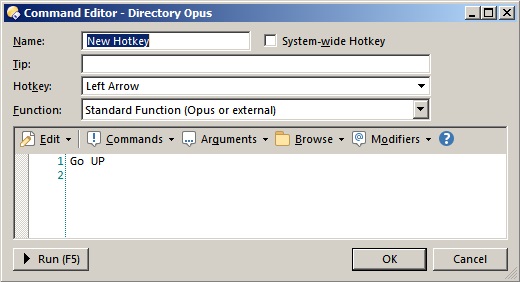
How can I set up Left and Right Arrow keys to `go to parent folder` and `open selected folder (or file)` respectively? Preferably, this behavior should only apply when file lister is focused.
---
### Author:  [@lxp](https://resource.dopus.com/u/lxp)
#### Post date: [April 10, 2019, 10:13am UTC](https://resource.dopus.com/t/left-right-arrow-keys-for-folder-navigation/32150/2 "2019-04-10T10:13:30Z")
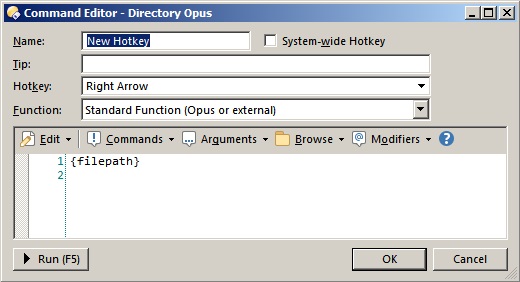
Try this
---
### Author:  [@Leo](https://resource.dopus.com/u/Leo)
#### Post date: [April 10, 2019, 12:01pm UTC](https://resource.dopus.com/t/left-right-arrow-keys-for-folder-navigation/32150/3 "2019-04-10T12:01:59Z")
`Go FROMSEL` might be preferable for the right arrow, unless you want it to also run exe files and open images, etc.
> [@Open and go back with arrow key](https://resource.dopus.com/t/open-and-go-back-with-arrow-key/29153):
>
> Hi. I would like to use left and right arrow key to navigate into folders in detail mode like in folder tree. So I have add left key as alternate key for backward (command go up back). What would be the command acting like enter key : open selecte…
---
### Author:  [@timlitos](https://resource.dopus.com/u/timlitos)
#### Post date: [December 7, 2022, 6:21pm UTC](https://resource.dopus.com/t/left-right-arrow-keys-for-folder-navigation/32150/4 "2022-12-07T18:21:37Z")
I got the left arrow to work but what did you use for the right arrow. I'm not seeing the choices in that post. You are doing this under Customize\>Keys, yes?
---
### Author:  [@lxp](https://resource.dopus.com/u/lxp)
#### Post date: [December 7, 2022, 6:42pm UTC](https://resource.dopus.com/t/left-right-arrow-keys-for-folder-navigation/32150/5 "2022-12-07T18:42:37Z")
> [@timlitos](#):
>
> You are doing this under Customize\>Keys, yes?
Yes.
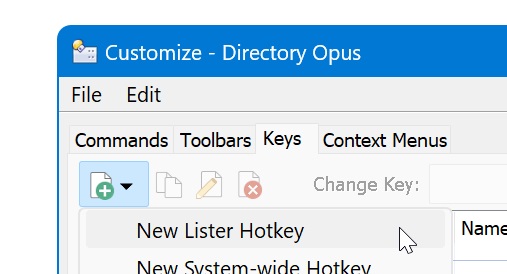
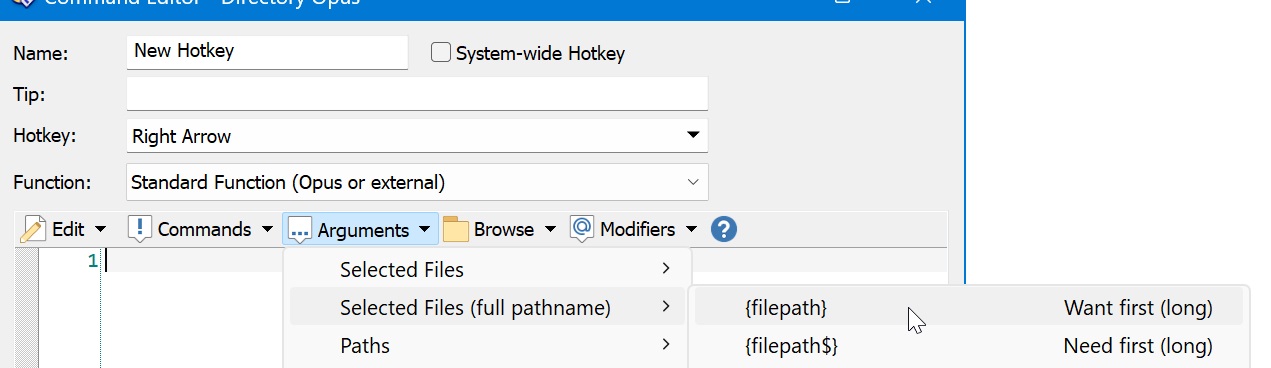
Simply hit the key after selecting this field:
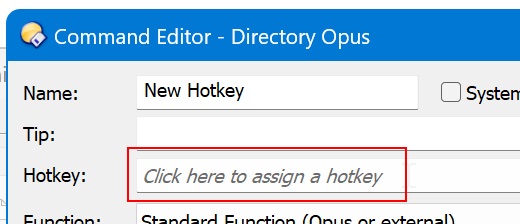
Enter this or Leo's alternative suggestion:
> [@How to use buttons and scripts from this forum](https://resource.dopus.com/t/how-to-use-buttons-and-scripts-from-this-forum/3546):
>
> This post explains how to add buttons to toolbars and menus, and also applies to raw commands for things like standalone hotkeys. For how to use Script Add-Ins, please scroll down to the post below this one. See Also: The manual has more detail in…
---
### Author:  [@timlitos](https://resource.dopus.com/u/timlitos)
#### Post date: [December 7, 2022, 6:49pm UTC](https://resource.dopus.com/t/left-right-arrow-keys-for-folder-navigation/32150/6 "2022-12-07T18:49:27Z")
Ah. Ok. I was missing the advanced options. This works for me now.
I am having one issue though. So if I use the left arrow to go back (using the Go UP command) it works, but the folder I came from doesn't get selected automatically. So I have to hit the down key and back up to select, then hit the right arrow to enter that folder. Is there a way to fix this?
---
### Author:  [@Leo](https://resource.dopus.com/u/Leo)
#### Post date: [December 7, 2022, 6:52pm UTC](https://resource.dopus.com/t/left-right-arrow-keys-for-folder-navigation/32150/7 "2022-12-07T18:52:08Z")
Turn on **Preferences / Folders / Folder Behavior / Select previous folder when going Up**.
Using `Go UP BACK` instead of `Go UP` is probably also preferable if you're doing that. It'll pull the parent directory, including selection(s) and scroll position, from history if you recently came from it. Selection will usually be the directory you're leaving, since it was selected to go into it.
---
### Author:  [@timlitos](https://resource.dopus.com/u/timlitos)
#### Post date: [December 7, 2022, 6:59pm UTC](https://resource.dopus.com/t/left-right-arrow-keys-for-folder-navigation/32150/8 "2022-12-07T18:59:22Z")
That's perfect. Thanks!
I'm finding a similar issue with the right arrow key. Once I "go right" one level, there is nothing selected. So if I want to "go right" another level, I have to hit down, up, then right. Any similar solve for that?
---
### Author:  [@Leo](https://resource.dopus.com/u/Leo)
#### Post date: [December 7, 2022, 7:01pm UTC](https://resource.dopus.com/t/left-right-arrow-keys-for-folder-navigation/32150/9 "2022-12-07T19:01:12Z")
**Preferences / File Displays / Options / Automatically select first file in folder (except in Power Mode)**
(There's a similar, separate option for Power Mode, if you're using that.)
---
### Author:  [@timlitos](https://resource.dopus.com/u/timlitos)
#### Post date: [December 7, 2022, 8:24pm UTC](https://resource.dopus.com/t/left-right-arrow-keys-for-folder-navigation/32150/10 "2022-12-07T20:24:35Z")
Excellent! Thanks again!