Note: This script now requires a minimum Opus version 11.16...
This script was written in response to a request from abr in the following discussion:
[DO11: scripting, triggering new tab by opening folder?](https://resource.dopus.com/t/do11-scripting-triggering-new-tab-by-opening-folder/17184/1)
What does it do?:
The purpose of this script is to provide a way for users to associate two folder paths with one another such that entering 'one' will cause Opus to automatically open the 'other' in a new tab in the opposite file display (switching to dual file display if currently in single display mode). The two folder tabs are also then linked as slave tabs. The method by which the trigger folder is opened does not matter... the script will respond whether one of the trigger folders is opened via double-click, key, some other use of the 'Go' command, or clicking on it in the folder tree. All of these methods of opening a folder generate the OnAfterFolderChange event which the script responds to. The script also checks for existing linktab state in order to avoid opening duplicate tabs if you go back/forward through one of the trigger folders.
How to install and use it?:
The script is provided here as an [Opus Script Package](https://resource.dopus.com/t/directory-opus-11-beta/16744/1)... which in turn is actually a zip file with a VBScript packaged inside. It can be installed by either manually copying the OSP file to the /dopusdata\Script AddIns folder, or via drag-and-drop into the Preferences / Toolbars / Scripts page.
Download: [LinkedTab\_AutoOpen\_Handler.osp](https://resource.dopus.com/uploads/default/original/3X/1/8/1869649fe2dd285d44a82f2779ca999eedab789a.osp) (5.71 KB)
Notes:
2014-03-19: Initial release...
2014-03-25: v1.0.5 - Script updated, [adds multiple options](http://resource.dopus.com/viewtopic.php?f=26&t=21639#p116674) and now requires a minimum Opus version of 11.1 Beta 3
2014-03-26: v1.0.8 - Script updated, no ~functional changes, just settled on a consistent method of enabling debug via a global SCRIPT\_DEBUG variable
2015-12-29: v1.2.0 - Script renamed to match my new standard, added support for [multiple new options](http://resource.dopus.com/viewtopic.php?f=35&t=21639&p=139523#p139523), and minimum required Opus version is now set to 11.16
2016-11-22: v1.2.2 - Minor update to include support for Ctrl and Alt qualifier keys. Also added some test support for use of Regex in setting the paired folder association. This is currently only supported in uni-directional mode. [More info here](http://resource.dopus.com/viewtopic.php?f=35&t=21639&p=154211#p154211)
As of the v1.2.0 update, I've separated the OnCloseTab\_LinkedTab\_AutoClose.vbs script component out of this package. They're not directly related, and I've long since uploaded the [LinkedTab\_AutoClose\_Handler: Auto-close linked tabs](https://resource.dopus.com/t/linkedtab-autoclose-handler-auto-close-linked-tabs/17944) as its own standalone script... so grab BOTH if you want to use these features together.
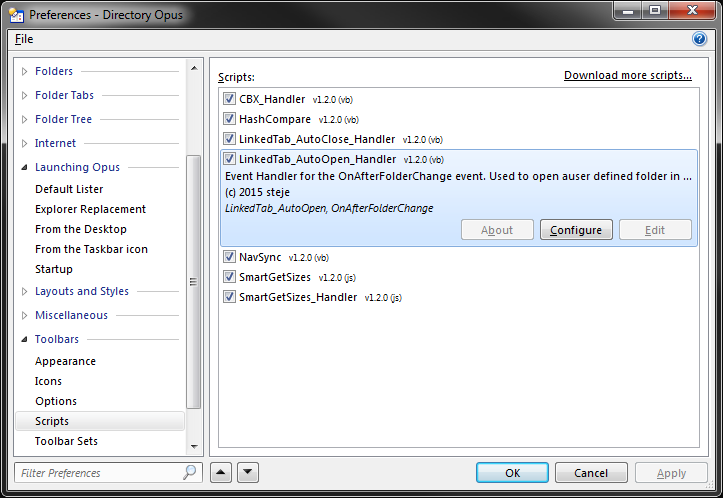
After installing the script package, users must define the full folder paths for the folders they want associated for the purposes of this script. This can be done via the scripts Configuration dialog.
The Configuration dialog will display a LinkedTabList property for the user to make one or more entries:
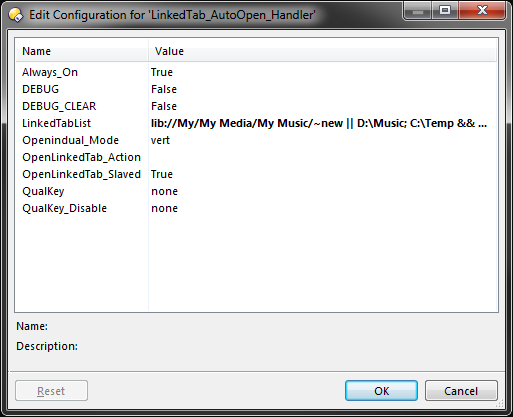
The script allows for both unidirectional and bidirectional relationships...
Examples of each type of relationship:
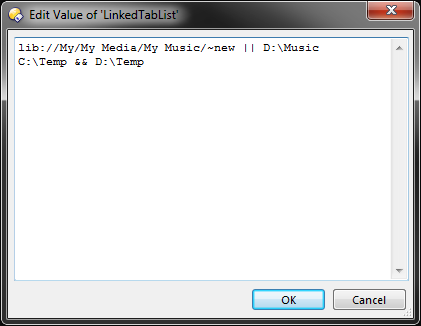
Unidirectional - using && to separate the two folder paths:
Opening the FIRST folder will cause the SECOND folder to be opened in a new tab, but not the other way around:
```nohighlight
C:\Temp && D:\Temp
```
Bidirectional - using || to separate the two folder paths:
Opening EITHER of the folders will cause the OTHER folder to be opened in a new tab:
```nohighlight
lib://My/My Media/My Music/~new || D:\Music
```
In addition to the qualifier keys that can be set to enable/disable the scripts execution (qualifier keys require the Always\_On option to be set to True), script execution can also be enabled by the use of an Opus environment variable called linkedtab\_autoopen.
Here is a sample toolbar button that toggles the lister scoped variable (the script supports tab, lister or global scoped variables) which you can [copy and paste directly to your toolbar](https://resource.dopus.com/t/how-to-add-buttons-from-this-forum-to-your-toolbars/3546/1):
```xml
```
...feedback appreciated!
---
_[View the full topic](https://resource.dopus.com/t/linkedtab-autoopen-handler-open-related-folder-tabs-automatically/17850)._