# Mouse coordinates but relative to dialog's window
**URL:** https://resource.dopus.com/t/mouse-coordinates-but-relative-to-dialogs-window/54550
**Category:** Help & Support
**Tags:** script, feature-request
**Created:** [February 15, 2025, 9:54pm UTC](https://resource.dopus.com/t/mouse-coordinates-but-relative-to-dialogs-window/54550 "2025-02-15T21:54:35Z")
**Posts on this page:** 3
**Page:** 1
### Author:  [@errante](https://resource.dopus.com/u/errante)
#### Post date: [February 15, 2025, 9:54pm UTC](https://resource.dopus.com/t/mouse-coordinates-but-relative-to-dialogs-window/54550/1 "2025-02-15T21:54:35Z")
Currently you can get mouse coordinates when reacting to an event in a script dialog via the `Msg` object, but these are relative to the screen rather than the dialog itself. Although you can do some math to convert these coordinates to be relative to the dialog, it would only be an approximation because there are unknowns (like the titlebar height, etc.).
Is there any way to achieve that? I want to show a control exactly where the mouse pointer is (Assuming that its coordinates are within the space of the dialog window in question).
---
### Author:  [@Leo](https://resource.dopus.com/u/Leo)
#### Post date: [February 19, 2025, 6:14pm UTC](https://resource.dopus.com/t/mouse-coordinates-but-relative-to-dialogs-window/54550/2 "2025-02-19T18:14:50Z")
We'll add methods for this in the next beta.
Example of how it can be used:
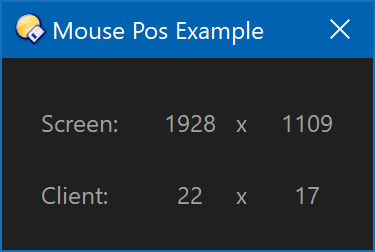
Script Code:
```javascript
function OnClick(clickData)
{
var dlg = DOpus.Dlg();
dlg.window = clickData.func.sourcetab;
dlg.template = "mousePosDialog";
dlg.detach = true;
dlg.Create();
dlg.SetTimer(100, "mouseTimer");
dlg.Show();
var ctrlSX = dlg.Control("staticSX");
var ctrlSY = dlg.Control("staticSY");
var ctrlCX = dlg.Control("staticCX");
var ctrlCY = dlg.Control("staticCY");
while(true)
{
var msg = dlg.GetMsg();
if (!msg.result)
break;
if (msg.control == "mouseTimer")
{
var t = dlg.ScreenToClient(msg.mousex, msg.mousey);
ctrlSX.label = String(msg.mousex);
ctrlSY.label = String(msg.mousey);
ctrlCX.label = String(t.left);
ctrlCY.label = String(t.top);
}
}
}
```
Resources:
```xml
```
---
### Author:  [@errante](https://resource.dopus.com/u/errante)
#### Post date: [February 26, 2025, 11:37pm UTC](https://resource.dopus.com/t/mouse-coordinates-but-relative-to-dialogs-window/54550/3 "2025-02-26T23:37:05Z")
Many thanks!