# Move to Named Folder
**URL:** https://resource.dopus.com/t/move-to-named-folder/34954
**Category:** Rename Presets
**Created:** [March 21, 2020, 11:47am UTC](https://resource.dopus.com/t/move-to-named-folder/34954 "2020-03-21T11:47:47Z")
**Posts on this page:** 3
**Page:** 1
### Author:  [@hl2guide](https://resource.dopus.com/u/hl2guide)
#### Post date: [March 21, 2020, 11:47am UTC](https://resource.dopus.com/t/move-to-named-folder/34954/1 "2020-03-21T11:47:47Z")
This **rename preset** renames a file into a same-named folder.
E.g. **Example.mp4** gets moved into a folder named: **Example**
_Settings:_
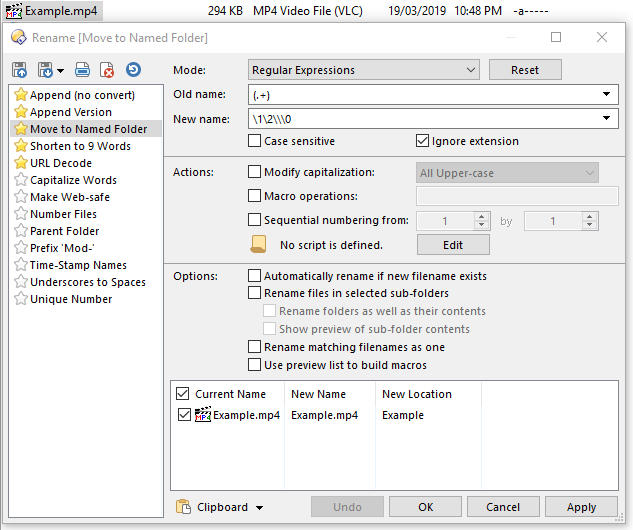
_Result:_

_ **Rename Preset** Import:_
[Move to Named Folder.orp](https://resource.dopus.com/uploads/short-url/rFUtsdacMjLtYgGswhsIs5zImYC.orp) (214 Bytes)
---
### Author:  [@Steve](https://resource.dopus.com/u/Steve)
#### Post date: [March 21, 2020, 11:35pm UTC](https://resource.dopus.com/t/move-to-named-folder/34954/2 "2020-03-21T23:35:27Z")
Handy rename preset. Thanks.
I think though that the \2 is not needed in the new name field (it seems to work fine without it - I'm hopeless with regexp though).
You could also do the same with standard Opus commands:
`Copy HERE CREATEFOLDER= {file$|noext} MOVE`
---
### Author:  [@artfulstitches](https://resource.dopus.com/u/artfulstitches)
#### Post date: [March 6, 2024, 9:46pm UTC](https://resource.dopus.com/t/move-to-named-folder/34954/4 "2024-03-06T21:46:15Z")
Thank you. I had been using a program called Files2Folder but I should have gone looking for an option like this long ago. It is much more convenient. It also completes the action much faster than files2folder.