# New folder with items ... I want to be able to give it a name
**URL:** https://resource.dopus.com/t/new-folder-with-items-i-want-to-be-able-to-give-it-a-name/37413
**Category:** Help & Support
**Created:** [December 19, 2020, 6:22am UTC](https://resource.dopus.com/t/new-folder-with-items-i-want-to-be-able-to-give-it-a-name/37413 "2020-12-19T06:22:25Z")
**Posts on this page:** 12
**Page:** 1
### Author:  [@KebordKauboi](https://resource.dopus.com/u/KebordKauboi)
#### Post date: [December 19, 2020, 6:22am UTC](https://resource.dopus.com/t/new-folder-with-items-i-want-to-be-able-to-give-it-a-name/37413/1 "2020-12-19T06:22:26Z")
Hi,
I like the feature of selecting some files and folders and place them all in one folder.
But it happens a lot that I want to do this with several groups of files and folder that happened that they all exists on the same folder.
So if I selected the first group of files and folder and right clicked them and selected New Folder With Selection, every time it places them all in a folder titled New Folder With Items and gave it a name ended with incremented number like 1, 2 ...etc
So is it possible to have an option or a feature like a pop up or anything else when I click on the New Folder With Items that allow me to give the new created folder a NAME.
Something that like when I create a folder(s).
Thanks
---
### Author:  [@lxp](https://resource.dopus.com/u/lxp)
#### Post date: [December 19, 2020, 8:10am UTC](https://resource.dopus.com/t/new-folder-with-items-i-want-to-be-able-to-give-it-a-name/37413/2 "2020-12-19T08:10:04Z")
**New folder with selection** is probably not an Opus command (Teracopy?) and might be difficult to change.
You could instead use a button or a context menu with
```
Copy MOVE HERE CREATEFOLDER="{dlgstring}"
```
---
### Author:  [@KebordKauboi](https://resource.dopus.com/u/KebordKauboi)
#### Post date: [December 19, 2020, 8:27am UTC](https://resource.dopus.com/t/new-folder-with-items-i-want-to-be-able-to-give-it-a-name/37413/3 "2020-12-19T08:27:39Z")
Thanks a lot for replying me.
I am sorry, I mean _ **New Folder With Items** _
Where exactly to place the command you mentioned?
Also is it possible to add this command to the right click menu that appear when I right click items?
Thanks
---
### Author:  [@KebordKauboi](https://resource.dopus.com/u/KebordKauboi)
#### Post date: [December 19, 2020, 9:01am UTC](https://resource.dopus.com/t/new-folder-with-items-i-want-to-be-able-to-give-it-a-name/37413/4 "2020-12-19T09:01:38Z")
Is it possible to add this command to the end of the new folder drop down menu from the toolbar? 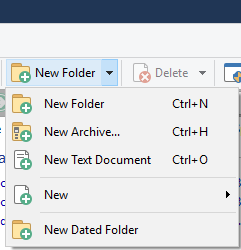
---
### Author:  [@lxp](https://resource.dopus.com/u/lxp)
#### Post date: [December 19, 2020, 9:04am UTC](https://resource.dopus.com/t/new-folder-with-items-i-want-to-be-able-to-give-it-a-name/37413/5 "2020-12-19T09:04:27Z")
If you want a button, look here
> [@How to use buttons and scripts from this forum](https://resource.dopus.com/t/how-to-use-buttons-and-scripts-from-this-forum/3546):
>
> This post explains how to add buttons to toolbars and menus, and also applies to raw commands for things like standalone hotkeys. For how to use Script Add-Ins, please scroll down to the post below this one. See Also: The manual has more detail in…
or here, if you prefer a context menu.
[https://www.gpsoft.com.au/help/opus12/index.html#!Documents/Context\_Menu.htm](https://www.gpsoft.com.au/help/opus12/index.html#!Documents/Context_Menu.htm)
---
### Author:  [@KebordKauboi](https://resource.dopus.com/u/KebordKauboi)
#### Post date: [December 19, 2020, 9:12am UTC](https://resource.dopus.com/t/new-folder-with-items-i-want-to-be-able-to-give-it-a-name/37413/6 "2020-12-19T09:12:52Z")
Thanks a lot.
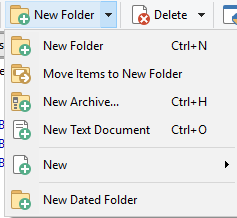
I've added it to the exact place where I need it to be.
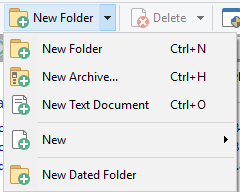
Also made it set to hide if nothing selected.
Thanks
When I select anything.
When nothing selected.
---
### Author:  [@KebordKauboi](https://resource.dopus.com/u/KebordKauboi)
#### Post date: [October 2, 2021, 2:25pm UTC](https://resource.dopus.com/t/new-folder-with-items-i-want-to-be-able-to-give-it-a-name/37413/7 "2021-10-02T14:25:15Z")
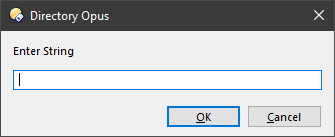
How to edit the text and replace "Enter String" with "New Folder Name/Title" ?
Thanks
Sorry for posting in an old and solved thread.
---
### Author:  [@Leo](https://resource.dopus.com/u/Leo)
#### Post date: [October 2, 2021, 4:11pm UTC](https://resource.dopus.com/t/new-folder-with-items-i-want-to-be-able-to-give-it-a-name/37413/8 "2021-10-02T16:11:02Z")
Within Opus, push F1 to open the manual, then type `dlgstring` into the Search tab on the left, and click the first result.
---
### Author:  [@KebordKauboi](https://resource.dopus.com/u/KebordKauboi)
#### Post date: [October 2, 2021, 4:27pm UTC](https://resource.dopus.com/t/new-folder-with-items-i-want-to-be-able-to-give-it-a-name/37413/9 "2021-10-02T16:27:05Z")
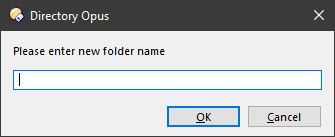
Now we are talking 😁
---
### Author:  [@KebordKauboi](https://resource.dopus.com/u/KebordKauboi)
#### Post date: [November 25, 2023, 4:23am UTC](https://resource.dopus.com/t/new-folder-with-items-i-want-to-be-able-to-give-it-a-name/37413/10 "2023-11-25T04:23:03Z")
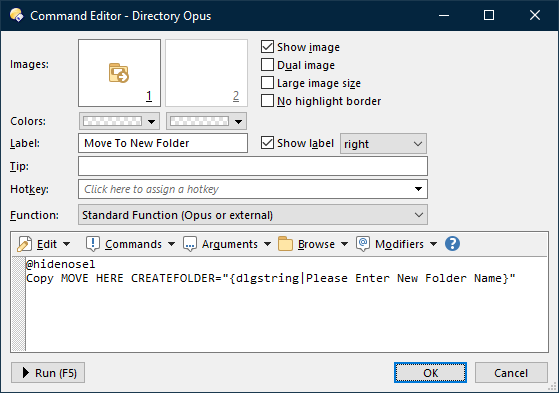
If I would like to add a short cut to this action command, how do I do so?
The shortcut I want to use is:
Ctrl+Alt+N, I mean to press the three keys simultaneously.
---
### Author:  [@Leo](https://resource.dopus.com/u/Leo)
#### Post date: [November 25, 2023, 5:16am UTC](https://resource.dopus.com/t/new-folder-with-items-i-want-to-be-able-to-give-it-a-name/37413/11 "2023-11-25T05:16:23Z")
In your screenshot, "Click here to assign a hotkey".
---
### Author:  [@KebordKauboi](https://resource.dopus.com/u/KebordKauboi)
#### Post date: [November 25, 2023, 5:39am UTC](https://resource.dopus.com/t/new-folder-with-items-i-want-to-be-able-to-give-it-a-name/37413/12 "2023-11-25T05:39:11Z")
Thanks bro