# No longer able to create a zip archive
**URL:** https://resource.dopus.com/t/no-longer-able-to-create-a-zip-archive/22646
**Category:** Help & Support
**Created:** [May 27, 2016, 10:38pm UTC](https://resource.dopus.com/t/no-longer-able-to-create-a-zip-archive/22646 "2016-05-27T22:38:38Z")
**Posts on this page:** 20
**Page:** 1
### Author:  [@Sitka](https://resource.dopus.com/u/Sitka)
#### Post date: [May 27, 2016, 10:38pm UTC](https://resource.dopus.com/t/no-longer-able-to-create-a-zip-archive/22646/1 "2016-05-27T22:38:38Z")
I frequently make zip archives from within DOpus, but today it fails every time. The error message is:
"An error occurred creating the archive ... The operation is not supported by this VFS." I am initiating this from a button on my toolbar, and it has always worked before.
I have checked the archives section in Preferences, and the only thing that may be amiss is that there is no zip listing on the "Archive and VFS plugins" panel. I followed the "Download more plugins" link there, but I wasn't able to find a zip plugin there.
Any idea how I can restore the feature for creating zips?
---
### Author:  [@Sitka](https://resource.dopus.com/u/Sitka)
#### Post date: [May 27, 2016, 10:50pm UTC](https://resource.dopus.com/t/no-longer-able-to-create-a-zip-archive/22646/2 "2016-05-27T22:50:52Z")
I find that I am able to create a self-extracting zip archive, but as above not a regular zip file.
---
### Author:  [@Jon](https://resource.dopus.com/u/Jon)
#### Post date: [May 27, 2016, 10:55pm UTC](https://resource.dopus.com/t/no-longer-able-to-create-a-zip-archive/22646/3 "2016-05-27T22:55:07Z")
Zip is built in which is why there's no plugin for it. It can be disabled using the Preferences / Zip & Other Archives / Zip Files / Enable internal Opus Zip support option so make sure that option's turned on.
Failing that, what command does the button you're using actually run?
---
### Author:  [@Sitka](https://resource.dopus.com/u/Sitka)
#### Post date: [May 27, 2016, 11:11pm UTC](https://resource.dopus.com/t/no-longer-able-to-create-a-zip-archive/22646/4 "2016-05-27T23:11:28Z")
Yes, that is checked.
The button is a yellow folder with a zipper and an orange arrow. Its label is "Add to Zip...". In the Commands tab of the Customize panel \> File Commands, the closest match to that is the New Archive command. However when I right click on commands in that folder no menu pops up. So I can't go to edit to see if the label matches and what command it runs. In the User-defined Commands section I have nothing like that button.
---
### Author:  [@Leo](https://resource.dopus.com/u/Leo)
#### Post date: [May 28, 2016, 1:27am UTC](https://resource.dopus.com/t/no-longer-able-to-create-a-zip-archive/22646/5 "2016-05-28T01:27:56Z")
Are you trying to create a zip file while inside another zip file?
---
### Author:  [@Sitka](https://resource.dopus.com/u/Sitka)
#### Post date: [May 28, 2016, 2:12am UTC](https://resource.dopus.com/t/no-longer-able-to-create-a-zip-archive/22646/6 "2016-05-28T02:12:27Z")
No. I am trying to put a couple of folders and a few files into a new zip file. Actually, I also tried it with just one file, and that gave the same error message.
---
### Author:  [@Jon](https://resource.dopus.com/u/Jon)
#### Post date: [May 28, 2016, 2:23am UTC](https://resource.dopus.com/t/no-longer-able-to-create-a-zip-archive/22646/7 "2016-05-28T02:23:15Z")
Where are the files located?
---
### Author:  [@Sitka](https://resource.dopus.com/u/Sitka)
#### Post date: [May 28, 2016, 3:42am UTC](https://resource.dopus.com/t/no-longer-able-to-create-a-zip-archive/22646/8 "2016-05-28T03:42:01Z")
They are in the folder:
F:\A\0--Forest\Projects\_Areas\_Sales\0--DNR\Timber
I also just tried to zip a text file in C:\ and that also gave the same error.
---
### Author:  [@Jon](https://resource.dopus.com/u/Jon)
#### Post date: [May 28, 2016, 4:01am UTC](https://resource.dopus.com/t/no-longer-able-to-create-a-zip-archive/22646/9 "2016-05-28T04:01:19Z")
If you right-click on the file, is there a "Directory Opus Archives" menu? If so, what happens if you select the "Add to Archive" command from there?
---
### Author:  [@Sitka](https://resource.dopus.com/u/Sitka)
#### Post date: [May 28, 2016, 4:10am UTC](https://resource.dopus.com/t/no-longer-able-to-create-a-zip-archive/22646/10 "2016-05-28T04:10:29Z")
That worked. (I didn't even realize it is in the menu.)
---
### Author:  [@Sitka](https://resource.dopus.com/u/Sitka)
#### Post date: [May 28, 2016, 4:14am UTC](https://resource.dopus.com/t/no-longer-able-to-create-a-zip-archive/22646/11 "2016-05-28T04:14:55Z")
I just discovered that when in Customize I can right-click the button that is causing the problem, and there is an Edit function there (instead of trying to edit via the Commands pane. The function for the button is: Copy ADDTOZIP.
---
### Author:  [@Leo](https://resource.dopus.com/u/Leo)
#### Post date: [May 28, 2016, 11:10am UTC](https://resource.dopus.com/t/no-longer-able-to-create-a-zip-archive/22646/12 "2016-05-28T11:10:43Z")
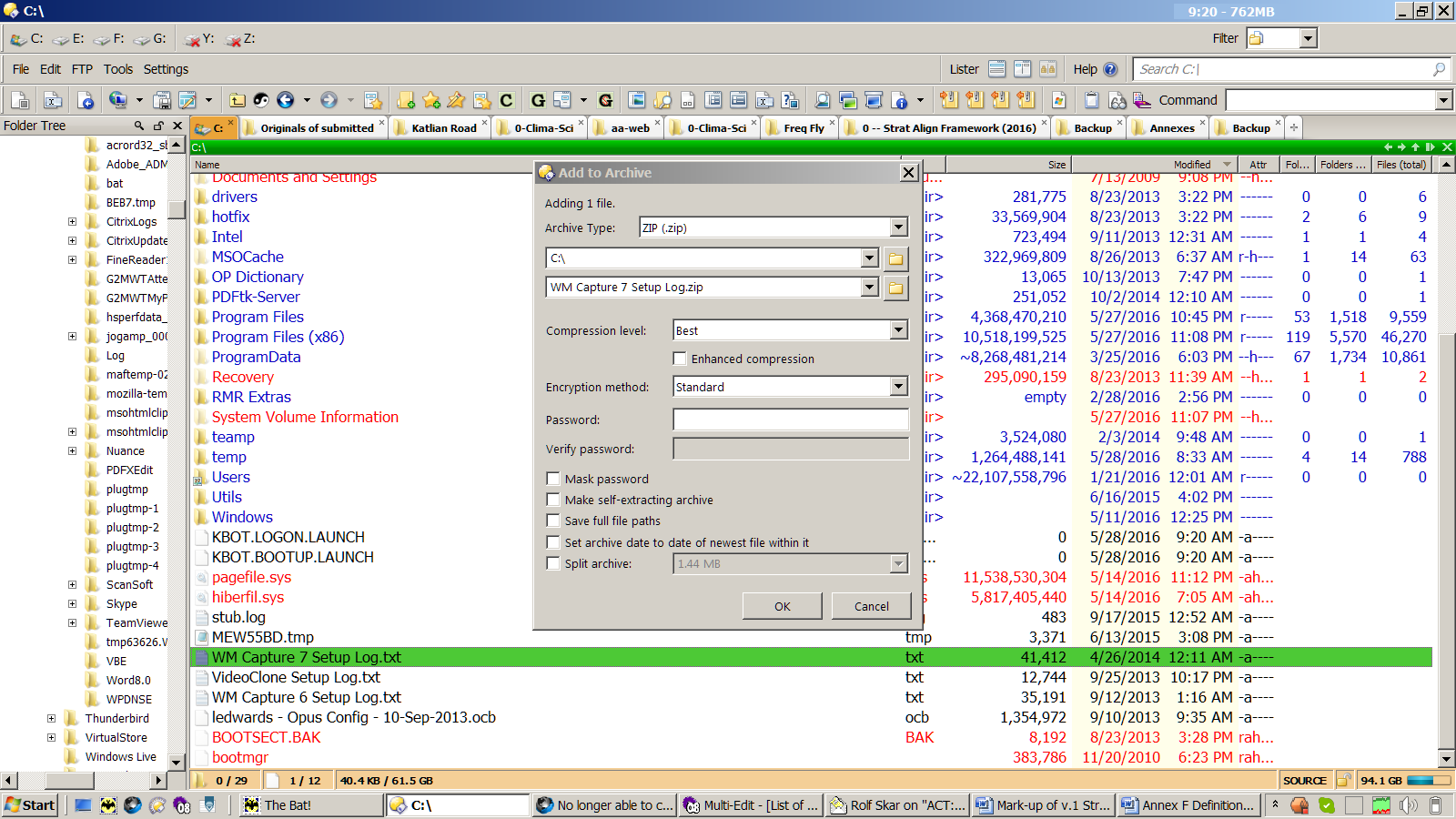
"Copy ADDTOZIP" will display a dialog. Can you show a screenshot of that dialog so we can see how it is configured?
---
### Author:  [@Sitka](https://resource.dopus.com/u/Sitka)
#### Post date: [May 28, 2016, 5:41pm UTC](https://resource.dopus.com/t/no-longer-able-to-create-a-zip-archive/22646/13 "2016-05-28T17:41:42Z")
Here you go. I have tried it with Mask Password both checked and unchecked, but have not been using a password.
---
### Author:  [@Leo](https://resource.dopus.com/u/Leo)
#### Post date: [May 28, 2016, 5:59pm UTC](https://resource.dopus.com/t/no-longer-able-to-create-a-zip-archive/22646/14 "2016-05-28T17:59:48Z")
Is the problem only when you're in the root of a drive?
Is the Opus version up to date?
---
### Author:  [@Sitka](https://resource.dopus.com/u/Sitka)
#### Post date: [May 28, 2016, 8:48pm UTC](https://resource.dopus.com/t/no-longer-able-to-create-a-zip-archive/22646/15 "2016-05-28T20:48:57Z")
Yes, Opus is up-to-date, and I have the problem on any of my drives.
---
### Author:  [@Leo](https://resource.dopus.com/u/Leo)
#### Post date: [May 28, 2016, 10:21pm UTC](https://resource.dopus.com/t/no-longer-able-to-create-a-zip-archive/22646/16 "2016-05-28T22:21:12Z")
Is it only in the root of drives?
---
### Author:  [@Sitka](https://resource.dopus.com/u/Sitka)
#### Post date: [May 29, 2016, 12:11am UTC](https://resource.dopus.com/t/no-longer-able-to-create-a-zip-archive/22646/17 "2016-05-29T00:11:45Z")
No, the problem occurs anywhere in the folder structure.
---
### Author:  [@Leo](https://resource.dopus.com/u/Leo)
#### Post date: [May 29, 2016, 11:37am UTC](https://resource.dopus.com/t/no-longer-able-to-create-a-zip-archive/22646/18 "2016-05-29T11:37:23Z")
Unless there's something wrong with the temp folder, or antivirus is getting in the way of updating the temp zip file, or there's something like a space on the end of the path, name or password field that we can't see, I'm out of ideas I'm afraid.
If it used to work for you, try think about config and software changes made since then. Maybe it will be related.
---
### Author:  [@Sitka](https://resource.dopus.com/u/Sitka)
#### Post date: [May 29, 2016, 5:56pm UTC](https://resource.dopus.com/t/no-longer-able-to-create-a-zip-archive/22646/19 "2016-05-29T17:56:04Z")
Would that be an Opus temp folder, or the Windows one? If the former, where is it located?
My thanks to you and Jon for your help on this.
---
### Author:  [@Leo](https://resource.dopus.com/u/Leo)
#### Post date: [May 29, 2016, 6:20pm UTC](https://resource.dopus.com/t/no-longer-able-to-create-a-zip-archive/22646/20 "2016-05-29T18:20:56Z")
The Windows one. You can use /temp or %TEMP% to go there. (%TEMP% works in Explorer as well while /temp only works in Opus.)