# Opening insp 360 files in DOpus viewer
**URL:** https://resource.dopus.com/t/opening-insp-360-files-in-dopus-viewer/33880
**Category:** Help & Support
**Created:** [November 3, 2019, 1:33am UTC](https://resource.dopus.com/t/opening-insp-360-files-in-dopus-viewer/33880 "2019-11-03T01:33:08Z")
**Posts on this page:** 5
**Page:** 1
### Author:  [@Hydrops](https://resource.dopus.com/u/Hydrops)
#### Post date: [November 3, 2019, 1:33am UTC](https://resource.dopus.com/t/opening-insp-360-files-in-dopus-viewer/33880/1 "2019-11-03T01:33:09Z")
Hi I'm trying to open insp 360 files in dopus viewer and it opens the images as 2 fish eyes lens images which is ok but next \ previous buttons are not working is there any way to fix this ?
I just want to be able to navigate the images as there are a lot of them and I have no other way of quick previewing them
If there is a way to preview them as 360 images or maybe stitch them it would be perfect but I'll be happy if I can just navigate the images in the folders
thank you
---
### Author:  [@Leo](https://resource.dopus.com/u/Leo)
#### Post date: [November 3, 2019, 12:11pm UTC](https://resource.dopus.com/t/opening-insp-360-files-in-dopus-viewer/33880/2 "2019-11-03T12:11:01Z")
I don't have any experience with Insp 360 files but, from what I can gather, they are just JPEGs with a different extension and some extra EXIF metadata.
If so, it should all work automatically.
How are you opening the files in the viewer?
Have you changed any filetype settings for the insp type, or is it happening automatically?
If you do the same thing with a standard JPG file, and some others in the same folder, do the next/prev buttons work then?
---
### Author:  [@Hydrops](https://resource.dopus.com/u/Hydrops)
#### Post date: [November 3, 2019, 3:43pm UTC](https://resource.dopus.com/t/opening-insp-360-files-in-dopus-viewer/33880/3 "2019-11-03T15:43:14Z")
Yes, i think they are exactly that but previous\next buttons are bold but if I put jpg's in folder the buttons do work with those jpg's only
I am opening them automatically like I open jpg's the extension was installed in windows with a plugin from the machine I have
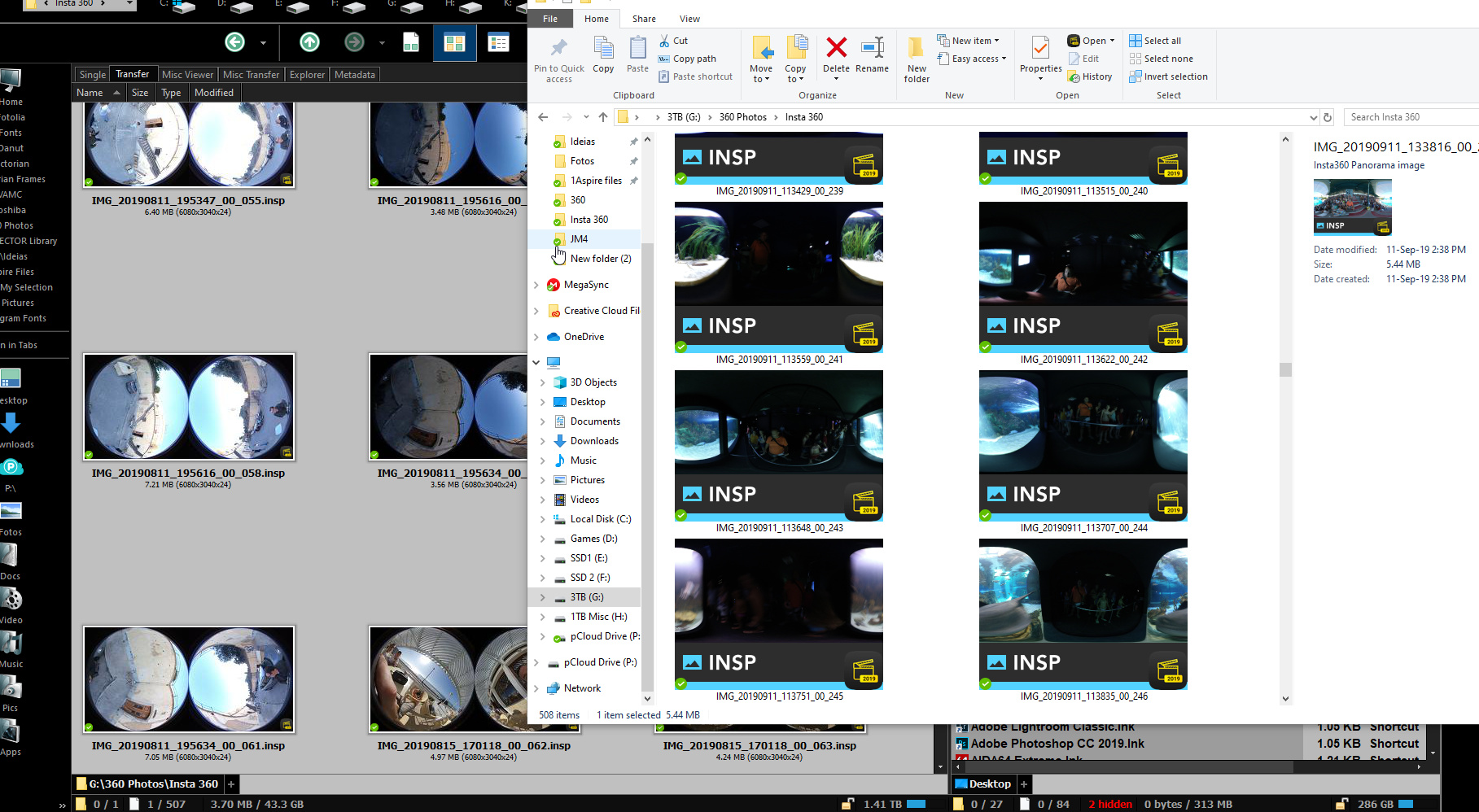
That I recall I did not change anything and I do notice a couple of issues in explorer the thumbnail is displayed as wide angle lens and much larger than in DOpus where it appears as double image fish lens and smaller check image
I assigned a program to open these files when clicked, in explorer it is working but in dopus instead of opening in the assigned program it opens with DOpus viewer
In Dopus viewer when I right click select open with and select a program and check mark the "always open with this program" it opens the image but only once and when I right click again I notice the option to always open with assigned program is deselected again
---
### Author:  [@Leo](https://resource.dopus.com/u/Leo)
#### Post date: [November 3, 2019, 6:11pm UTC](https://resource.dopus.com/t/opening-insp-360-files-in-dopus-viewer/33880/4 "2019-11-03T18:11:22Z")
Assuming you still want to use the Opus viewer for normal JPEGs and other images:
- In Opus, go to **Settings \> File Types**
- Expand the **System File Types** section of the list
- Find the **INSP** file type and double-click it
(Note: I don't have an INSP type as I don't have the software for that camera installed, so I'm using the JPG type in my examples. Don't change that, of course!)
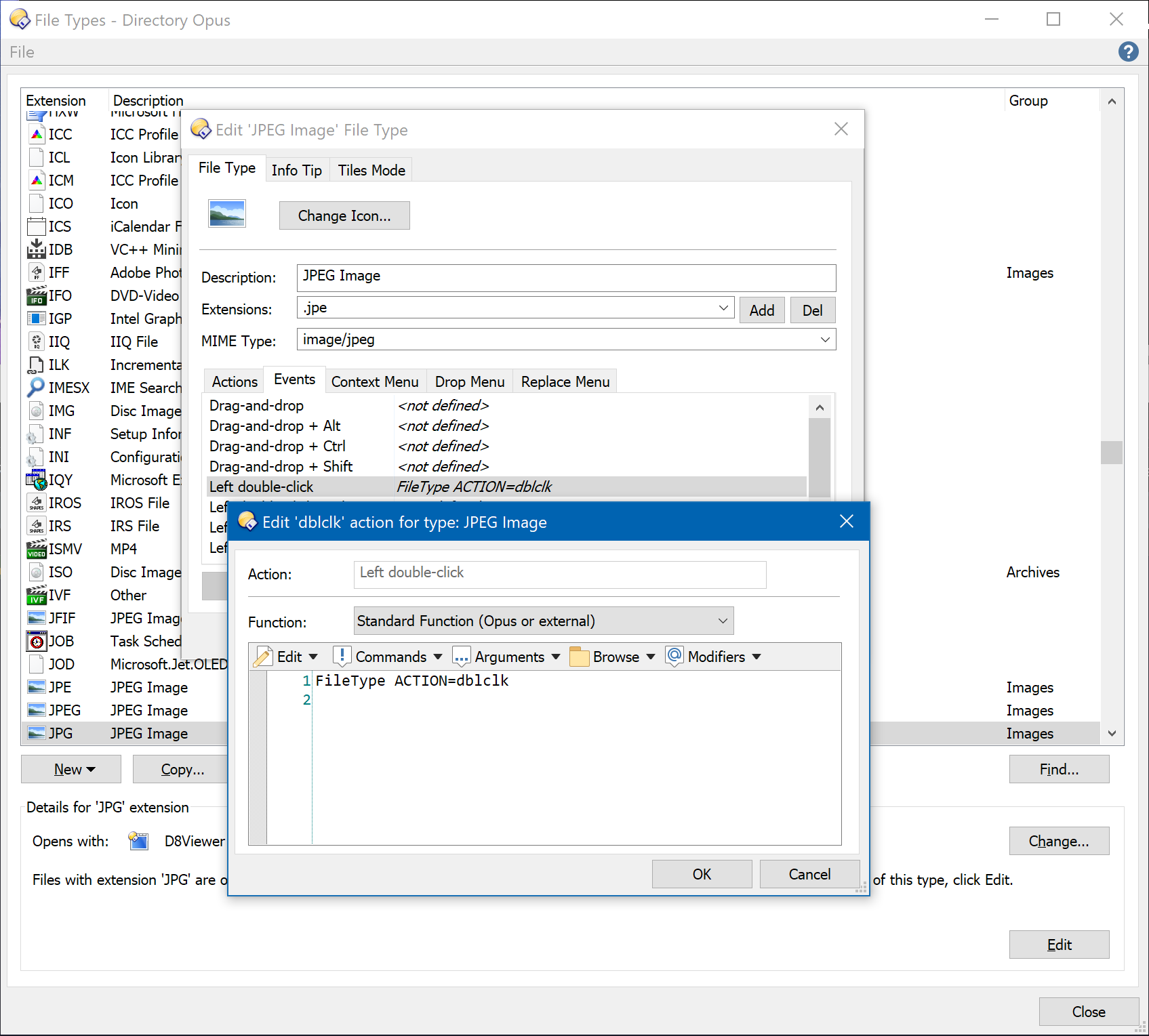
- Select the **Events** tab and double-click the **Left double-click** event
- Set it to run this command:
```nohighlight
FileType ACTION=dblclk
```
(If that doesn't work, try `FileType ACTION=open ` instead.)
- Click **OK** in the two editor dialogs to save the changes and then **Close** the File Types list.
(If you don't want to use the Opus viewer in general, for any image types, there's [an easier way[([How to stop the Opus image viewer from being used by default](https://resource.dopus.com/t/how-to-stop-the-opus-image-viewer-from-being-used-by-default/1366)).)
---
### Author:  [@Hydrops](https://resource.dopus.com/u/Hydrops)
#### Post date: [November 3, 2019, 9:34pm UTC](https://resource.dopus.com/t/opening-insp-360-files-in-dopus-viewer/33880/5 "2019-11-03T21:34:37Z")
Thank you will try it I do want DOpus to open all the files but these,
I have done your tutorial with DOS lines to assign DOpus as default too for jpg, png, etc