I tried "Worker" some time ago..
I don't think it makes much sense to use it, it has a weird interface by todays standards, what GUI standard or framework is it actually using? It looks totally out of place.. o) There was no context menu either and weird handling when selecting files if I remember correctly.
Double Commander is the same thing, they are all weird in one way or another.
There is no way around programming something usable from scratch I think, something which adheres to modern standards and makes use of a flexible customization system and scripting.
The best file manager right now I think is Krusader (in theory), it lacks a preview pane though, which is a no-no for me nowadays, it only supports dual panel mode and it has some cosmetic issues as well, but from a functional perspective, it kind of makes sense.
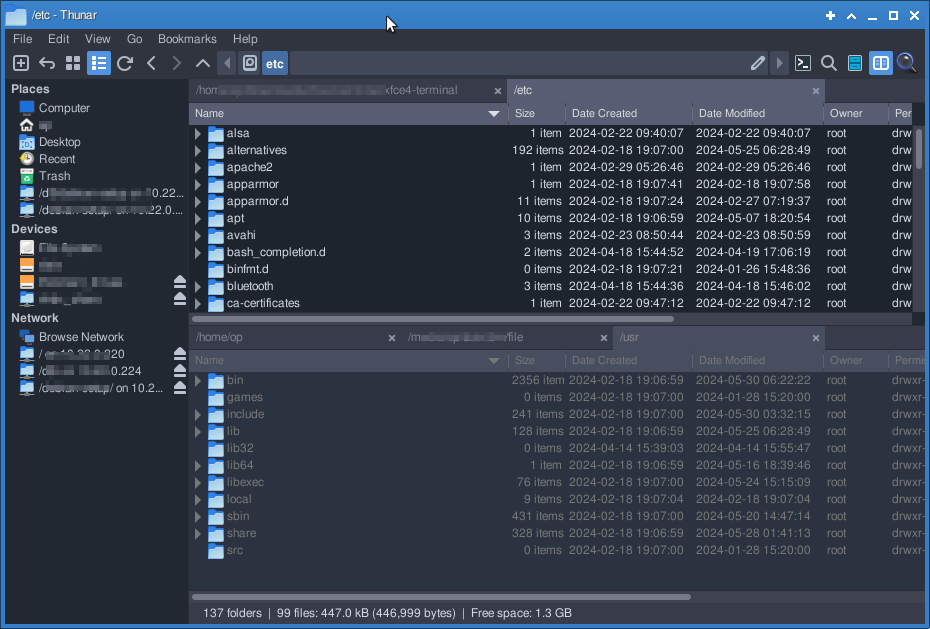
Right now I use Thunar nightly on Linux, self compiled from their source repository to be able to use the latest fixes and little enhancements, you need every little enhancement there is to get along. It's the only one allowing to switch from single to dual panel, have a preview pane (which only works for images for some reason, but at least a preview! o), it also has tabs and can toggle vertical and horizontal dual panel mode.
To toggle the panels or dual/horizontal, you have to do some funky batch scripting and you can only toggle things for ALL the Thunar windows currently open (wtf! o).
Thunar also has some hidden options you need to check out if you want to squeeze the most out of it and it has "Custom Actions", a very bare bones way to add custom functionality to the context menu or toolbar, but be aware, this is nowhere near what DO has to offer.
You probably also need to hack the CSS for Thunar to be able to make use of the two panels successfully, since which one has focus is not distinguishable with the default settings, uurgs! It's a lot of work and there are basically no CSS classes inside the Thunar executable to make life easy.

But after you did all the compiling and hacking, you have an emergency file manager, which dims the pane which does not have focus, something the Linux world has never seen before! o) (I could not get the icons to dim, but spacing, coloring, margins and font sizes, it's way better already.).