# Powershell here?
**URL:** https://resource.dopus.com/t/powershell-here/24039
**Category:** Help & Support
**Created:** [November 5, 2016, 6:51pm UTC](https://resource.dopus.com/t/powershell-here/24039 "2016-11-05T18:51:14Z")
**Posts on this page:** 20
**Page:** 1
### Author:  [@bigc90210](https://resource.dopus.com/u/bigc90210)
#### Post date: [November 5, 2016, 6:51pm UTC](https://resource.dopus.com/t/powershell-here/24039/1 "2016-11-05T18:51:14Z")
I see in the tools menu there are 2 shortcuts to command prompt here (also, any way to set it so the admin window isnt red? i find it quite hard to read). Is it possible to have some extra items in the tools menu? such as
Launch Powershell Here
Launch Powershell Here (Administrator)
Launch Powershell ISE Here
Launch Powershell ISE Here (Administrator)
it would save me a lot of time if this were possible 🙂
Thanks
---
### Author:  [@peCeha](https://resource.dopus.com/u/peCeha)
#### Post date: [November 5, 2016, 7:01pm UTC](https://resource.dopus.com/t/powershell-here/24039/2 "2016-11-05T19:01:42Z")
check this link
[[Open PowerShell Here](http://resource.dopus.com/t/open-powershell-here/3020/1))
---
### Author:  [@Leo](https://resource.dopus.com/u/Leo)
#### Post date: [November 5, 2016, 7:02pm UTC](https://resource.dopus.com/t/powershell-here/24039/3 "2016-11-05T19:02:00Z")
[Open PowerShell Here](https://resource.dopus.com/t/open-powershell-here/3020/1) has one way to do it.
The [CLI command](https://www.gpsoft.com.au/help/opus12/index.html#!Documents/CLI_Command.htm) has arguments for changing the normal Command Prompt colors.
Editing the default Tools menu is possible in Opus Pro.
If you're using Opus Light, the default menu is not editable but you can add additional toolbars and/or hotkeys for custom actions (single-line commands only).
---
### Author:  [@tbone](https://resource.dopus.com/u/tbone)
#### Post date: [November 6, 2016, 8:12am UTC](https://resource.dopus.com/t/powershell-here/24039/4 "2016-11-06T08:12:22Z")
This is my Powershell HERE command. I looked the other threads, looked very complicated to set up? This is all in one line, also changing prompt to be dual line whilst adding time and user information. Maybe you can make use of it.
```auto
powershell.exe -noexit -command "&{cd '{sourcepath}'; $env:CurrentDirectory='{sourcepath}'; function global:prompt {''+(gl).providerpath+' - '+(get-date -uf %H:%M:%S)+' '+$env:username+[char]10+'>'}}"
```
Results in a regular powershell window and prompt like this:
[code]D:\bin\file\dopus - 09:10:03 Administrator
> [/code]
---
### Author:  [@Leo](https://resource.dopus.com/u/Leo)
#### Post date: [November 15, 2016, 1:23pm UTC](https://resource.dopus.com/t/powershell-here/24039/5 "2016-11-15T13:23:57Z")
We're adding a proper "PowerShell Here" command in the next update (12.2.6), and also including it in the default toolbars.
e.g. CLI DOSPROMPT=powershell is all you would need to open PowerShell.exe in the current folder.
or CLI DOSPROMPT=powershellise for the ISE version.
---
### Author:  [@jcordes](https://resource.dopus.com/u/jcordes)
#### Post date: [December 29, 2016, 5:32pm UTC](https://resource.dopus.com/t/powershell-here/24039/6 "2016-12-29T17:32:55Z")
I'm on Win10 Pro - haven't had the Anniversary Update very long. I have just noticed that in my DOpus 12.3 x64, under the Tools menu, both 'Command Prompt Here' items are grayed out. I have set up a right-click context setting to get a command prompt with admin rights, but am puzzled at the Tools menu. If I go into Settings -\> customize for the Tools Menu I see that both Command Prompts (one with admin rights and one without) are there, but I don't know how to make them stay active once I'm out of Customize.
That probably isn't very clear - sorry!
How can I restore the expected behaviour under the Tools Menu?
Thanks.
---
### Author:  [@Leo](https://resource.dopus.com/u/Leo)
#### Post date: [December 29, 2016, 5:42pm UTC](https://resource.dopus.com/t/powershell-here/24039/7 "2016-12-29T17:42:40Z")
Please re-download 12.3 and it should be fixed.
---
### Author:  [@jcordes](https://resource.dopus.com/u/jcordes)
#### Post date: [December 29, 2016, 5:53pm UTC](https://resource.dopus.com/t/powershell-here/24039/8 "2016-12-29T17:53:44Z")
Leo - That was a very surprising answer, but it did indeed fix the problem. Thank you very much.
John
---
### Author:  [@jimbodimbo](https://resource.dopus.com/u/jimbodimbo)
#### Post date: [December 30, 2016, 8:52pm UTC](https://resource.dopus.com/t/powershell-here/24039/9 "2016-12-30T20:52:14Z")
I 'factory reset' my Toolbars and now can see the new 'PowerShell Here' commands in the Tools menu. Nice, thanks.
I could not see how DO sets the Background/Foreground colours for these? The Edit command shows only the CLI DOSPROMPT command with the 'admin' and new 'powershell' options but without the 'color=nn' option?
I can over-ride by adding the 'color' option (and surrounding all the options with quotes as suggested in the CLI link you provided above).
But how does DO set the colours for the DOS Windows?
---
### Author:  [@Leo](https://resource.dopus.com/u/Leo)
#### Post date: [December 30, 2016, 8:59pm UTC](https://resource.dopus.com/t/powershell-here/24039/10 "2016-12-30T20:59:35Z")
It sends commands/arguments to the PowerShell or cmd.exe to tell it which colors to use.
You don't need to do that yourself, though. You can change the colors by adding the color=nn option to the command. Details are in the page documenting the CLI command.
---
### Author:  [@jimbodimbo](https://resource.dopus.com/u/jimbodimbo)
#### Post date: [December 30, 2016, 9:40pm UTC](https://resource.dopus.com/t/powershell-here/24039/11 "2016-12-30T21:40:29Z")
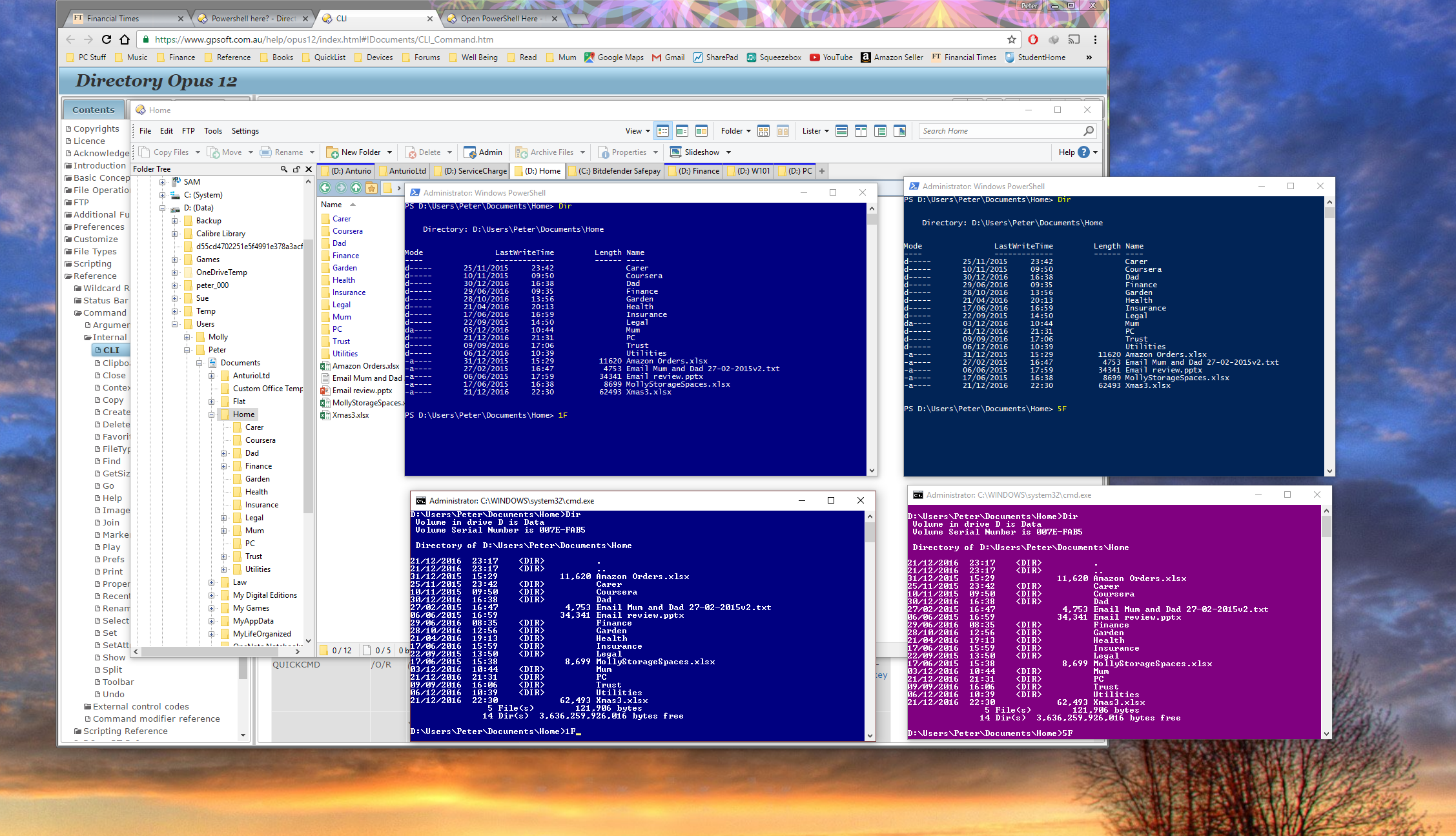
How weird, I seem to have a colour mismatch when using the DOSPROMPT 'color=nn' option between the CLI and PowerShell Windows? I set both Admin windows to be 'color=5F' and the PowerShell comes out a dark blue rather than purple? My '1F' color windows look similar, but 5F are very different? Is this just my own setup/monitor, or is it everyone?
See screenshot of '1F' and '5F' DOS/PowerShell windows (four windows in centre of screen). The left top is the PowerShell '1F' window, bottom left is the DOS '1F' window. Top right is PowerShell '5F' window (? looks blue to me), bottom right is the DOS '5F' window. All are 'admin' windows. I prefer the darker blue to the purple actually, but why is there a mismatch for the same color value?
---
### Author:  [@Leo](https://resource.dopus.com/u/Leo)
#### Post date: [December 31, 2016, 5:38am UTC](https://resource.dopus.com/t/powershell-here/24039/12 "2016-12-31T05:38:55Z")
Command Prompt and PowerShell both use 16 colors defined via their settings dialogs:
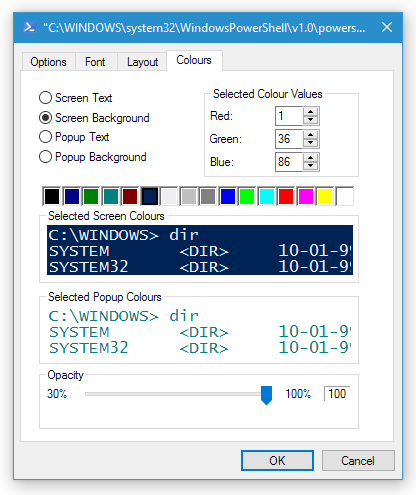
(PowerShell has names for the colors, like "red" etc., but they are actually wrong, as each name just maps to a color index number, and the default colors changed a long time ago. So you have to work out which color index you are using, then work out which name maps to that index (which isn't documented!), then specify that name, even though the name may have nothing to do with the actual color. God knows why they used indexed color for something invented in the last 20 years, then used names, then let the names go wrong without updating them... Or, really, why they made PowerShell use the ancient command prompt host in the first place... PowerShell generally solves all the wrong problems, makes a bunch of things worse, and does very little to solve the real issues that the Windows command prompt has always suffered from. On top of that, it made the much more useful JScript/VBScript ActiveScripting become relegated to a legacy component, despite the fact it does things PowerShell still can't do, and could do everything PowerShell does if expanded a bit. It's a crying shame.)
---
### Author:  [@MadAus](https://resource.dopus.com/u/MadAus)
#### Post date: [March 18, 2017, 10:16am UTC](https://resource.dopus.com/t/powershell-here/24039/13 "2017-03-18T10:16:36Z")
I'm running 12.4, is it just me or does **CLI DOSPROMPT=powershellise** end up just launching a normal powershell on the relevant path?
Is there any plans for an elevated option?
**CLI DOSPROMPT=powershellise,_admin_**
---
### Author:  [@Leo](https://resource.dopus.com/u/Leo)
#### Post date: [March 18, 2017, 12:29pm UTC](https://resource.dopus.com/t/powershell-here/24039/14 "2017-03-18T12:29:09Z")
> [@MadAus](#):
>
> is it just me or does CLI DOSPROMPT=powershellise end up just launching a normal powershell on the relevant path?
It opens PowerShell ISE for me here, at least. Opus 12.4 and up-to-date Windows 10.
> [@MadAus](#):
>
> CLI DOSPROMPT=powershellise,admin
That already works (at least here).
Questions:
- Does PowerShell ISE work on your machine if launched via the start menu?
- Is it in the standard path? `C:\Windows\system32\WindowsPowerShell\v1.0\PowerShell_ISE.exe`
---
### Author:  [@MadAus](https://resource.dopus.com/u/MadAus)
#### Post date: [March 18, 2017, 12:53pm UTC](https://resource.dopus.com/t/powershell-here/24039/15 "2017-03-18T12:53:02Z")
Thanks for the prompt response Leo, I'll check and get back to you tomorrow. Sounds like it is an issue on my side somewhere. Cheers.
---
### Author:  [@MadAus](https://resource.dopus.com/u/MadAus)
#### Post date: [March 19, 2017, 1:14am UTC](https://resource.dopus.com/t/powershell-here/24039/16 "2017-03-19T01:14:08Z")
So, ISE (for what it's worth, I'm referring to ISE as opposed to ISE x86) details as per my working shortcut are -
Target:
**%windir%\system32\WindowsPowerShell\v1.0\PowerShell\_ISE.exe**
(%windir% is indeed C:\Windows)
Start in:
**%HOMEDRIVE%%HOMEPATH%**
So yes, when launched from that shortcut, it works (and a right click, run as administrator also launches an elevated Powershell ISE correctly).
EDIT: I just realised that it was Quick Access Popup ([http://www.quickaccesspopup.com/](http://www.quickaccesspopup.com/)) that was stuffing up the middle click for ISE, so disregard the ISE issue, it works fine with QAP disabled. Apologies for wasting your time on that aspect!
So the only outstanding issue I can see is that when you try and launch an elevated variant of either ISE or Powershell using **CLI DOSPROMPT=powershell,admin** or **CLI DOSPROMPT=powershellise,admin** it will open on the local system path (PS C:\WINDOWS\system32\>) all the time if you attempt to launch it from a folder on a UNC path. By comparison, the non-elevated variants detect the UNC path and launch correctly on the UNC path. The elevated variants launch correctly on local paths rather than the system path too (I haven't tested mapped drives as yet).
---
### Author:  [@Leo](https://resource.dopus.com/u/Leo)
#### Post date: [March 19, 2017, 1:26am UTC](https://resource.dopus.com/t/powershell-here/24039/17 "2017-03-19T01:26:25Z")
You could try running it manually. All the command really does is run the program and pass an argument for the current path to it, or change the current folder path before launching it (for ISE, since it lacks a proper way to tell it the path to use or a command to run; ISE is extremely limited in terms of command-line options, ironically).
---
### Author:  [@MadAus](https://resource.dopus.com/u/MadAus)
#### Post date: [March 19, 2017, 1:30am UTC](https://resource.dopus.com/t/powershell-here/24039/18 "2017-03-19T01:30:01Z")
Thanks Leo, as per edit above, the ISE aspect was indeed my problem, sorry for the Red Herring there. Any thoughts on the UNC issue with an elevated shell/ISE?
---
### Author:  [@Leo](https://resource.dopus.com/u/Leo)
#### Post date: [March 19, 2017, 1:38am UTC](https://resource.dopus.com/t/powershell-here/24039/19 "2017-03-19T01:38:40Z")
It works OK with UNC paths for me, at least the one I'm trying that is mapped with explicit credentials (not pass-through authentication).
Newer versions of Windows do not pass mapped network drives through to elevated contexts by default, but I think that would only matter if you were using a mapped drive letter, not a UNC path.
Maybe something else on your system is causing problems?
What happens if you try to do it manually, without Opus being involved?
---
### Author:  [@MadAus](https://resource.dopus.com/u/MadAus)
#### Post date: [March 19, 2017, 1:39am UTC](https://resource.dopus.com/t/powershell-here/24039/20 "2017-03-19T01:39:59Z")
Thanks Leo, sounds like that issue might be on my side as well then. I'll have a play around and get back to you.
[Next page](https://resource.dopus.com/t/powershell-here/24039.md?page=2)