# Print Export Folder Listing Error (Win 11)
**URL:** https://resource.dopus.com/t/print-export-folder-listing-error-win-11/42326
**Category:** Help & Support
**Created:** [September 29, 2022, 10:18am UTC](https://resource.dopus.com/t/print-export-folder-listing-error-win-11/42326 "2022-09-29T10:18:14Z")
**Posts on this page:** 9
**Page:** 1
### Author:  [@LMGKy](https://resource.dopus.com/u/LMGKy)
#### Post date: [September 29, 2022, 10:18am UTC](https://resource.dopus.com/t/print-export-folder-listing-error-win-11/42326/1 "2022-09-29T10:18:14Z")
I am running Dopus on both Win 10 and Win 11 machines. No Dopus problems on the Win 10 machines. The new desktop came pre-installed with Win 11, the laptop was an upgrade to Win 11.
On both the Win 11 machines the Print Export Folder Listing produces this error message. This one is from the desktop but I receive a similar message on the laptop but do not have access to it at the moment to grab a screenshot of its specific message.
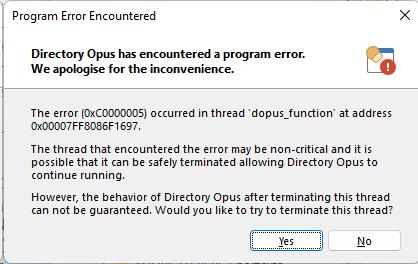
I did follow the suggested action on both machines, and it does successfully terminate the thread but it after restarting Dopus the same error message appears for this function.
I hope there is a fix for this feature 🙂
---
### Author:  [@Leo](https://resource.dopus.com/u/Leo)
#### Post date: [September 29, 2022, 10:29am UTC](https://resource.dopus.com/t/print-export-folder-listing-error-win-11/42326/2 "2022-09-29T10:29:26Z")
Please send us the crash logs and we'll take a look:
> [@Automatic crash logs (for bug reports)](https://resource.dopus.com/t/crash-dumps-for-bug-reports/8861/1):
>
> In the event of a crash, Directory Opus usually creates a log file (also known as a "dump file") with information that may be useful in diagnosing the problem. (For problems which don't result in a crash -- e.g. freezes or abnormal CPU usage -- you …
It's more likely to be due to the file types and columns involved than the OS version, although both are possible.
---
### Author:  [@LMGKy](https://resource.dopus.com/u/LMGKy)
#### Post date: [September 30, 2022, 8:59am UTC](https://resource.dopus.com/t/print-export-folder-listing-error-win-11/42326/3 "2022-09-30T08:59:26Z")
Thanks Leo. Sent them over.
---
### Author:  [@Leo](https://resource.dopus.com/u/Leo)
#### Post date: [September 30, 2022, 11:25am UTC](https://resource.dopus.com/t/print-export-folder-listing-error-win-11/42326/4 "2022-09-30T11:25:09Z")
Many thanks!
It seems to be crashing inside the Windows print spooler, but I had a look at how we are calling it and found something that could be the cause. It's strange if it hasn't affected any other setups until now, but maybe some print drivers make the API more sensitive than others.
Please give this dopus.exe a try over the top of a 12.29 install:
- Extract [dopus\_12.29\_print\_test.zip](https://resource.dopus.com/uploads/short-url/LQY34pxzX4GkLGZcbHU9XZUfpD.zip) (12.8 MB)
- Open `C:\Program Files\GPSoftware\Directory Opus` in File Explorer.
- Make sure Opus isn't running (_File \> Exit Directory Opus_)
- Copy the new dopus.exe over and restart Opus.
(If you need to go back to vanilla 12.29, just re-run the installer over the top of the existing install.)
If that still doesn't work, are you able to print things, as well as show the printer setup window, from other programs?
---
### Author:  [@Leo](https://resource.dopus.com/u/Leo)
#### Post date: [October 3, 2022, 7:24pm UTC](https://resource.dopus.com/t/print-export-folder-listing-error-win-11/42326/5 "2022-10-03T19:24:37Z")
There are also recent reports of printer-driver problems with Windows 11, which could explain what you're seeing:
> **[Microsoft confirms Windows 11 Printer issue - gHacks Tech News](https://www.ghacks.net/2022/09/30/microsoft-confirms-windows-11-printer-issue/)**
>
> Microsoft confirmed a new Windows 11 issue that is affecting the functionality of some printers on the operating system.
---
### Author:  [@LMGKy](https://resource.dopus.com/u/LMGKy)
#### Post date: [October 3, 2022, 8:32pm UTC](https://resource.dopus.com/t/print-export-folder-listing-error-win-11/42326/6 "2022-10-03T20:32:18Z")
Thanks for the heads up and article link. I'll have a look.
---
### Author:  [@LMGKy](https://resource.dopus.com/u/LMGKy)
#### Post date: [October 3, 2022, 8:35pm UTC](https://resource.dopus.com/t/print-export-folder-listing-error-win-11/42326/7 "2022-10-03T20:35:35Z")
Updating my results for the forum. The updated exe file worked for both the desktop and laptop machines running Win 11. In my case, Dopus crashed even before getting to choose a printer and after replacing the exe file it works beautifully again.
---
### Author:  [@Leo](https://resource.dopus.com/u/Leo)
#### Post date: [October 3, 2022, 8:38pm UTC](https://resource.dopus.com/t/print-export-folder-listing-error-win-11/42326/8 "2022-10-03T20:38:49Z")
That's great to know. We'll include that change in the next update. Thanks for testing it!
---
### Author:  [@jdfoster](https://resource.dopus.com/u/jdfoster)
#### Post date: [October 10, 2022, 7:39pm UTC](https://resource.dopus.com/t/print-export-folder-listing-error-win-11/42326/9 "2022-10-10T19:39:23Z")
Just adding that I experienced an identical situation on a Windows 10 laptop. I found this thread, and the updated EXE also resolved the crashes for me.