PrintMeta (Write metadata to text files)

Probably not:

I have unsuccessfully tried fsu.Run() and various links. I might try shortpaths (8.3 notation), although that technology is on its way out, or a PowerShell version.

BTW, I got ExifTool working by using an argfile that contains the Unicode paths.

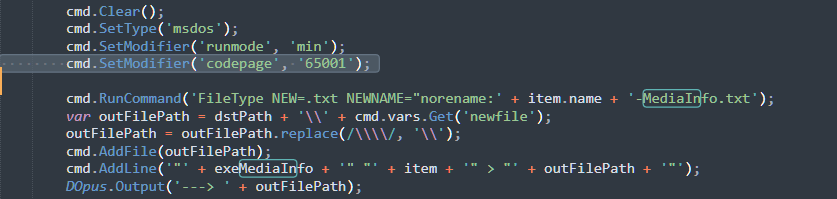
Have you tried changing the codepage as I suggested above?

Because in a test with a file named c:\test\āĻĒāĻŋāϰ⧀āϤāĻŋāϰ\āĻĒā§āϰ⧇āĻŽ āĻĒāĻŋāϰ⧀āϤāĻŋāϰ āĻĻāĻžāĻŽ - āϰ⧁āύāĻž āϞāĻžā§ŸāϞāĻž.flac, simply adding that line before running the 2 commands works here. Without that line PrintMeta Mediainfo creates 2 empty text files.

Not yet. Have you tried with a file in a Unicode folder?

I've tried with this:
E:\Music\āĻĒā§āϰ⧇āĻŽ āĻĒāĻŋāϰ⧀āϤāĻŋāϰ āĻĻāĻžāĻŽ\āĻŦāĻžāĻ‚āϞāĻž\æ—ĨæœŦčĒž\📂Proyectos\CÃŗdigo\āĻĒā§āϰ⧇āĻŽ āĻĒāĻŋāϰ⧀āϤāĻŋāϰ āĻĻāĻžāĻŽ - āϰ⧁āύāĻž āϞāĻžā§ŸāϞāĻž.mp3

Changing just this:

And the result:
āĻĒā§āϰ⧇āĻŽ āĻĒāĻŋāϰ⧀āϤāĻŋāϰ āĻĻāĻžāĻŽ - āϰ⧁āύāĻž āϞāĻžā§ŸāϞāĻž.mp3-MediaInfo.Full.txt (7.6 KB)
āĻĒā§āϰ⧇āĻŽ āĻĒāĻŋāϰ⧀āϤāĻŋāϰ āĻĻāĻžāĻŽ - āϰ⧁āύāĻž āϞāĻžā§ŸāϞāĻž.mp3-MediaInfo.txt (2.4 KB)

And FWIW, changing to FSUtil().Run() seems to work better.

	function WriteMediaInfo(item) {
		if (item.def_value.substring(0, 6) == 'ftp://') {
			DOpus.Output('---> Sorry, MediaInfo does not work on FTP.');
			return;
		}

		cmd.Clear();
		cmd.RunCommand('FileType NEW=.txt NEWNAME="norename:' + item.name + '-MediaInfo.txt');
		var outFilePath = dstPath + '\\' + cmd.vars.Get('newfile');
		outFilePath = outFilePath.replace(/\\\\/, '\\');
		var run = fsu.Run('"' + exeMediaInfo + '" "' + item + '"', 0, true);
		if (run) {
			//DOpus.Output('---> ' + run.exitcode + ':' + run.stderr + ':' + run.stdout);
			WriteToFile(outFilePath, run.stdout);
		}

		cmd.RunCommand('FileType NEW=.txt NEWNAME="norename:' + item.name + '-MediaInfo.Full.txt');
		var outFilePath = dstPath + '\\' + cmd.vars.Get('newfile');
		outFilePath = outFilePath.replace(/\\\\/, '\\');
		var run = fsu.Run('"' + exeMediaInfo + '" --Full "' + item + '"', 0, true);
		if (run) {
			//DOpus.Output('---> ' + run.exitcode + ':' + run.stderr + ':' + run.stdout);
			WriteToFile(outFilePath, run.stdout);
		}

	}

	function WriteToFile(file, content) {
		if (!file || !content) return;
		try {
			var outFile = fsu.OpenFile(file, 'wa');
			outFile.Write(content);
			outFile.Close();
		}
		catch (err) {
			DOpus.Output('---> Error writing to "' + file + '" : ' + err.description);
		}
	}

Hi dear @errante
I have no clear idea how to use this code? I have been tried this code just copy and paste in a button editor but that's doesn't worked in my system.
Just wait for lxp to do its magic with that info.

1 Like