# Readout of PNG chunks
**URL:** https://resource.dopus.com/t/readout-of-png-chunks/44361
**Category:** Help & Support
**Tags:** feature-request
**Created:** [May 5, 2023, 9:41am UTC](https://resource.dopus.com/t/readout-of-png-chunks/44361 "2023-05-05T09:41:25Z")
**Posts on this page:** 12
**Page:** 1
### Author:  [@HansMeiser1](https://resource.dopus.com/u/HansMeiser1)
#### Post date: [May 5, 2023, 9:41am UTC](https://resource.dopus.com/t/readout-of-png-chunks/44361/1 "2023-05-05T09:41:26Z")
I love using DO as a viewer for image files, the possibility to configure the details one get when hovering an image. As I'm a graphics developer, I currently work heavily with AI generated images. Those generated images get some meta data written into the chunks part of PNG files.
So I would like to feature request that DO could also readout this data from PNGs, so that we could use it via a tag like {name}, {picsize}, etc., something like {pnginfo}.
That would be really helpful.
---
### Author:  [@efourc](https://resource.dopus.com/u/efourc)
#### Post date: [May 7, 2023, 11:53pm UTC](https://resource.dopus.com/t/readout-of-png-chunks/44361/2 "2023-05-07T23:53:11Z")
I also would love something like this -- the ability extract AI image metadata (which details the generation parameters) from .png chunks or .jpeg Exif within DOpus.
A way to make this data available to scripts in addition to tooltips, etc. would be ideal.
---
### Author:  [@Leo](https://resource.dopus.com/u/Leo)
#### Post date: [May 7, 2023, 11:57pm UTC](https://resource.dopus.com/t/readout-of-png-chunks/44361/3 "2023-05-07T23:57:35Z")
You can probably get the data to appear in Opus using this:
> [@ExifTool Custom Columns](https://resource.dopus.com/t/exiftool-custom-columns/38975):
>
> This script add-in generates custom columns showing metadata provided by ExifTool. It's designed for speed and comes with a few helper buttons that make it convenient and easy to use. The custom columns can be formatted as dates and numbers which ma…
---
### Author:  [@efourc](https://resource.dopus.com/u/efourc)
#### Post date: [May 8, 2023, 12:56am UTC](https://resource.dopus.com/t/readout-of-png-chunks/44361/4 "2023-05-08T00:56:55Z")
Thanks for that suggestion Leo, it looks very promising (but of course will take some time to study!).
I had vaguely seen mention of the underlying ExifTool before, but I never realized just how broadly it applies to all sorts of file type metadata.
---
### Author:  [@HansMeiser1](https://resource.dopus.com/u/HansMeiser1)
#### Post date: [May 8, 2023, 8:15am UTC](https://resource.dopus.com/t/readout-of-png-chunks/44361/5 "2023-05-08T08:15:28Z")
Thanks for this suggestion, but I'm not sure if this isn't complete overkill for a task, that also a text editor can do (PNG chunks can be manually read when opening the PNG in a text editor).
Also, I don't know if or how the ExifTool can put this information into the tool tip of DO.
@efourc Would be nice if you would share some information on that once you you have found out something. 👍
---
### Author:  [@efourc](https://resource.dopus.com/u/efourc)
#### Post date: [May 8, 2023, 9:06pm UTC](https://resource.dopus.com/t/readout-of-png-chunks/44361/6 "2023-05-08T21:06:54Z")
Sure I can do that, although I don't know when I'll next have time to continue.
**Edit:** I also don't know if the data can be put into a tooltip...
For anyone's reference, so far I've tested the basic usage of ExifTool (not yet the DOpus script).
Running `.\exiftool.exe .\image.png` (or dragging an image onto `exiftool(-k).exe` for a popup window) gives the following:
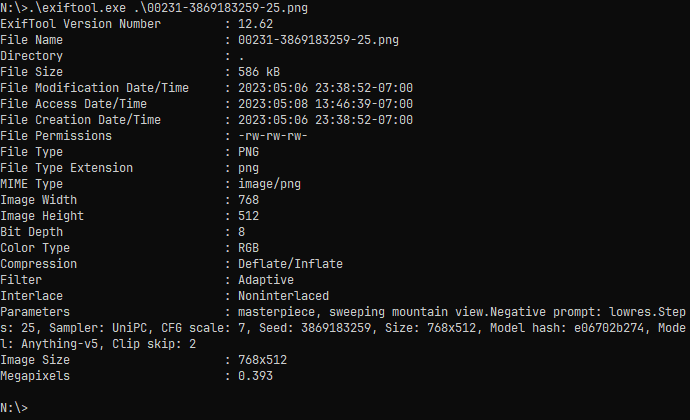
Instead, using `-b` for binary to get rid of the `.` characters that replace newlines, and `-Parameters` to limit only to the section for AI image params gives:
`.\exiftool.exe -b -Parameters .\image.png`

( **note:** I don't know if different AI platforms use a different metadata tag name than 'Parameters', and I also haven't looked at .jpeg files yet.)
**A side topic:** I've been using EditPad Pro to view .png metadata because I could create a custom syntax color scheme, although it's not perfect. Editpad won't work this way for .jpeg metadata, and there are some occasional glitches for .png (like the unrelated '5' after 'Clip skip: 2' also gets highlighted).
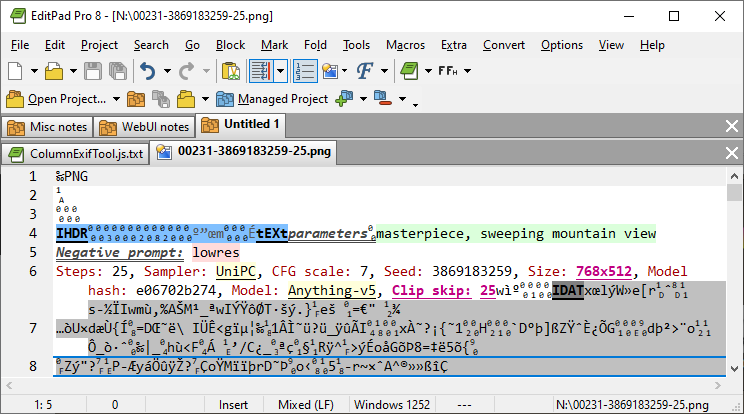
In the end, I'd like to use ExifTool to quickly glance at the metadata within DOpus, and also send just the metadata to EditPad Pro for highlighting, but I haven't worked through the details of doing it yet.
---
### Author:  [@HansMeiser1](https://resource.dopus.com/u/HansMeiser1)
#### Post date: [May 8, 2023, 9:20pm UTC](https://resource.dopus.com/t/readout-of-png-chunks/44361/7 "2023-05-08T21:20:44Z")
Very helpful, many thanks for that! 👍
---
### Author:  [@Leo](https://resource.dopus.com/u/Leo)
#### Post date: [May 8, 2023, 10:01pm UTC](https://resource.dopus.com/t/readout-of-png-chunks/44361/8 "2023-05-08T22:01:45Z")
> [@efourc](#):
>
> I also don't know if the data can be put into a tooltip...
Anything that appears in a column can be added to an info-tip.
That includes things that come from script columns like [ExifTool Custom Columns](https://resource.dopus.com/t/exiftool-custom-columns/38975).
You can edit Info-Tips via Settings \> File Types. It's most likely the Images file type group that you want to edit for PNG files, although you could also edit the PNG type itself if you don't want to change what's displayed for other image types.
---
### Author:  [@HansMeiser1](https://resource.dopus.com/u/HansMeiser1)
#### Post date: [May 9, 2023, 5:56am UTC](https://resource.dopus.com/t/readout-of-png-chunks/44361/9 "2023-05-09T05:56:26Z")
Thanks, I will check this out and try to get it to work.
---
### Author:  [@HansMeiser1](https://resource.dopus.com/u/HansMeiser1)
#### Post date: [May 9, 2023, 6:50pm UTC](https://resource.dopus.com/t/readout-of-png-chunks/44361/10 "2023-05-09T18:50:30Z")
Well, I don't know if there is a problem with the script and new DO, or me not getting it.
I downloaded the JS and put it into the scripts folder. I restarted DO. I adjusted the path to exiftool.
> They can be turned on and off via right-click in the column header Columns/Script/ExifTool.
I don't have or see such an option.
> Select the files whose metadata interests you and run **Generate Helper Files**
When I do this, the script insists that exiftool.exe was not found (and of course I adjusted the path to the exe).
So, now I'm stuck, because the scripts don't work for me.
Any ideas?
---
### Author:  [@Leo](https://resource.dopus.com/u/Leo)
#### Post date: [May 9, 2023, 6:57pm UTC](https://resource.dopus.com/t/readout-of-png-chunks/44361/11 "2023-05-09T18:57:23Z")
> [@HansMeiser1](#):
>
> When I do this, the script insists that exiftool.exe was not found (and of course I adjusted the path to the exe).
Did you double the backslashes in the path, like in the original script? That's easily overlooked.
What does this line look like in your copy of the script?
```javascript
var exeExifTool = fsu.Resolve('/bin\\exiftool\\exiftool.exe'); // -- Adjust to your system
```
Please also link your account if you need help in this much detail.
---
### Author:  [@HansMeiser1](https://resource.dopus.com/u/HansMeiser1)
#### Post date: [May 9, 2023, 8:04pm UTC](https://resource.dopus.com/t/readout-of-png-chunks/44361/12 "2023-05-09T20:04:45Z")
Ah, doubling the backslashes ... I should have known ... thanks for the hint. 👍