# Recreate Empty Directory Structure
**URL:** https://resource.dopus.com/t/recreate-empty-directory-structure/6489
**Category:** Buttons/Scripts
**Tags:** commands, button
**Created:** [July 31, 2008, 5:49pm UTC](https://resource.dopus.com/t/recreate-empty-directory-structure/6489 "2008-07-31T17:49:46Z")
**Posts on this page:** 20
**Page:** 1
### Author:  [@Leo](https://resource.dopus.com/u/Leo)
#### Post date: [July 31, 2008, 5:49pm UTC](https://resource.dopus.com/t/recreate-empty-directory-structure/6489/1 "2008-07-31T17:49:46Z")
## Non-Recursive Version
If you only want to re-create the top-level, selected directories and not the other directories inside them, use this command:
```nohighlight
@dirsonly
@nofilenamequoting
CreateFolder NAME "{destpath$}{file$|noterm}"
```
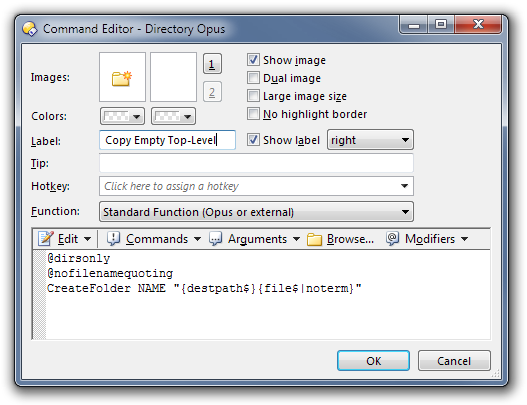
That will take the folders selected in the source window/panel and create empty folders with the same names in the destination window/panel.
## Recursive Version
If you want to re-create an entire hierarchy of empty directories you can do that as well.
The button below will copy just the selected folders and sub-folders -- but not any of the files -- from the source to the destination.
In other words, it will recreate the selected directory structure in the source by creating matching empty directories in the destination.
The screenshot below shows an example where the original structure on the left has been recreated on the right:
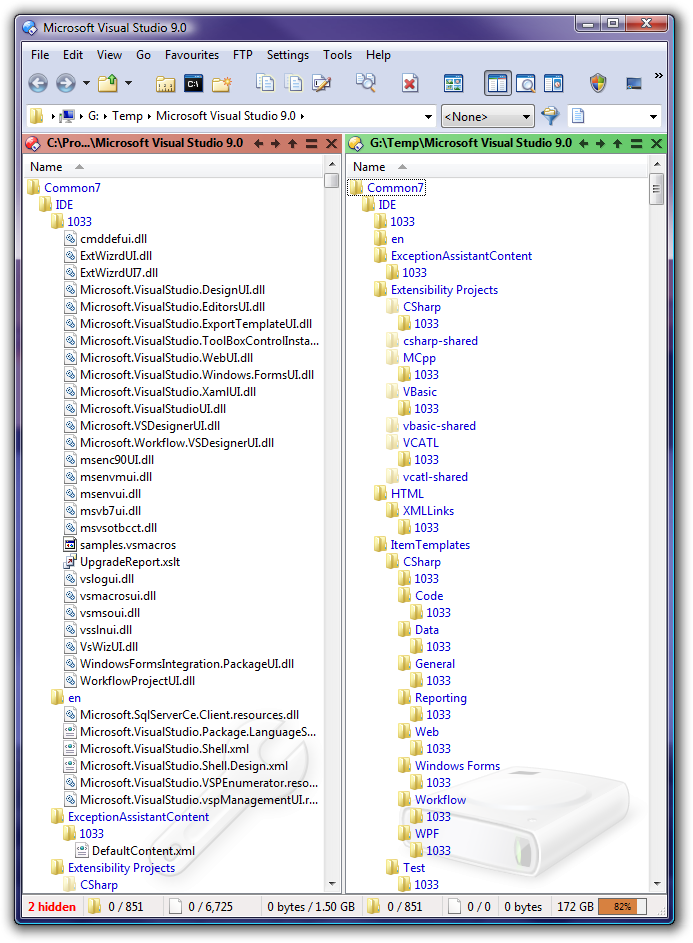
The button requires you to create a simple filter which matches the special [Folders Only] file type. You can do this via Settings -\> Preferences as shown below:
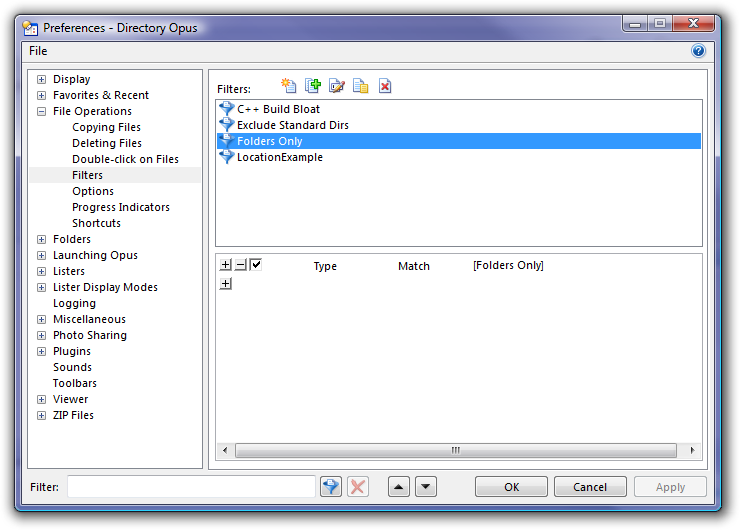
Make sure you click OK or Apply in the Preferences window to finish creating the filter.
The button itself is very simple:
```nohighlight
Copy FILTER="Folders Only"
```
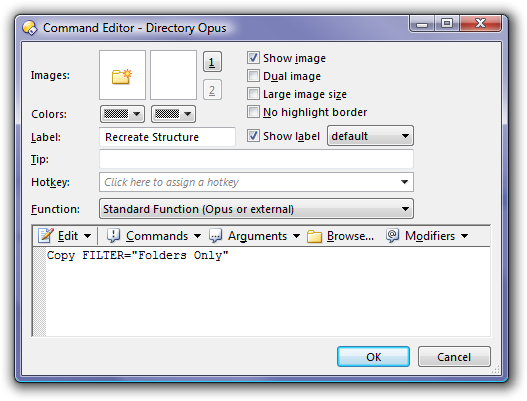
Obviously, if you didn't call your filter Folders Only then you should change the name given to the Copy FILTER="xyz" command.
That's it. Now select the directories you wish to recreate and click the button to make it happen.
---
### Author:  [@avic](https://resource.dopus.com/u/avic)
#### Post date: [August 3, 2008, 2:48pm UTC](https://resource.dopus.com/t/recreate-empty-directory-structure/6489/2 "2008-08-03T14:48:22Z")
Great! This is very usefull!
Thanks!
avic
---
### Author:  [@Leo](https://resource.dopus.com/u/Leo)
#### Post date: [November 12, 2010, 1:35pm UTC](https://resource.dopus.com/t/recreate-empty-directory-structure/6489/3 "2010-11-12T13:35:49Z")
I've added the Non-Recursive Version to the top of the original post, for cases where you only want to reproduce the top-level of directories.
---
### Author:  [@pmennen](https://resource.dopus.com/u/pmennen)
#### Post date: [July 16, 2011, 4:14am UTC](https://resource.dopus.com/t/recreate-empty-directory-structure/6489/4 "2011-07-16T04:14:08Z")
Thanks Leo ... from this information I created a new button. (Left click to copy just the upper level folder, Right click to copy all the folders recursively (without the files of course). Works great 🙂
~Paul
---
### Author:  [@abr](https://resource.dopus.com/u/abr)
#### Post date: [September 13, 2012, 5:30pm UTC](https://resource.dopus.com/t/recreate-empty-directory-structure/6489/5 "2012-09-13T17:30:11Z")
Is there a way to include COPYCREATIONTIME=yes?
`@dirsonly
@nofilenamequoting
CreateFolder NAME "{destpath$}{file$|noterm}"`
It doesn´t work inserted after CreateFolder or at the end.
---
### Author:  [@Jon](https://resource.dopus.com/u/Jon)
#### Post date: [September 13, 2012, 8:41pm UTC](https://resource.dopus.com/t/recreate-empty-directory-structure/6489/6 "2012-09-13T20:41:17Z")
Why would you expect an argument from the Copy command to work with the CreateFolder command?
---
### Author:  [@abr](https://resource.dopus.com/u/abr)
#### Post date: [September 13, 2012, 10:19pm UTC](https://resource.dopus.com/t/recreate-empty-directory-structure/6489/7 "2012-09-13T22:19:23Z")
Hmm, that´s true. Maybe, because i used in in a similar way (copying folder structures) . The old command used a copy filter to
copy the folders structures. But i like the top-level only solution, so i´d like to have it combined with the
Copycreationtime feature, if possible.
---
### Author:  [@Leo](https://resource.dopus.com/u/Leo)
#### Post date: [September 13, 2012, 10:57pm UTC](https://resource.dopus.com/t/recreate-empty-directory-structure/6489/8 "2012-09-13T22:57:30Z")
You could do that by using the recursive version (i.e. the one with the Copy command), adding COPYCREATIONTIME=yes to the Copy command, and changing the filter it uses so that it doesn't go into any subdirectories (by adding a subfolder clause to the filter).
(You can't use the Copy command's arguments with the CreateFolder command, though. That'd never work. Commands only take the arguments they are documented as taking, not all the arguments from other commands.)
---
### Author:  [@abr](https://resource.dopus.com/u/abr)
#### Post date: [September 14, 2012, 5:28am UTC](https://resource.dopus.com/t/recreate-empty-directory-structure/6489/9 "2012-09-14T05:28:18Z")
Ok, then i will modify my old command to only handle the top directories. Thanks.
---
### Author:  [@dopusnewb](https://resource.dopus.com/u/dopusnewb)
#### Post date: [April 28, 2013, 12:55pm UTC](https://resource.dopus.com/t/recreate-empty-directory-structure/6489/10 "2013-04-28T12:55:05Z")
Hi, I tried to use your recursive button to create a button that would only copy the files inside.
Basically I download podcasts into folders according to the name of the show, ie:
```nohighlight
Z:\radio\All in the mind\whatevershow.mp3
Z:\radio\NPR Radio\anothershow.mp3
etc.
```
It is easy for me to copy these onto my mp3 player, then I want to archive only the podcast mp3 files into folders like:
```nohighlight
Z:\radio\Already Put On MP3 Player\All in the mind\whatevershow.mp3
Z:\radio\Already Put On MP3 Player\NPR Radio\anothershow.mp3
```
, leaving the original folders intact (and empty) like:
```nohighlight
Z:\radio\All in the mind\
Z:\radio\NPR Radio\
```
I tried making a filter called "Files Only", like from your first post (recursive one), using the Type:Match:[Files Only] filter, then making a button with command:
```nohighlight
Copy FILTER="Files Only" MOVE
```
, but it still deletes the source folder, essentially doing just a move of the folder. I want it ideally to leave the source folders intact, just moving the files inside.
Any ideas??
---
### Author:  [@alexonlife](https://resource.dopus.com/u/alexonlife)
#### Post date: [October 6, 2017, 1:11am UTC](https://resource.dopus.com/t/recreate-empty-directory-structure/6489/11 "2017-10-06T01:11:57Z")
Is it possible to make Recursive Version work with Duplicate option? Not working for me.
I.e. I'd like to duplicate the structure with the different name for the top folder.
---
### Author:  [@alexonlife](https://resource.dopus.com/u/alexonlife)
#### Post date: [October 6, 2017, 1:53am UTC](https://resource.dopus.com/t/recreate-empty-directory-structure/6489/12 "2017-10-06T01:53:14Z")
Got it. Just Copy As Here ...
Ignore my question, please.
---
### Author:  [@tdanielsson](https://resource.dopus.com/u/tdanielsson)
#### Post date: [November 9, 2020, 9:51pm UTC](https://resource.dopus.com/t/recreate-empty-directory-structure/6489/13 "2020-11-09T21:51:21Z")
Hi
I'm sorry that asking a question here in this old tree.
I just found this solution when I was searching the forum.
So I have now created a button as is said in the instructions as well a filter for Recursive Version.
But it will not working for me when I try it out, I can see that the folders are copied over to the other lister, but when it's finished the folders disappears.
I have also tried the filter function in the copy menu, but it will not work there either.
Only difference I can see that I have three boxes in the filter that I can choose.
So what can I have done wrong here when the folders disappears?.
Thank you
Have a nice day
Sincerely
Thomas
---
### Author:  [@Leo](https://resource.dopus.com/u/Leo)
#### Post date: [November 9, 2020, 10:20pm UTC](https://resource.dopus.com/t/recreate-empty-directory-structure/6489/14 "2020-11-09T22:20:40Z")
I did a quick test and it's still working the same as it used to.
Check you've got everything exactly as in the top post and, if it's still not working, post screenshots of what you've done. Maybe we'll be able to see what's wrong from those.
Are you using the latest version of Opus as well? I tested with 12.22.1 (latest beta, but 12.22 should be the same).
---
### Author:  [@tdanielsson](https://resource.dopus.com/u/tdanielsson)
#### Post date: [November 9, 2020, 10:58pm UTC](https://resource.dopus.com/t/recreate-empty-directory-structure/6489/15 "2020-11-09T22:58:03Z")
Hi
Thank you for the reply.
I think I just found out what I did wrong in the configurations, I missed to changed the first column to type and I had name.
.
Although the last column says Folders and not [Folders Only] as on your picture, I hope that's ok?.
Any way it seems to work now thanks for your help and time.
Sincerely
Thomas
---
### Author:  [@Dagur](https://resource.dopus.com/u/Dagur)
#### Post date: [March 21, 2023, 3:40pm UTC](https://resource.dopus.com/t/recreate-empty-directory-structure/6489/16 "2023-03-21T15:40:12Z")
Hi! I've been using these custom buttons for just copying folders for a long time now and it's so useful, thank you for this!
I'm now in a situation where I need to copy ONLY the content from several selected folders into one target folder, but I'm having no success creating a button for this. Whatever I try it copies the folders with the files inside.
Anyone know how to set this up? Feels like it should be possible, right..? 🙂
---
### Author:  [@Leo](https://resource.dopus.com/u/Leo)
#### Post date: [March 21, 2023, 4:26pm UTC](https://resource.dopus.com/t/recreate-empty-directory-structure/6489/17 "2023-03-21T16:26:26Z")
> [@Dagur](#):
>
> I'm now in a situation where I need to copy ONLY the content from several selected folders into one target folder
I can see a few ways to interpret that. To clarify things, please give some examples of what you want to do.
---
### Author:  [@Dagur](https://resource.dopus.com/u/Dagur)
#### Post date: [March 21, 2023, 4:47pm UTC](https://resource.dopus.com/t/recreate-empty-directory-structure/6489/18 "2023-03-21T16:47:01Z")
Wonderful, thanks!
Let's say I have folder A and folder B open in a double lister. Folder A contains hundreds of folders with random files in the them and folder B is empty. I want to be able to manually select a few of the child folders in folder A and have only the files from within those folders copied to folder B. Does that make sense? Maybe there is not even a need for a custom button, I just haven't been able to figure out how to do it.
---
### Author:  [@lxp](https://resource.dopus.com/u/lxp)
#### Post date: [March 21, 2023, 6:48pm UTC](https://resource.dopus.com/t/recreate-empty-directory-structure/6489/19 "2023-03-21T18:48:02Z")
> [@Dagur](#):
>
> I want to be able to manually select a few of the child folders in folder A and have only the files from within those folders copied to folder B
This job description perfectly fits [**CopyFlat**](https://resource.dopus.com/t/copyflat-flat-copy-selection-without-flat-view/44001).
---
### Author:  [@Dagur](https://resource.dopus.com/u/Dagur)
#### Post date: [March 22, 2023, 10:54pm UTC](https://resource.dopus.com/t/recreate-empty-directory-structure/6489/20 "2023-03-22T22:54:59Z")
Thank you very much! That seems to be exactly what I need, will give it a try 🙂
[Next page](https://resource.dopus.com/t/recreate-empty-directory-structure/6489.md?page=2)