# Rename - Batch Rename Files
**URL:** https://resource.dopus.com/t/rename-batch-rename-files/35373
**Category:** Help & Support
**Created:** [May 1, 2020, 2:46am UTC](https://resource.dopus.com/t/rename-batch-rename-files/35373 "2020-05-01T02:46:15Z")
**Posts on this page:** 5
**Page:** 1
### Author:  [@i8alls](https://resource.dopus.com/u/i8alls)
#### Post date: [May 1, 2020, 2:46am UTC](https://resource.dopus.com/t/rename-batch-rename-files/35373/1 "2020-05-01T02:46:15Z")
I have 10 files on the right lister and want to paste the file names on 10 files on the left lister. I'm using F2 per file to copy and paste. Is there a faster way to bulk rename?
---
### Author:  [@Jon](https://resource.dopus.com/u/Jon)
#### Post date: [May 1, 2020, 2:56am UTC](https://resource.dopus.com/t/rename-batch-rename-files/35373/2 "2020-05-01T02:56:48Z")
Select the files on the left-hand side and use **Edit -\> Copy File Names** to copy them to the clipboard.
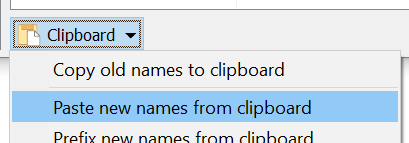
Then select the files on the right-hand side, click the **Rename** button in the toolbar, and use the **Paste new names from clipboard** command in the **Clipboard** drop-down menu at the bottom of the Rename dialog.
---
### Author:  [@anon30529981](https://resource.dopus.com/u/anon30529981)
#### Post date: [July 12, 2022, 1:44pm UTC](https://resource.dopus.com/t/rename-batch-rename-files/35373/3 "2022-07-12T13:44:33Z")
Is it possible to make a button for the "Paste new names from clipboard" option?
Edit: I use this a lot 😅
---
### Author:  [@Leo](https://resource.dopus.com/u/Leo)
#### Post date: [July 12, 2022, 1:50pm UTC](https://resource.dopus.com/t/rename-batch-rename-files/35373/4 "2022-07-12T13:50:03Z")
The [From Clipboard or File v4.0](https://resource.dopus.com/t/from-clipboard-or-file-v4-0/23433) rename script/preset may be what you're looking for.
---
### Author:  [@anon30529981](https://resource.dopus.com/u/anon30529981)
#### Post date: [July 12, 2022, 2:31pm UTC](https://resource.dopus.com/t/rename-batch-rename-files/35373/5 "2022-07-12T14:31:24Z")
Thanks, Leo! You are the best 😁
For reference: `Rename PRESET="New names from clipboard" `