# Rename Help with interesting difficult regEx patterns
**URL:** https://resource.dopus.com/t/rename-help-with-interesting-difficult-regex-patterns/17292
**Category:** Help & Support
**Created:** [February 11, 2014, 1:17am UTC](https://resource.dopus.com/t/rename-help-with-interesting-difficult-regex-patterns/17292 "2014-02-11T01:17:39Z")
**Posts on this page:** 17
**Page:** 1
### Author:  [@OpelOpus](https://resource.dopus.com/u/OpelOpus)
#### Post date: [February 11, 2014, 1:17am UTC](https://resource.dopus.com/t/rename-help-with-interesting-difficult-regex-patterns/17292/1 "2014-02-11T01:17:39Z")
Hi guys, I hope you can help me with some interesting rename patterns. Here's my request.
1. Clean multiple spaces or underscores.
I found this awesome scripts in this thread [Various simple rename presets](https://resource.dopus.com/t/various-simple-rename-presets/3297/1) which does just fine, except that it doesn't remove a space at the end. And it would be great if it would affect both underscores and spaces. Integrated with the Underscores to spaces preset.
_How\_\_to\_\_\_rename_.txt
How to rename.txt
2. Seperate words by recognizing cases. (even if the first word does not start with a case)
1. howToRename.txt
2. How To Rename.txt
3. Make only extension lowercase. I have the preset called Capitilize words but it also effects filename before the file extension.
How to RENAME.TXT
How to RENAME.txt
4. Find specific character and replace (in this example: find the second dot and replace with a space+dash)
1.04. How to rename.txt
1.04 - How to rename.txt
5. I figured out the following example, but that is as far as I got. (.+)-(.+)(.[^.]+) to \1\3
How to rename-1.txt
How to rename.txt
It would be awesome to have these as presets. And I'm sure more people would benefit from such presets. Thanks in Advance.
---
### Author:  [@abr](https://resource.dopus.com/u/abr)
#### Post date: [February 11, 2014, 1:24am UTC](https://resource.dopus.com/t/rename-help-with-interesting-difficult-regex-patterns/17292/2 "2014-02-11T01:24:41Z")
[quote="OpelOpus"]3. Make only extension lowercase. I have the preset called Capitilize words but it also effects filename before the file extension.
How to RENAME.TXT
How to RENAME.txt
[/quote]
That one is quite easy:
RENAME CASE=extlower
---
### Author:  [@MrC](https://resource.dopus.com/u/MrC)
#### Post date: [February 11, 2014, 2:29am UTC](https://resource.dopus.com/t/rename-help-with-interesting-difficult-regex-patterns/17292/3 "2014-02-11T02:29:09Z")
Try my [Dynamic Renamer](https://resource.dopus.com/t/dynamic-renamer/14993/1). It makes these really easy, and you can save them as presets. Here are the "New name" values that solve your problems 1 - 5:
1. -/_{2,}/ /g -/_//g
2. -/([a-z])([A-Z])/$1 $2/g -ct
3. -sl
4. -/. / - /
5. -/-\d+//
And you can add additional transformations if you wanted. For example, your number 5 changes the 1st one here to the 2nd one:
How to rename-1.txt
How to rename.txt
If you now wanted to title case that name, just add -ct to to #5 answer:
-/-\d+// -ct
or if you didn't want the "To" to be uppercased (because it is a preposition):
-/-\d+// -cT
---
### Author:  [@playful](https://resource.dopus.com/u/playful)
#### Post date: [February 11, 2014, 8:49pm UTC](https://resource.dopus.com/t/rename-help-with-interesting-difficult-regex-patterns/17292/4 "2014-02-11T20:49:52Z")
Hi OpelOpus!
Just for fun, in addition to abr's suggestion: here are some regexes you can save as presets.
1.
_How\_\_to\_\_\_rename_.txt =\> How to rename.txt
Regex mode
Old name: _\*([^_]+)\_+(.\*)#
New name: \1 \2
No need to check any of the boxes
1.
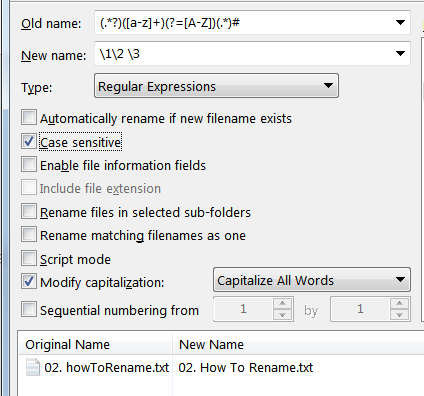
2. howToRename.txt =\> 02. How To Rename.txt
Regex mode
Old name: (._?)([a-z]+)(?=[A-Z])(._)#
New name: \1\2 \3
Check the "Case Sensitive" and "Modify Capitalization: Capitalize all words" boxes
3.
How to RENAME.TXT =\> How to RENAME.txt
Regex mode
Old name: (.\*)
New name: \1
Check the "Modify Capitalization: Lower-Case Extension" box
1.
1.04. How to rename.txt =\> 1.04 - How to rename.txt
Since you want to replace "specific characters", you will need some knowledge of regex to adapt the saved pattern for every case.
Regex mode
Old name: ([^.]+).([^.]+).(.\*)
New name: \1.\2 -\3
No need to check any boxes.
1.
How to rename-1.txt =\> How to rename.txt
Regex mode
Old name: (.\*)-\d(.[^.]+)
New name: \1\2
No need to check any boxes.
Let me know if you have any questions!
---
### Author:  [@playful](https://resource.dopus.com/u/playful)
#### Post date: [February 11, 2014, 8:53pm UTC](https://resource.dopus.com/t/rename-help-with-interesting-difficult-regex-patterns/17292/5 "2014-02-11T20:53:16Z")
> [@](#):
>
> in addition to abr's suggestion
I meant, abr and MrC.
---
### Author:  [@OpelOpus](https://resource.dopus.com/u/OpelOpus)
#### Post date: [February 13, 2014, 4:27pm UTC](https://resource.dopus.com/t/rename-help-with-interesting-difficult-regex-patterns/17292/6 "2014-02-13T16:27:30Z")
Thank you very much guys. Really appreaciate your help.
@MrC. That looks like a powerful tool! I installed activePerl than I placed the orp file in Appdata under rename presets, but it doesn't show up. Should I do something in ActivePerl first?
@Playful
Example 1 still doesn't remove a space at the end. And is it possible the same rule addresses both multiple underscores and spaces?
Example 2 did not work for me.
Example 4. "Since you want to replace "specific characters", you will need some knowledge of regex to adapt the saved pattern for every case."
Thats indeed the difficult part. Is there a way to just address the 4th character with regex? Say if I just want the 4th character and replace it with x?
Merci!
---
### Author:  [@MrC](https://resource.dopus.com/u/MrC)
#### Post date: [February 13, 2014, 5:12pm UTC](https://resource.dopus.com/t/rename-help-with-interesting-difficult-regex-patterns/17292/7 "2014-02-13T17:12:31Z")
> [@OpelOpus](#):
>
> @MrC. That looks like a powerful tool! I installed activePerl than I placed the orp file in Appdata under rename presets, but it doesn't show up. Should I do something in ActivePerl first?
No, just import the orp via the Rename dialog, File \> Import.
---
### Author:  [@OpelOpus](https://resource.dopus.com/u/OpelOpus)
#### Post date: [February 13, 2014, 6:09pm UTC](https://resource.dopus.com/t/rename-help-with-interesting-difficult-regex-patterns/17292/8 "2014-02-13T18:09:05Z")
> [@MrC](#):
>
> [quote="OpelOpus"]@MrC. That looks like a powerful tool! I installed activePerl than I placed the orp file in Appdata under rename presets, but it doesn't show up. Should I do something in ActivePerl first?
No, just import the orp via the Rename dialog, File \> Import.[/quote]
Yes that worked. Brilliant! Especially for example 2, I thought that one was pretty though. Thank you so much! Im going to study this Dynamic Renamer and see if I can use it without help in the future.
👍
---
### Author:  [@playful](https://resource.dopus.com/u/playful)
#### Post date: [February 13, 2014, 7:07pm UTC](https://resource.dopus.com/t/rename-help-with-interesting-difficult-regex-patterns/17292/9 "2014-02-13T19:07:42Z")
Hi OpelOpus!
> [@](#):
>
> Example 2 did not work for me.
Did you check the boxes I mentioned?
Please see the screenshot below and the old name / new name.
> [@](#):
>
> Is there a way to just address the 4th character with regex? Say if I just want the 4th character and replace it with x?
Easy. 🙂
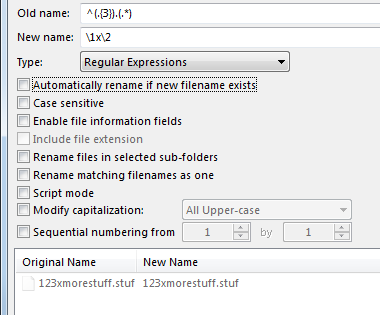
1234morestuff.stuf =\> 123xmorestuff.stuf
Old name: ^(.{3}).(.\*)
New name: \1x\2
> [@](#):
>
> Example 1 still doesn't remove a space at the end.
You're right, I missed that.
Regex mode
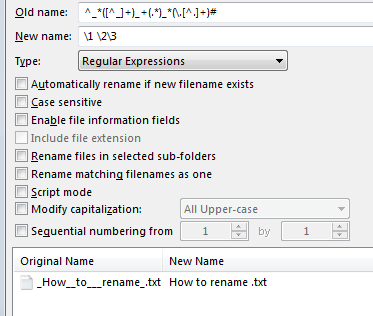
Old name: ^_\*([^_]+)_+(.\*)_\*(.[^.]+)#
New name: \1 \2\3
No need to check any of the boxes
Let me know if you have any questions. 🙂
---
### Author:  [@OpelOpus](https://resource.dopus.com/u/OpelOpus)
#### Post date: [February 13, 2014, 8:24pm UTC](https://resource.dopus.com/t/rename-help-with-interesting-difficult-regex-patterns/17292/10 "2014-02-13T20:24:12Z")
Hello Playful,
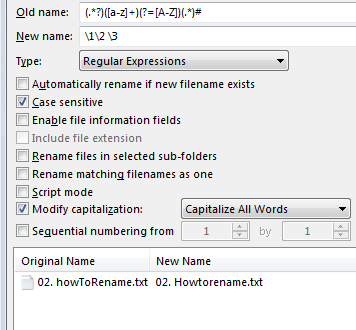
Still no succes. See my attachments. Maybe its because I have an older version of opus? (9.5.6.0)
---
### Author:  [@playful](https://resource.dopus.com/u/playful)
#### Post date: [February 13, 2014, 9:16pm UTC](https://resource.dopus.com/t/rename-help-with-interesting-difficult-regex-patterns/17292/11 "2014-02-13T21:16:10Z")
Hi OpelOpus!
On your first screenshot, please note that you said you wanted to replace the fourth character with x:
> [@](#):
>
> Is there a way to just address the 4th character with regex? Say if I just want the 4th character and replace it with x?
Your original filename already contains "x" as the fourth character, so there is no change (x is changed into x). To change the fourth character to "y" in the file name, change the x to a y in the replacement string:
\1y\2
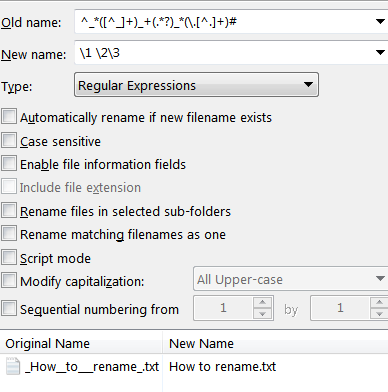
For your second screenshot... I must have been asleep when I wrote to you (first thing in the morning). I was missing one character. Please see attached screenshot.
^_\*([^_]+)_+(.\*?)_\*(.[^.]+)#
\1 \2\3
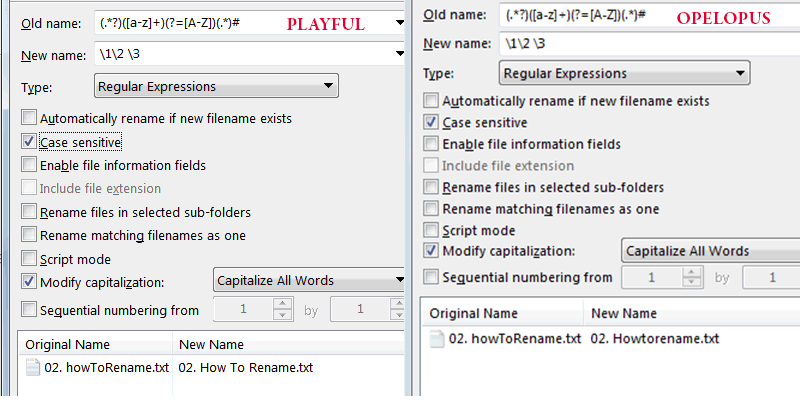
For your last screenshot... It beats me. Please have a look at the "comp" screenshot below. Do you see any difference? I don't think I see one. A good question for someone with keener eyes. Maybe we're missing a setting somewhere.
Or could it be that one of the characters in your file name is some unicode character that looks exactly like ascii but is not ascii? That can happen with foreign locales. To give you an example, there are several ways to encode "é".
---
### Author:  [@Leo](https://resource.dopus.com/u/Leo)
#### Post date: [February 13, 2014, 10:15pm UTC](https://resource.dopus.com/t/rename-help-with-interesting-difficult-regex-patterns/17292/12 "2014-02-13T22:15:10Z")
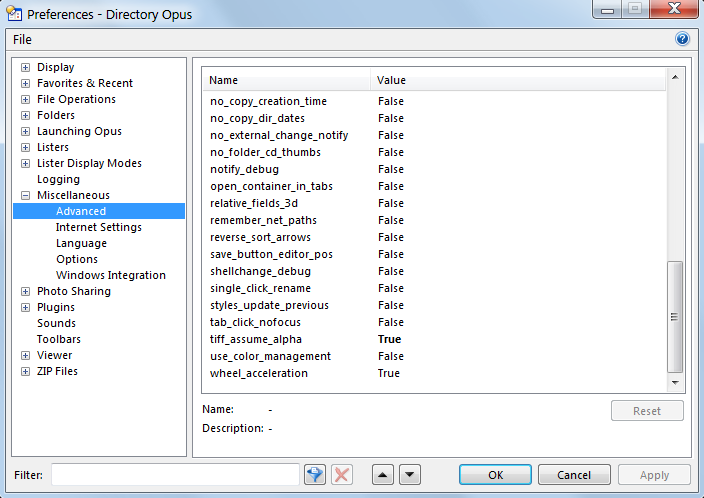
Make sure Preferences / Miscellaneous / Advanced: regex\_style is not set to the legacy Opus 9 mode.
---
### Author:  [@playful](https://resource.dopus.com/u/playful)
#### Post date: [February 13, 2014, 10:40pm UTC](https://resource.dopus.com/t/rename-help-with-interesting-difficult-regex-patterns/17292/13 "2014-02-13T22:40:04Z")
> [@](#):
>
> Make sure Preferences / Miscellaneous / Advanced: regex\_style is not set to the legacy Opus 9 mode.
Ah, OpelOpus, I was sure that if Leo had a look he would detect the problem. Brilliant!
Is that working for you with that different setting?
---
### Author:  [@Jon](https://resource.dopus.com/u/Jon)
#### Post date: [February 13, 2014, 11:32pm UTC](https://resource.dopus.com/t/rename-help-with-interesting-difficult-regex-patterns/17292/14 "2014-02-13T23:32:29Z")
If OpelOpus is using Opus 9 then the legacy regex is his only option.
---
### Author:  [@OpelOpus](https://resource.dopus.com/u/OpelOpus)
#### Post date: [February 13, 2014, 11:49pm UTC](https://resource.dopus.com/t/rename-help-with-interesting-difficult-regex-patterns/17292/15 "2014-02-13T23:49:19Z")
Guys, I don't have that option legacy option.
But no worries. For now I'll use MrC's dynamic rename. Im really grateful for your time and help. Great community!
Im planning on upgrade when opus 11 releases, so maybe then I get to play with new regex and more stuff.
---
### Author:  [@playful](https://resource.dopus.com/u/playful)
#### Post date: [February 14, 2014, 12:02am UTC](https://resource.dopus.com/t/rename-help-with-interesting-difficult-regex-patterns/17292/16 "2014-02-14T00:02:48Z")
Good one OpelOpus, I'm sure you'll love Opus 11. 👍
---
### Author:  [@MrC](https://resource.dopus.com/u/MrC)
#### Post date: [February 14, 2014, 4:07am UTC](https://resource.dopus.com/t/rename-help-with-interesting-difficult-regex-patterns/17292/17 "2014-02-14T04:07:55Z")
@OpelOpus - I'm glad you like the tool. I find it very useful, and use it frequently. It is pretty easy to build up very complex renames with a few simple chained options.
Yesterday I solved part 1 of a long-standing problem, and just a few minutes ago I solved part 2:
[Perlscript & Unicode problem [Solved]](https://resource.dopus.com/t/perlscript-unicode-problem-solved/15005/1)
These fixes will go into a new version of Dynamic Renamer, which I'll put out tomorrow. In a nut shell, the fixes will allow certain tricky Unicode characters to be processed by Directory Opus correctly (the thread above mentions the character "ţ" (latin small t with cedilla), which in your version of Dynamic Renamer will get treated as a "t" (small t).
EDIT: I've updated the script to version 1.9.