I used the backup and restore to port my setup from my desktop pc to my laptop did not make a backup. My desktop's much higher resolution and dual monitors and settings do not work at all on my laptop, fonts appear too large and in general I don't know what I have to change to get things back how they were previously. Is there a way to refresh Directory Opus to when I installed it on the laptop? I have heard that I need to delete a certain file or folder but I want to make sure I know what I'm doing first.
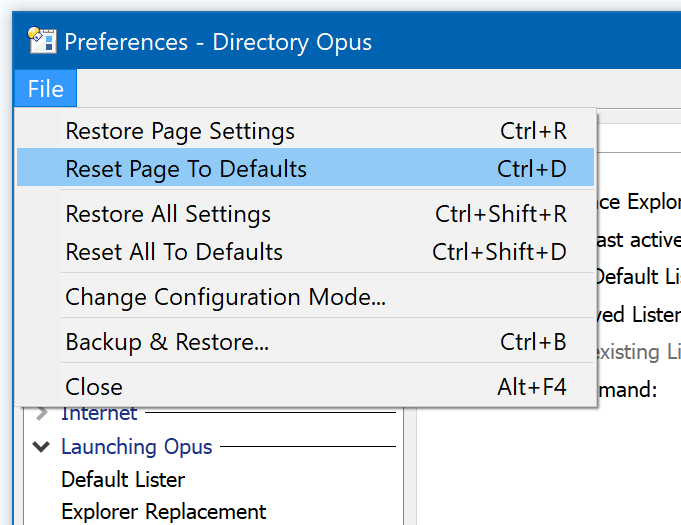
You can reset individual parts of Preferences via the File menu in the Preferences dialog.
There is also an option in the same menu to reset all Preferences pages to the defaults.
If you want to completely revert your entire configuration -- including toolbars, hotkeys, etc. -- back to the defaults, uninstall Opus, reboot when prompted, then reinstall it. That's the most straightforward way.
Leo,
I don't want to hijack this thread, but came across this one whilst checking how to restore to defaults.
I did as per your recommendation (re-install) but then did a backup of the settings immediately after first launch,
naming it something like 'Opus vxx - default settings - date-time.ocb'
In future restore this default .ocb only.
Probably uninstalling/reinstalling may not be necessary then.
If so, what about having such .ocb available as addition to the FAQ "Installation and Evaluation Period"?
Yeah it's not really necessary to uninstall and reinstall. For me at least, I simply first fully quite Directory Opus (File > Exit Directory Opus) and then just deleted the profile folder GPSoftware in AppData\Roaming. You could also delete the same folder in AppData\Local to reset your logs, FTP data, and other state information but I don't usually bother with that. If you did choose to delete this folder, iirc, you would also have to reinstall your license.
But yeah, easier is to make a backup right at the very beginning and restore from that when necessary.
We change and evolve the defaults over time, and they differ between versions (quite a lot between major versions).
Restoring a backup of the old default configuration won't always get you the current default configuration. It'll get you what the default was when you made the backup, for your old version of Opus.
It wouldn't make sense to include such .ocb files as part of the FAQs because you'd have to choose the right backup for your version of Opus, and we'd have to keep uploading new ones every time we made changes.
Most parts of Opus have a way to reset them to the defaults, and if you want to reset absolutely everything at once then the best thing to do is still the uninstall/reinstall. If you're resetting the entire configuration to defaults so frequently that you care about it taking a few seconds longer, then something strange is happening.
But isn't deleting the profile does the same thing without the need to uninstall and reinstall?
At least for me, uninstall/reinstall always involved restarting the computer or use the tools to find out exactly what program is locking up certain files in the installation directory which is always a hassle. So at the very least, just simply deleting the GPSoftware folder in both AppData\Local and AppData\Roaming is pretty much more effective in that case. On the other hand, if you're trying to prevent "riskier" people from doing funny things in AppData and messing up their programs, then yes I understand that Uninstall/Reinstall is the best way for them to go (is that your hidden meaning haha?)
Haha I don't do it often so it does not affect me. However it annoys me greatly when I have to reboot the computer and that's mainly because of the applications that I run (simulations and such) which takes a while to get back to where you were. Therefore I pretty much try not to update Directory Opus unless I'm done with whatever I was doing.
So basically it really depends on each user than anything.
Yeah, that is not the right way to do it, especially if you do it using Opus while it is still running. it will miss a lot of things which get written out when Opus exits.

 (is that your hidden meaning haha?)