# Script adds extra backslash to path
**URL:** https://resource.dopus.com/t/script-adds-extra-backslash-to-path/33822
**Category:** Help & Support
**Created:** [October 25, 2019, 2:15pm UTC](https://resource.dopus.com/t/script-adds-extra-backslash-to-path/33822 "2019-10-25T14:15:16Z")
**Posts on this page:** 7
**Page:** 1
### Author:  [@opw62](https://resource.dopus.com/u/opw62)
#### Post date: [October 25, 2019, 2:15pm UTC](https://resource.dopus.com/t/script-adds-extra-backslash-to-path/33822/1 "2019-10-25T14:15:16Z")
Up front...
Yes, I know Directory Opus is -not- designed for Linux.
I am using "Linux File Systems for Windows " which enables me to access Linux drives as if it were under Windows. So I can delete, rename files also using Directory Opus.
All the usual renaming (rename panel, including regex etc) works fine.
Using a script though, the rename adds an extra backslash to the driveletter-folder path, i.e.
instead of `x:\folder` (under Windows) it becomes `x:\\folder` and the script fails.
Again.. I know, Opus isn't designed for this and if it doesn't work, then so be it, I simply have to accept this. But I am just curious to know if this is indeed what should be expected.
Thanks.

---
### Author:  [@Leo](https://resource.dopus.com/u/Leo)
#### Post date: [October 25, 2019, 2:17pm UTC](https://resource.dopus.com/t/script-adds-extra-backslash-to-path/33822/2 "2019-10-25T14:17:19Z")
> [@opw62](#):
>
> Using a script though, the rename adds an extra backslash to the driveletter-folder path, i.e.
> instead of x:\folder (under Windows) it becomes x:\folder and the script fails.
Which script? What is the code that generates that command and path?
We don't have enough information to know if the script is the problem, or if it's something in Opus itself.
---
### Author:  [@opw62](https://resource.dopus.com/u/opw62)
#### Post date: [October 28, 2019, 9:21am UTC](https://resource.dopus.com/t/script-adds-extra-backslash-to-path/33822/3 "2019-10-28T09:21:42Z")
Sorry for the delay. One way or the other, it looks I haven't received a notification, neither in the 'junk' box.
Earlier posts can be found in thread "Change modified date after filename"
> [@Change modified date after filename](https://resource.dopus.com/t/change-modified-date-after-filename/15994/9):
>
> Regret, nothing happens. Anyway, forget it, many thanks for the effort! I have found a renamer that can do this job.
For experts this script probably looks crap, but it works fine for me.
For good order's sake below the script
```auto
Rename PATTERN="*" TO="*"
@nodeselect
@script vbscript
Option Explicit
' Change the path below if you haven't installed Opus to the default location:
dim DOpusRTPath
'DOpusRTPath = "C:\Program Files\GPSoftware\Directory Opus\dopusrt.exe"
DOpusRTPath = "D:\Directory Opus\dopusrt.exe"
Dim Shell
Set Shell = CreateObject("WScript.Shell")
Function Rename_GetNewName(strFileName, strFilePath, fIsFolder, strOldName, ByRef strNewName)
Dim strDateTime
Dim strCommand
' Set strNewName to an empty string so that Opus does not rename the file.
strNewName = ""
Dim debstr
Dim gettimestamp
gettimestamp = 0
' format: file name+ddmmyyyy hhmmss dd-mm-yyyy hh-mm-ss dd mm yyyy hh mm ss
Dim re0
Set re0 = new RegExp
re0.Pattern = "^(?:.*?)[-_\s]*(0[1-9]|[12][0-9]|3[01])[\s\-\_\.]?(0[1-9]|1[0-2])[\s\-\_\.]?(17[0-9][0-9]|18[0-9][0-9]|19[0-9][0-9]|20[0-2][0-9])[-\s_]?([0-1]\d|[2][0-3])[\s\-\_]?([0-5]\d)[\s\-\_]?([0-5]\d)\.(?:.*?)$"
' format: file name+yyyymmdd hhmmss yyyy-mm-dd hh-mm-ss (with or without dashes)
Dim re1
Set re1 = new RegExp
re1.Pattern = "^(?:.*?)[-_\s]*(17[0-9][0-9]|18[0-9][0-9]|19[0-9][0-9]|20[0-2][0-9])[\s\-\_\.]?(0[1-9]|1[0-2])[\s\-\_\.]?(0[1-9]|[12][0-9]|3[01])[-\s_]?([0-1]\d|[2][0-3])[\s\-\_]?([0-5]\d)[\s\-\_]?([0-5]\d)\.(?:.*?)$"
' format: file name+ddmmyyyy dd-mm-yyyy Date ONLY (no time)
Dim re2
Set re2 = new RegExp
re2.Pattern = "^(?:.*?)[-_\s]*(0[1-9]|[12][0-9]|3[01])[\s\-\_\.]?(0[1-9]|1[0-2])[\s\-\_\.]?(17[0-9][0-9]|18[0-9][0-9]|19[0-9][0-9]|20[0-2][0-9])\.(?:.*?)$"
' format: file name+yyyy-mm-dd yyyymmdd date ONLY without time
Dim re3
Set re3 = new RegExp
re3.Pattern = "^(?:.*?)[-_\s]*(17[0-9][0-9]|18[0-9][0-9]|19[0-9][0-9]|20[0-2][0-9])[\s\-\_\.]?(0[1-9]|1[0-2])[\s\-\_\.]?(0[1-9]|[12][0-9]|3[01])\.(?:.*?)$"
If (re0.Test(strFileName)) Then
strDateTime = re0.Replace(strFileName, "$3$2$1 $4:$5:$6")
gettimestamp = 1
debstr = "(0): " & strDateTime
ElseIf (re1.Test(strFileName)) Then
strDateTime = re1.Replace(strFileName, "$1$2$3 $4:$5:$6")
gettimestamp = 1
debstr = "(1): " & strDateTime
ElseIf (re2.Test(strFileName)) Then
strDateTime = re2.Replace(strFileName, "$3$2$1")
gettimestamp = 1
debstr = "(2): " & strDateTime
ElseIf (re3.Test(strFileName)) Then
strDateTime = re3.Replace(strFileName, "$1$2$3")
gettimestamp = 1
debstr = "(3): " & strDateTime
End If
If (Not IsEmpty(strDateTime)) Then
If (gettimestamp) Then
strDateTime = strDateTime & " " & GetFileModTime(strFilePath & "\" & strFileName)
End If
DOpus.OutputString "Set Date & Time " & debstr
strCommand = """" & DOpusRTPath & """ /cmd SetAttr FILE=""" & strFilePath & "\" & strFileName & """ MODIFIED=""" & strDateTime & """"
DOpus.OutputString "CMD = " & strCommand
Shell.Run strCommand,0,true
End If
End Function
Function GetFileModTime(filespec)
Dim fso, f, s
Set fso = CreateObject("Scripting.FileSystemObject")
Set f = fso.GetFile(filespec)
s = split(f.DateLastModified, " ", -1, 1)
GetFileModTime = s(1)
End Function
```
---
### Author:  [@Leo](https://resource.dopus.com/u/Leo)
#### Post date: [October 28, 2019, 9:44am UTC](https://resource.dopus.com/t/script-adds-extra-backslash-to-path/33822/4 "2019-10-28T09:44:19Z")
I don't think this has anything to do with Linux.
Your script doesn't handle when the path is at the root of a drive properly. Your first example is in a sub-folder and the second is in the root of a drive.
Drive roots like `E:\` already have a backslash on the end. Your script adds a backslash to the path (now there are two) and then the filename.
The FSUtils object in Opus has methods for adding components to paths without worrying about backslashes. Or you could change your script to look for an existing backslash and only add it if it's needed (but using FSUtils is easier and less code/mess).
This is all academic though as Windows doesn't usually care about extra backslashes and ignores them.
---
### Author:  [@opw62](https://resource.dopus.com/u/opw62)
#### Post date: [October 30, 2019, 6:33am UTC](https://resource.dopus.com/t/script-adds-extra-backslash-to-path/33822/5 "2019-10-30T06:33:39Z")
Many thanks indeed. That clarifies it then.
I have no knowledge of writing scripts. This one has been created by MrC and I haven't the faintest idea how i works. Over time I have merely changed the regex parts, so it would work the way I want(ed).
-later-
I have moved the file to a subfolder on the Linux USB drive and did the 'Date from Filename' thing.
No extra backslash is added now, but still nothing changes.
Now the logs entries look identical. The script doesn't work properly in this a little exceptional situation.
Vainly spent some time figuring out why, but gave up. Let it rest...
**Off-topic** :
For one reason or the other I don't get any notifications... This used to work well in the past.
At the bottom of the thread it says "_You will receive notifications because you created this topic_."
Also below the my profile button it says:
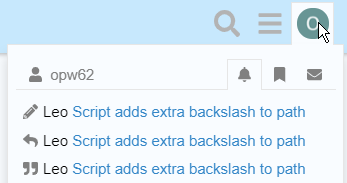
There is nothing in 'spam/junk' (Outlook 365 desktop) and neither there is anything within that folder within Outlook Web Access.
---
### Author:  [@Jon](https://resource.dopus.com/u/Jon)
#### Post date: [October 30, 2019, 6:39am UTC](https://resource.dopus.com/t/script-adds-extra-backslash-to-path/33822/6 "2019-10-30T06:39:48Z")
Do you have emails turned on in your user preferences?
---
### Author:  [@opw62](https://resource.dopus.com/u/opw62)
#### Post date: [October 31, 2019, 8:00am UTC](https://resource.dopus.com/t/script-adds-extra-backslash-to-path/33822/7 "2019-10-31T08:00:51Z")
Thank you! Frankly, I wasn't aware of any settings there.
The setting: "_Send me an email when someone quotes me, replies to my post_,..etc" was set to "Only when away" (?)
Changed this to "Always".
Thanks again.