# Select files with keyboard
**URL:** https://resource.dopus.com/t/select-files-with-keyboard/30974
**Category:** Help & Support
**Created:** [December 28, 2018, 12:37pm UTC](https://resource.dopus.com/t/select-files-with-keyboard/30974 "2018-12-28T12:37:37Z")
**Posts on this page:** 8
**Page:** 1
### Author:  [@AndreasHe](https://resource.dopus.com/u/AndreasHe)
#### Post date: [December 28, 2018, 12:37pm UTC](https://resource.dopus.com/t/select-files-with-keyboard/30974/1 "2018-12-28T12:37:37Z")
Is there a way to select files and folders with keyboard [insert-key] (total commander style)?
---
### Author:  [@Leo](https://resource.dopus.com/u/Leo)
#### Post date: [December 28, 2018, 1:21pm UTC](https://resource.dopus.com/t/select-files-with-keyboard/30974/2 "2018-12-28T13:21:10Z")
By default, the Insert key should toggle the current file's selection and move the keyboard focus to the next file.
If that isn't what you want, what do you want instead?
("Total Commander style" means nothing to me, btw. 🙂 )
---
### Author:  [@lxp](https://resource.dopus.com/u/lxp)
#### Post date: [December 28, 2018, 1:29pm UTC](https://resource.dopus.com/t/select-files-with-keyboard/30974/3 "2018-12-28T13:29:08Z")
You could turn the Check-Box Mode on and use the Space key. (My interpretation of your intention, don't know TC either)
---
### Author:  [@AndreasHe](https://resource.dopus.com/u/AndreasHe)
#### Post date: [December 28, 2018, 3:45pm UTC](https://resource.dopus.com/t/select-files-with-keyboard/30974/4 "2018-12-28T15:45:47Z")
Ok, found the checkbox mode.
For me there is no toggle by insert key. Tried to add a shortkey for that, but can not find an action for it.
Have to correct a bit myself: yes, insert marks some file, but starting with the next file. What about the currect one, the focus is on? This one is then skipped.
---
### Author:  [@Leo](https://resource.dopus.com/u/Leo)
#### Post date: [December 28, 2018, 4:57pm UTC](https://resource.dopus.com/t/select-files-with-keyboard/30974/5 "2018-12-28T16:57:30Z")
Insert should also toggle the current file's selection. (But note that if it is already selected it will be deselected. It's a full toggle.)
Ctrl-Space will toggle the current file's selection _without_ moving to the next file, if that's what you want.
---
### Author:  [@AndreasHe](https://resource.dopus.com/u/AndreasHe)
#### Post date: [December 29, 2018, 1:06pm UTC](https://resource.dopus.com/t/select-files-with-keyboard/30974/6 "2018-12-29T13:06:48Z")
Do you see there a way to keep selection on focused file when pressing insert, but then moving to the next?
---
### Author:  [@Leo](https://resource.dopus.com/u/Leo)
#### Post date: [December 29, 2018, 2:48pm UTC](https://resource.dopus.com/t/select-files-with-keyboard/30974/7 "2018-12-29T14:48:12Z")
It can be done, but let's take a step back first: If you're used to that type of thing, you may want to switch from Details to Power mode, and configure Power mode to not select files when you move up and down with the cursor keys. If that's something you also want, then the defailt Insert key behaviour might make sense and not need changing with that setup. (I think that's what it is designed for.)
---
### Author:  [@AndreasHe](https://resource.dopus.com/u/AndreasHe)
#### Post date: [December 30, 2018, 12:42pm UTC](https://resource.dopus.com/t/select-files-with-keyboard/30974/8 "2018-12-30T12:42:38Z")
Oh yes, thanks! That worked. See screenshot
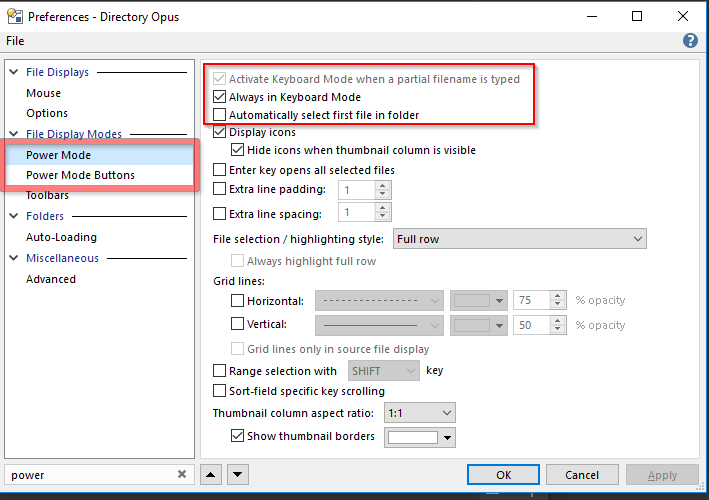
Select power mode:
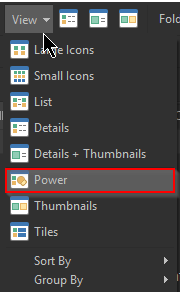
In addition, need to keep powermode, like described [here](https://resource.dopus.com/t/folder-formats-quick-guide/1313)