# Shift 'Date Taken' of photos?
**URL:** https://resource.dopus.com/t/shift-date-taken-of-photos/56159
**Category:** Help & Support
**Created:** [June 16, 2025, 10:52pm UTC](https://resource.dopus.com/t/shift-date-taken-of-photos/56159 "2025-06-16T22:52:49Z")
**Posts on this page:** 12
**Page:** 1
### Author:  [@MegMac](https://resource.dopus.com/u/MegMac)
#### Post date: [June 16, 2025, 10:52pm UTC](https://resource.dopus.com/t/shift-date-taken-of-photos/56159/1 "2025-06-16T22:52:49Z")
I thought I remembered seeing something in the metadata panel for shifting dates of photos by a certain number of years, months, days, etc.
Am I imagining this, or does it exist in DOpus - without a command or scripting.
---
### Author:  [@Jon](https://resource.dopus.com/u/Jon)
#### Post date: [June 16, 2025, 10:56pm UTC](https://resource.dopus.com/t/shift-date-taken-of-photos/56159/2 "2025-06-16T22:56:29Z")
> **[Time Shifting \[Directory Opus Manual\]](https://docs.dopus.com/doku.php?id=file_operations:editing_metadata:time_shifting)**
---
### Author:  [@MegMac](https://resource.dopus.com/u/MegMac)
#### Post date: [June 17, 2025, 4:50pm UTC](https://resource.dopus.com/t/shift-date-taken-of-photos/56159/3 "2025-06-17T16:50:05Z")
Thank you.
However, there's no indication in the date fields of the metadata pane that this is possible, and I would need to find the info in the manual each time, as I'll never remember the values to enter.
I _think_ I remember that the Version 12 UI had more in the metadata panel about this. Or am I imagining that?
In the Change Attributes and Timestamps dialog, the Time Shift option is not available for Date Taken.
Photo Mechanic has a good feature for this:
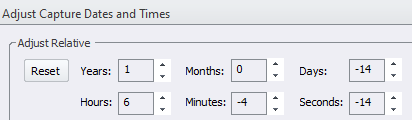
Please consider adding something like Photo mechanic has.
---
### Author:  [@AlbatorV](https://resource.dopus.com/u/AlbatorV)
#### Post date: [June 17, 2025, 5:51pm UTC](https://resource.dopus.com/t/shift-date-taken-of-photos/56159/4 "2025-06-17T17:51:12Z")
Maybe a good coder could create a script with an UI to do this 😜
---
### Author:  [@Leo](https://resource.dopus.com/u/Leo)
#### Post date: [June 17, 2025, 7:01pm UTC](https://resource.dopus.com/t/shift-date-taken-of-photos/56159/5 "2025-06-17T19:01:49Z")
> [@MegMac](#):
>
> I _think_ I remember that the Version 12 UI had more in the metadata panel about this. Or am I imagining that?
AFAIK how it works hasn't changed.
---
### Author:  [@abr](https://resource.dopus.com/u/abr)
#### Post date: [June 17, 2025, 8:04pm UTC](https://resource.dopus.com/t/shift-date-taken-of-photos/56159/6 "2025-06-17T20:04:44Z")
> [@MegMac](#):
>
> However, there's no indication in the date fields of the metadata pane that this is possible, and I would need to find the info in the manual each time, as I'll never remember the values to enter.
Not perfect, but here's my button code, if i once again messed up changing my camera clock to summer/winter time and have to fix the time stamps. The description can be changed to include days or even years.
```auto
@nodeselect
SetAttr META "datetaken:{dlgstring|Example:-0:3 (Hours/Minutes)}"
```
---
### Author:  [@AlbatorV](https://resource.dopus.com/u/AlbatorV)
#### Post date: [June 18, 2025, 8:19am UTC](https://resource.dopus.com/t/shift-date-taken-of-photos/56159/7 "2025-06-18T08:19:56Z")
> [@Jon](#):
>
> [Time Shifting [Directory Opus Manual]](https://docs.dopus.com/doku.php?id=file_operations:editing_metadata:time_shifting)
From this page...
> (For backward compatibility, **modifydate** also works as an alias of lastmodifieddate.)
**modifydate** seems to be broken.
---
### Author:  [@Leo](https://resource.dopus.com/u/Leo)
#### Post date: [June 19, 2025, 5:32pm UTC](https://resource.dopus.com/t/shift-date-taken-of-photos/56159/8 "2025-06-19T17:32:59Z")
The only mention of `modifydate` is on [Keywords for SetAttr META [Directory Opus Manual]](https://docs.dopus.com/doku.php?id=reference:metadata_keywords:keywords_for_setattr_meta&s%5B%5D=modifydate)
> You can also copy the values from another date field by specifying the other field's name: **createdate** , **lastmodifieddate** , **datedigitized** or **datetaken**. (For backward compatibility, **modifydate** also works as an alias of lastmodifieddate.)
>
> _Example_:
>
> **SetAttr META createdate:lastmodifieddate** _- sets the creation date to the file's last modified date/time_
That usage still works:
`SetAttr META createdate:modifydate`
---
### Author:  [@AlbatorV](https://resource.dopus.com/u/AlbatorV)
#### Post date: [July 31, 2025, 3:33pm UTC](https://resource.dopus.com/t/shift-date-taken-of-photos/56159/9 "2025-07-31T15:33:20Z")
@MegMac an old script...
> [@Dialog/button for batch timeshifting (picture) metadata with syntax check](https://resource.dopus.com/t/dialog-button-for-batch-timeshifting-picture-metadata-with-syntax-check/38723):
>
> This button will show a dialog (if you have selected files) to enter a timeshift string and picking a reference date ([https://www.gpsoft.com.au/help/opus12/index.html#!Documents/Time\_Shifting.htm](https://www.gpsoft.com.au/help/opus12/index.html#!Documents/Time_Shifting.htm)). It does syntax checking for the timeshift string. I…
---
### Author:  [@MegMac](https://resource.dopus.com/u/MegMac)
#### Post date: [July 31, 2025, 3:57pm UTC](https://resource.dopus.com/t/shift-date-taken-of-photos/56159/10 "2025-07-31T15:57:46Z")
Thank you.
While I know how to add a button for that, I just think that the feature should be better supported in the UI.
In a few days, I'll be launching a course for DOpus. While the course is aimed at people who have better than average software skills and experience, I am trying to avoid commands and scripts. The next courses will involve commands and scripts.
The course includes a link to the Time Shifting page of the online manual.
The course is for people who want to learn to use DOpus for working with photo and video collections, and professional photo organizers who currently use applications like Lightroom Classic work organizing digital photo and video collections.
Time Shifting is important to such people because (especially before smart phones) people's camera date was often set wrong, and Time Shifting is part of the U.I for applications like Lightroom Classic and Photo Mechanic.
---
### Author:  [@Felix.Froemel](https://resource.dopus.com/u/Felix.Froemel)
#### Post date: [August 12, 2025, 1:27pm UTC](https://resource.dopus.com/t/shift-date-taken-of-photos/56159/11 "2025-08-12T13:27:09Z")
I once wanted to update that script more to what your screenshot looks like but that project got suspended/forgotten 😅 But with my [MsgLoopHandler: an event driven wrapper for the Dopus message loop as include script](https://resource.dopus.com/t/msgloophandler-an-event-driven-wrapper-for-the-dopus-message-loop-as-include-script/51781/) it should become easier (at least ui handling). Maybe when i find the time and motivation, but someone asked for that feature some time ago
---
### Author:  [@Felix.Froemel](https://resource.dopus.com/u/Felix.Froemel)
#### Post date: [August 12, 2025, 1:31pm UTC](https://resource.dopus.com/t/shift-date-taken-of-photos/56159/12 "2025-08-12T13:31:25Z")
> [@MegMac](#):
>
> Time Shifting is important to such people because (especially before smart phones) people's camera date was often set wrong, and Time Shifting is part of the U.I for applications like Lightroom Classic and Photo Mechanic.
Not only before smart phones. I messed up syncing so often (multiple cameras, crossing time zones, dead battery…), that i wrote a script for dopus that could handle all those time shifts virtually (without the need to actually touch the file). 😅