It's weird that it even affects Windows thumbnails as well, it's like something is preventing the Opus process from seeing files inside that folder. It might be worth disabling your anti-virus temporarily to see if it makes a difference.
The random disappearance or reversion of icons looks awfully like a Windows icon cache bug that’s been here since Windows 7 that has never been fixed. Have you tried clearing the cache and restarting DOpus?
I haven’t cleared the icon cache, but Jon’s answer about anti-virus seem to have worked.
I disabled Microsoft Defender and that seems to have done the trick.
Testing for an hour without any flaws on a freshly installed 13.17 - great. After work today, I will upgrade to 13.17.5 and hope it still works like a charm.
Speed have increased as well in displaying thumbnails.
Hopefully I will be able to leave a checkmark in “Solution” after testing further later today 
Very interesting. We could be having the same bug, and maybe it was Defender for me all the time!
Especially if you see this happen with affected folders:
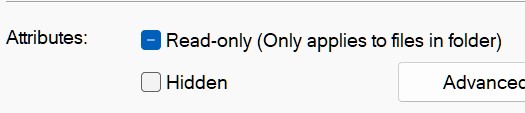
They’re not really Read-only, this is caused by a problem in Windows folder personalisation. But that’s usually what I see - a single folder icon changes to a small default one, and that happens.
It was indeed a problem with Microsoft Defender. No errors of any kind after disabling Defender and I’m back in love with DO.
@xraale a lot of my folders have the same Read-Only attribute set, possibly by Defender since I don’t know what else would have set the attribute. You have to try disablng Defender and see if your problems disappear too. I hope so 
Thanks Leo and Jon for all your help
The read-only attribute on folders isn't always bad or unwanted.
The Windows Shell will set the read-only attribute on a folder if you change the folder's appearance via the Properties dialog.
The attribute doesn't mean much on folders in Windows, so the Windows Shell uses/abuses it to mean "it's worth taking the time to check for a desktop.ini file inside this folder, because something about it may have been customized (and a hidden desktop.ini file stores the details)". That way it doesn't have to be done for every other folder.
On the other hand, if you end up with the files inside the folder also becoming read-only, that can cause problems, and is probably due to something else.
(There was a common tool which kept doing that to all the files in people's profile directories some years ago, although I forget what it was. Don't know if that was ever fixed or we just stopped getting reports about it because we made Opus check for and correct the problem when updating its own config files.)