# Sort by modified does not work
**URL:** https://resource.dopus.com/t/sort-by-modified-does-not-work/56773
**Category:** Help & Support
**Created:** [August 6, 2025, 6:23pm UTC](https://resource.dopus.com/t/sort-by-modified-does-not-work/56773 "2025-08-06T18:23:37Z")
**Posts on this page:** 9
**Page:** 1
### Author:  [@TeslaRename](https://resource.dopus.com/u/TeslaRename)
#### Post date: [August 6, 2025, 6:23pm UTC](https://resource.dopus.com/t/sort-by-modified-does-not-work/56773/1 "2025-08-06T18:23:38Z")
I selected Sort by modified, but it doesn't sort by most recently modified or least recently modified files. The only way to do this is to Group by modified, and even then it fails to show a recently modified file, although it does show others. This behavior doesn't occur in File Explorer.
Interestingly, when sorting by most recently modified, it sorts the files by type (folder, apps, and others).
---
### Author:  [@Leo](https://resource.dopus.com/u/Leo)
#### Post date: [August 6, 2025, 7:13pm UTC](https://resource.dopus.com/t/sort-by-modified-does-not-work/56773/2 "2025-08-06T19:13:07Z")
I assure you it works. People use it all the time and we'd have thousands of complaints if it didn't work.
Please post a screenshot of the whole window showing what you're doing and seeing.
---
### Author:  [@TeslaRename](https://resource.dopus.com/u/TeslaRename)
#### Post date: [August 6, 2025, 7:26pm UTC](https://resource.dopus.com/t/sort-by-modified-does-not-work/56773/3 "2025-08-06T19:26:44Z")
In this video, I show a zip file created and modified on August 6, 2025. When sorted by modification, it doesn't appear at the top. Furthermore, it appears to group files by type rather than by most recent modification date.
In File Explorer, the behavior is correct, showing the zip file at the top.
---
### Author:  [@Leo](https://resource.dopus.com/u/Leo)
#### Post date: [August 6, 2025, 7:28pm UTC](https://resource.dopus.com/t/sort-by-modified-does-not-work/56773/4 "2025-08-06T19:28:31Z")
Please use Details mode so we can see what the dates are. Otherwise the video tells us very little.
Also, if you're expecting newer files to appear before older folders when sorting by date, you need to turn that on in the folder format's sorting tab. Opus separates files and folders normally. (I think File Explorer does as well, but maybe they changed that since I last used it.)
---
### Author:  [@TeslaRename](https://resource.dopus.com/u/TeslaRename)
#### Post date: [August 6, 2025, 7:46pm UTC](https://resource.dopus.com/t/sort-by-modified-does-not-work/56773/5 "2025-08-06T19:46:18Z")
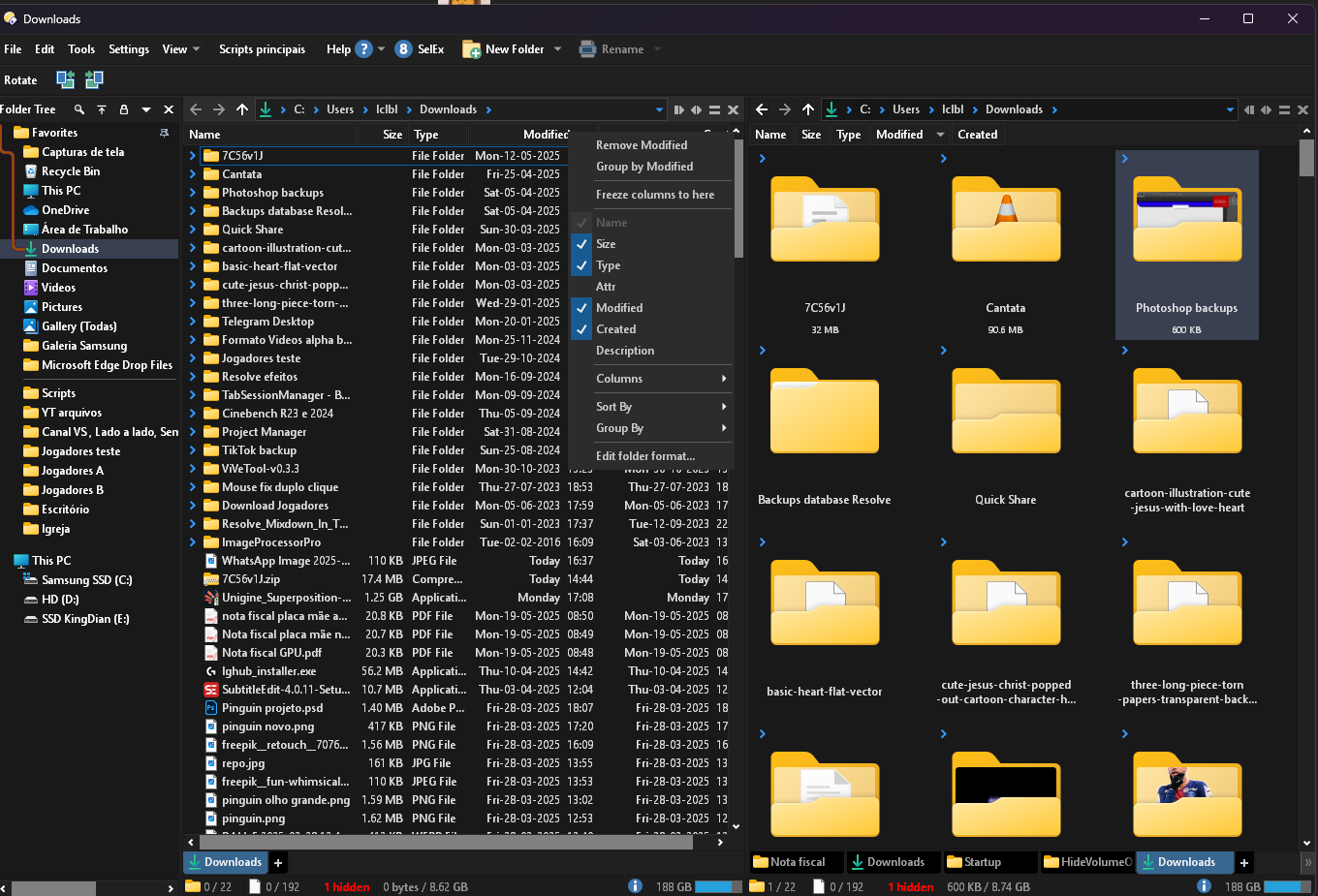
Notice that the files modified "Today" aren't at the top. I need the most recently modified files to be at the top, respecting the order, instead of placing multiple sorts by file type as they are.
Settings:
---
### Author:  [@Jon](https://resource.dopus.com/u/Jon)
#### Post date: [August 6, 2025, 7:48pm UTC](https://resource.dopus.com/t/sort-by-modified-does-not-work/56773/6 "2025-08-06T19:48:53Z")
They're at the top of the files; as Leo said, by default folders and files are sorted separately. You can turn that off in Folder Format \> Sorting.
---
### Author:  [@TeslaRename](https://resource.dopus.com/u/TeslaRename)
#### Post date: [August 6, 2025, 8:10pm UTC](https://resource.dopus.com/t/sort-by-modified-does-not-work/56773/7 "2025-08-06T20:10:16Z")
I managed to find it.
Right-click on any column \> Edit folder format \> Sorting \> Mixing: Mix files and folders together
I think this should be the default behavior, I'll leave it as feedback, thanks for the help 😃
---
### Author:  [@TeslaRename](https://resource.dopus.com/u/TeslaRename)
#### Post date: [October 11, 2026, 2:38pm UTC](https://resource.dopus.com/t/sort-by-modified-does-not-work/56773/8 "2026-10-11T14:38:36Z")
> [@TeslaRename](#):
>
> Right-click on any column \> Edit folder format \> Sorting \> Mixing: Mix files and folders together
Hello, is it possible to apply this setting to all folders? I'm only able to apply it to the folder where I right-clicked in the column.
---
### Author:  [@Hardkorn](https://resource.dopus.com/u/Hardkorn)
#### Post date: [October 11, 2026, 2:47pm UTC](https://resource.dopus.com/t/sort-by-modified-does-not-work/56773/9 "2026-10-11T14:47:18Z")
> [@Folder Formats: Quick Guide](https://resource.dopus.com/t/folder-formats-quick-guide/1313/1):
>
> This FAQ explains how to make Opus use the same format in all normal directories. There are two closely related FAQs which you may wish to read afterwards: [Folder Formats: Special Folders (Computer, Network, etc.)](https://resource.dopus.com/t/folder-formats-special-folders-computer-network-etc/1311/1)[Folder Formats: Detailed Guide](https://resource.dopus.com/t/folder-formats-detailed-guide/11718) T…