# Stop new split directory viewer window from displaying a previously closed view
**URL:** https://resource.dopus.com/t/stop-new-split-directory-viewer-window-from-displaying-a-previously-closed-view/25055
**Category:** Help & Support
**Created:** [February 26, 2017, 5:02am UTC](https://resource.dopus.com/t/stop-new-split-directory-viewer-window-from-displaying-a-previously-closed-view/25055 "2017-02-26T05:02:03Z")
**Posts on this page:** 17
**Page:** 1
### Author:  [@Bartman](https://resource.dopus.com/u/Bartman)
#### Post date: [February 26, 2017, 5:02am UTC](https://resource.dopus.com/t/stop-new-split-directory-viewer-window-from-displaying-a-previously-closed-view/25055/1 "2017-02-26T05:02:03Z")
How do you stop new split directory viewer window from displaying a previously closed view, never happened in previous versions and is really irritating?
---
### Author:  [@Leo](https://resource.dopus.com/u/Leo)
#### Post date: [February 26, 2017, 5:20am UTC](https://resource.dopus.com/t/stop-new-split-directory-viewer-window-from-displaying-a-previously-closed-view/25055/2 "2017-02-26T05:20:34Z")
Edit the toolbar button which now runs this by default:
```nohighlight
Set DUAL=Toggle,Vert,Remember,ToggleLayout
```
Remove the `Remember,` part, so it's like this:
```nohighlight
Set DUAL=Toggle,Vert,ToggleLayout
```
---
### Author:  [@Bartman](https://resource.dopus.com/u/Bartman)
#### Post date: [February 26, 2017, 5:55am UTC](https://resource.dopus.com/t/stop-new-split-directory-viewer-window-from-displaying-a-previously-closed-view/25055/3 "2017-02-26T05:55:11Z")
Sorry, I have no idea where to find these settings, looked in preferences but there's just too much confusing garbage...
---
### Author:  [@Leo](https://resource.dopus.com/u/Leo)
#### Post date: [February 26, 2017, 6:49am UTC](https://resource.dopus.com/t/stop-new-split-directory-viewer-window-from-displaying-a-previously-closed-view/25055/4 "2017-02-26T06:49:01Z")
- **Settings \> Customize Toolbars**
- Double-click the toolbar button you want to edit.
- Edit the command as per above.
- Click **OK** in the button editor, then **OK** in the Customize window.
More detail under [Editing The Toolbar](https://www.gpsoft.com.au/help/opus12/index.html#!Documents/Editing_the_Toolbar.htm).
---
### Author:  [@Bartman](https://resource.dopus.com/u/Bartman)
#### Post date: [February 26, 2017, 12:09pm UTC](https://resource.dopus.com/t/stop-new-split-directory-viewer-window-from-displaying-a-previously-closed-view/25055/5 "2017-02-26T12:09:29Z")
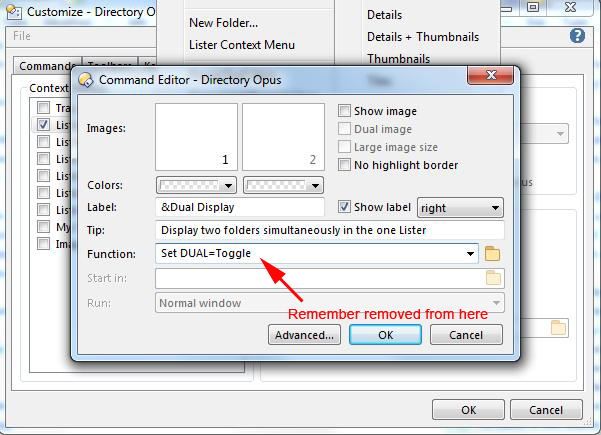
Eventually found my way to where I think you mean, removed "Remember", clicked OK and got back to the lister where deleted rhs pane followed by creating a new dual lister and the problem is still there even though on checking "Remember" is still gone as per attached image.
---
### Author:  [@Leo](https://resource.dopus.com/u/Leo)
#### Post date: [February 26, 2017, 12:16pm UTC](https://resource.dopus.com/t/stop-new-split-directory-viewer-window-from-displaying-a-previously-closed-view/25055/6 "2017-02-26T12:16:58Z")
It should now always open either a fixed folder or the same folder as the existing/main file display, rather than remembering how things where the last time that half of the window was open.
To change which folder it opens, turn on **Preferences / File Displays / Options / Specify initial folder when switching to dual file display** and specify a folder there.
---
### Author:  [@Bartman](https://resource.dopus.com/u/Bartman)
#### Post date: [February 26, 2017, 12:51pm UTC](https://resource.dopus.com/t/stop-new-split-directory-viewer-window-from-displaying-a-previously-closed-view/25055/7 "2017-02-26T12:51:15Z")
I think we're talking at cross purposes here so let me rephrase this...
Previously in Opus when I had a dual pane lister, my default, I would close one of the panes and then click a new dual pane which would then duplicate the existing single pane. I would like to get back to this setup, which was the default in Opus as long as I remember...
---
### Author:  [@Leo](https://resource.dopus.com/u/Leo)
#### Post date: [February 26, 2017, 12:53pm UTC](https://resource.dopus.com/t/stop-new-split-directory-viewer-window-from-displaying-a-previously-closed-view/25055/8 "2017-02-26T12:53:13Z")
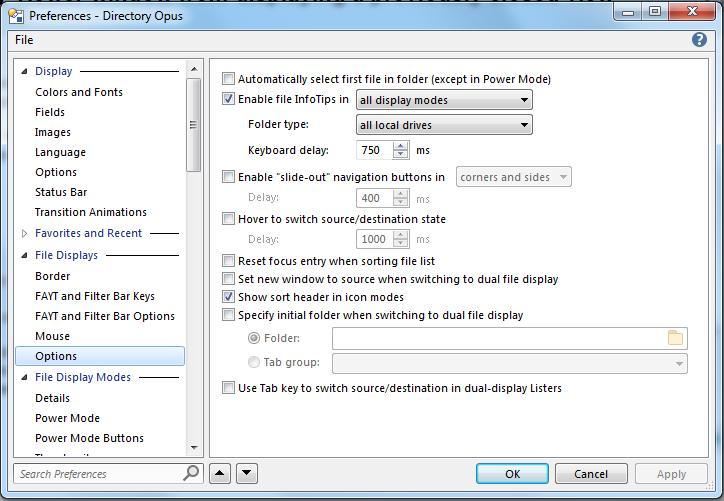
In that case turn _off_ **Preferences / File Displays / Options / Specify initial folder when switching to dual file display** , if it is currently on.
---
### Author:  [@Bartman](https://resource.dopus.com/u/Bartman)
#### Post date: [February 26, 2017, 12:58pm UTC](https://resource.dopus.com/t/stop-new-split-directory-viewer-window-from-displaying-a-previously-closed-view/25055/9 "2017-02-26T12:58:26Z")
Looks like it's off, see attached...
---
### Author:  [@Leo](https://resource.dopus.com/u/Leo)
#### Post date: [February 26, 2017, 1:03pm UTC](https://resource.dopus.com/t/stop-new-split-directory-viewer-window-from-displaying-a-previously-closed-view/25055/10 "2017-02-26T13:03:11Z")
That looks correct in Preferences.
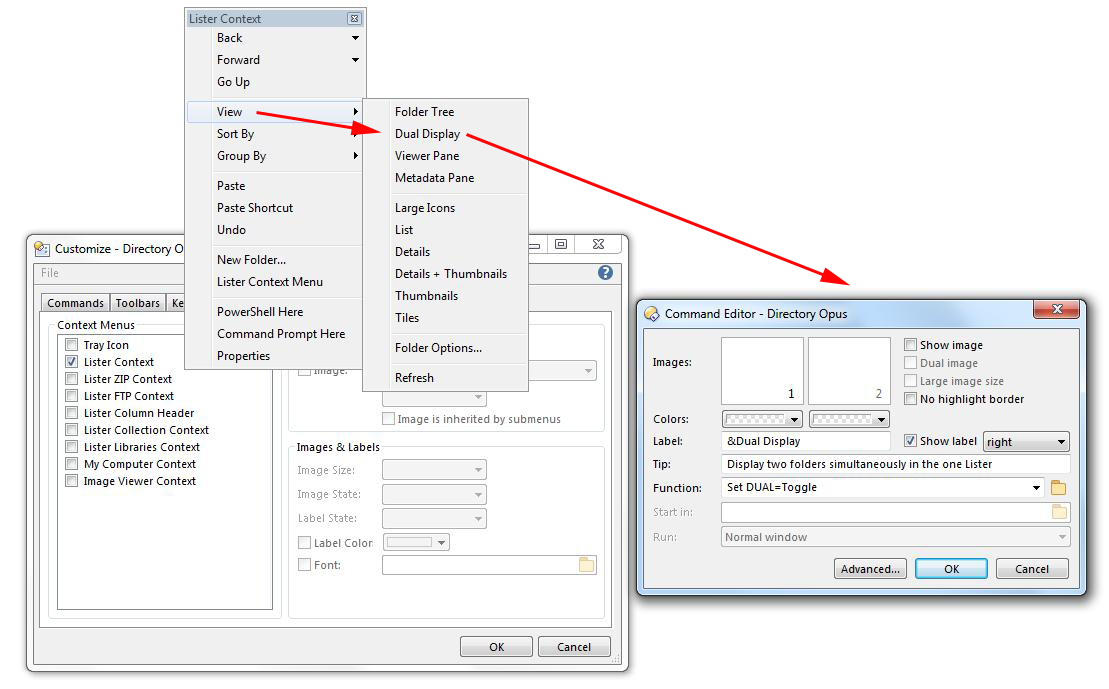
Looking back at the screenshot of the button editor, were you editing the button you are actually clicking, or a different one?
It looks like something inside a menu is being edited, but there's also a button to toggle dual display directly on the toolbar which you might be using instead. Be sure to edit the one you're using.
---
### Author:  [@Bartman](https://resource.dopus.com/u/Bartman)
#### Post date: [February 26, 2017, 1:25pm UTC](https://resource.dopus.com/t/stop-new-split-directory-viewer-window-from-displaying-a-previously-closed-view/25055/11 "2017-02-26T13:25:24Z")
See attached...
---
### Author:  [@Leo](https://resource.dopus.com/u/Leo)
#### Post date: [February 26, 2017, 8:43pm UTC](https://resource.dopus.com/t/stop-new-split-directory-viewer-window-from-displaying-a-previously-closed-view/25055/12 "2017-02-26T20:43:10Z")
Is the menu item that you're editing the thing you are using to go into dual display mode?
For example, there is also a toolbar button which you might be using instead:
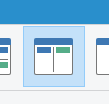
The buttons and menu items are all independent, so make sure you edit the thing you are using.
---
### Author:  [@Bartman](https://resource.dopus.com/u/Bartman)
#### Post date: [February 27, 2017, 7:23am UTC](https://resource.dopus.com/t/stop-new-split-directory-viewer-window-from-displaying-a-previously-closed-view/25055/13 "2017-02-27T07:23:47Z")
Like most people I use the shortest work path, which is a mouse activated button...
---
### Author:  [@Jon](https://resource.dopus.com/u/Jon)
#### Post date: [February 27, 2017, 8:00am UTC](https://resource.dopus.com/t/stop-new-split-directory-viewer-window-from-displaying-a-previously-closed-view/25055/14 "2017-02-27T08:00:31Z")
If you want to change what a particular button does, you have to edit that button.
Editing another button or menu item will only change what that other button or menu item does.
If you edit button A but click button B, button B will still do what button B did before because it's not the one you edited. You would need to click button A to get the new behaviour.
---
### Author:  [@Bartman](https://resource.dopus.com/u/Bartman)
#### Post date: [February 27, 2017, 8:30am UTC](https://resource.dopus.com/t/stop-new-split-directory-viewer-window-from-displaying-a-previously-closed-view/25055/15 "2017-02-27T08:30:01Z")
Where does one edit button functions?
---
### Author:  [@Jon](https://resource.dopus.com/u/Jon)
#### Post date: [February 27, 2017, 8:42am UTC](https://resource.dopus.com/t/stop-new-split-directory-viewer-window-from-displaying-a-previously-closed-view/25055/16 "2017-02-27T08:42:56Z")
From the screenshots you posted earlier it looked like you had already worked that out.
- **Settings \> Customize Toolbars**
- Double-click the toolbar button you want to edit.
- Edit the command as per above.
- Click **OK** in the button editor, then **OK** in the Customize window.
---
### Author:  [@Bartman](https://resource.dopus.com/u/Bartman)
#### Post date: [February 27, 2017, 9:54am UTC](https://resource.dopus.com/t/stop-new-split-directory-viewer-window-from-displaying-a-previously-closed-view/25055/17 "2017-02-27T09:54:38Z")
Thank you, that seems to have solved the problem...