# Suggestion : Undo Closed Lister
**URL:** https://resource.dopus.com/t/suggestion-undo-closed-lister/15270
**Category:** Help & Support
**Created:** [March 12, 2013, 3:48am UTC](https://resource.dopus.com/t/suggestion-undo-closed-lister/15270 "2013-03-12T03:48:14Z")
**Posts on this page:** 10
**Page:** 1
### Author:  [@aussieboykie](https://resource.dopus.com/u/aussieboykie)
#### Post date: [March 12, 2013, 3:48am UTC](https://resource.dopus.com/t/suggestion-undo-closed-lister/15270/1 "2013-03-12T03:48:14Z")
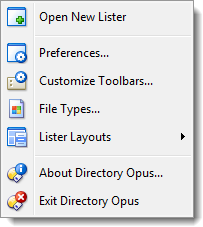
Having just accidentally closed a complex multi-tab lister by mistake (not for the first time!), it would be nice to have some way of re-opening the last closed lister as it was immediately before it was closed. This feature is available for re-opening the last closed tab but not, as far as I can see, the last lister. A good spot would be underneath the Open New Lister button in the context menu for the Opus icon in the system tray.
Regards, AB
---
### Author:  [@AlbatorV](https://resource.dopus.com/u/AlbatorV)
#### Post date: [March 12, 2013, 7:35am UTC](https://resource.dopus.com/t/suggestion-undo-closed-lister/15270/2 "2013-03-12T07:35:01Z")
😒
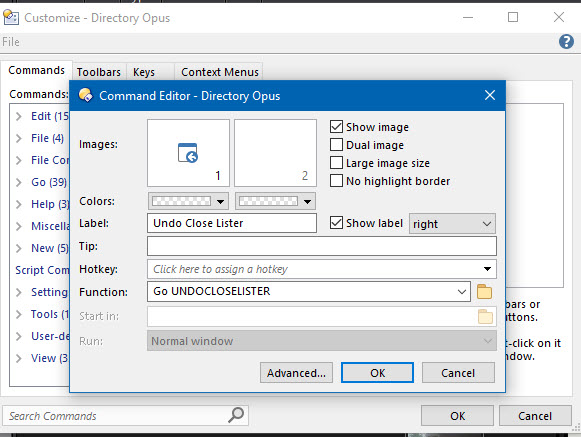
It's already exists : Go UNDOCLOSELISTER
Just add it to systray context menu.
---
### Author:  [@aussieboykie](https://resource.dopus.com/u/aussieboykie)
#### Post date: [March 12, 2013, 7:49am UTC](https://resource.dopus.com/t/suggestion-undo-closed-lister/15270/3 "2013-03-12T07:49:41Z")
It's already exists : Go UNDOCLOSELISTER
Just add it to systray context menu.[/quote]
Merci AlbatorV. That command does the trick. Now how do I add the relevant command to the SysTray context menu?
Regards, AB
---
### Author:  [@AlbatorV](https://resource.dopus.com/u/AlbatorV)
#### Post date: [March 12, 2013, 7:57am UTC](https://resource.dopus.com/t/suggestion-undo-closed-lister/15270/4 "2013-03-12T07:57:43Z")
In customize mode, "Context menu" tab, open "Tray icon" and add item 😉
[gpsoft.com.au/help/opus10/index. ... /Menus.htm](http://gpsoft.com.au/help/opus10/index.html#!Documents/Menus.htm)
---
### Author:  [@aussieboykie](https://resource.dopus.com/u/aussieboykie)
#### Post date: [March 12, 2013, 9:30am UTC](https://resource.dopus.com/t/suggestion-undo-closed-lister/15270/5 "2013-03-12T09:30:58Z")
I have been using (and customising) Opus for years and never noticed the Context Menu tab! Thanks. 😃
Regards, AB
---
### Author:  [@michaelkenward](https://resource.dopus.com/u/michaelkenward)
#### Post date: [March 12, 2013, 10:11am UTC](https://resource.dopus.com/t/suggestion-undo-closed-lister/15270/6 "2013-03-12T10:11:59Z")
> [@aussieboykie](#):
>
> I have been using (and customising) Opus for years and never noticed the Context Menu tab!
I'm not the only one slow on the uptake then. Thanks indeed.
---
### Author:  [@dopus\_user](https://resource.dopus.com/u/dopus_user)
#### Post date: [July 17, 2020, 5:40pm UTC](https://resource.dopus.com/t/suggestion-undo-closed-lister/15270/7 "2020-07-17T17:40:28Z")
was this feature removed , because I can't seem to find or add it.
---
### Author:  [@Leo](https://resource.dopus.com/u/Leo)
#### Post date: [July 17, 2020, 6:04pm UTC](https://resource.dopus.com/t/suggestion-undo-closed-lister/15270/8 "2020-07-17T18:04:18Z")
It still exists.
Make a button or hotkey which runs `Go UNDOCLOSELISTER` to use it.
See **Raw Commands** here if you don't know what to do with the command:
> [@How to use buttons and scripts from this forum](https://resource.dopus.com/t/how-to-use-buttons-and-scripts-from-this-forum/3546):
>
> This post explains how to add buttons to toolbars and menus, and also applies to raw commands for things like standalone hotkeys. For how to use Script Add-Ins, please scroll down to the post below this one. See Also: The manual has more detail in…
---
### Author:  [@dopus\_user](https://resource.dopus.com/u/dopus_user)
#### Post date: [July 17, 2020, 6:11pm UTC](https://resource.dopus.com/t/suggestion-undo-closed-lister/15270/9 "2020-07-17T18:11:17Z")
Thanks , I will check this out and try it.
---
### Author:  [@dopus\_user](https://resource.dopus.com/u/dopus_user)
#### Post date: [July 17, 2020, 6:23pm UTC](https://resource.dopus.com/t/suggestion-undo-closed-lister/15270/10 "2020-07-17T18:23:49Z")
I did it , it worked thanks !