# SVG viewer from Microsoft
**URL:** https://resource.dopus.com/t/svg-viewer-from-microsoft/35052
**Category:** Viewer/VFS Plugins
**Tags:** viewer, source-available
**Created:** [April 1, 2020, 7:34pm UTC](https://resource.dopus.com/t/svg-viewer-from-microsoft/35052 "2020-04-01T19:34:05Z")
**Posts on this page:** 6
**Page:** 1
### Author:  [@Leo](https://resource.dopus.com/u/Leo)
#### Post date: [April 1, 2020, 7:34pm UTC](https://resource.dopus.com/t/svg-viewer-from-microsoft/35052/1 "2020-04-01T19:34:05Z")
Microsoft have released an SVG preview handler which works in both File Explorer and Directory Opus.
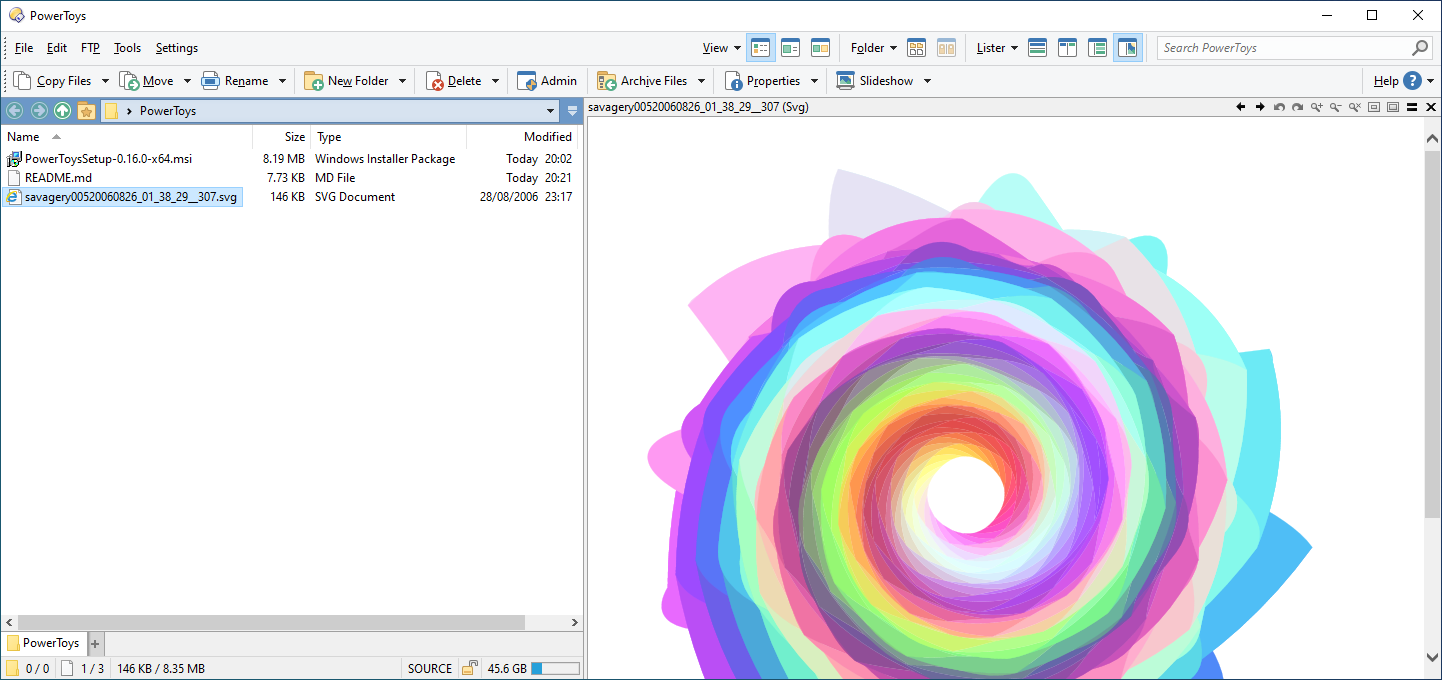
SVG is a vector-based image format which is becoming reasonably popular for certain things.
Note that Opus can also preview SVG files in the viewer pane via Internet Explorer, but this new viewer may be preferable if you don't find that method works as well.
This viewer is part of Microsoft's PowerToys for Windows 10, which you can download from [https://github.com/microsoft/PowerToys/releases](https://github.com/microsoft/PowerToys/releases).
> **[Releases · microsoft/PowerToys](https://github.com/microsoft/PowerToys/releases)**
>
> Windows system utilities to maximize productivity. Contribute to microsoft/PowerToys development by creating an account on GitHub.
Once PowerToys is installed, the viewer is enabled by default and should just work.
One issue I found is that the viewer doesn't attempt to resize the image to fit the available space, but that also happens in File Explorer, as well as when using IE to display SVG files instead of this viewer.
As this is a third party viewer, if you find problems or want to request features, you should do so at [https://github.com/microsoft/PowerToys/issues](https://github.com/microsoft/PowerToys/issues).
> ⚠ Beware - PDF viewing: ⚠
>
> PowerToys also installs a PDF viewer which is _terrible_.
>
> (It will only display 10 pages, renders everything at a very low resolution where text is barely readable, and does not render properly when you scroll some documentes.)
>
> If you install PowerToys for its other functionality, we recommend disabling the PDF viewer part of it. You can do so from PowerToys itself, or you can do it for just Opus (and also assign PDF back to some other viewer) via **Preferences / Viewer / Plugins** and configuring the **ActiveX + Preview + Office + Web** plugin, which acts as a proxy for preview handlers in general.
---
### Author:  [@moontear](https://resource.dopus.com/u/moontear)
#### Post date: [October 27, 2023, 5:54pm UTC](https://resource.dopus.com/t/svg-viewer-from-microsoft/35052/2 "2023-10-27T17:54:31Z")
I only comment on this, since the Viewer \> Download more plugins... also links to this forum.
I am using the SVG Powertoys viewer in the preview pane - works like a charm. How do I use the internal picture viewer to also open SVG files? Right now the default is to open them in the Edge browser. File operations \> Double-click on files sets the internal picture viewer for all recognized pictures. SVG does not seem to be a recognized picture? I added it via file type groups, but that doesn't change anything.
How do I set the internal picture viewer (popup) as the default for SVG files?
---
### Author:  [@Leo](https://resource.dopus.com/u/Leo)
#### Post date: [October 27, 2023, 6:06pm UTC](https://resource.dopus.com/t/svg-viewer-from-microsoft/35052/3 "2023-10-27T18:06:00Z")
> [@moontear](#):
>
> How do I use the internal picture viewer to also open SVG files?
Easiest way is probably to add SVG to the Images file type group (Settings \> File Types).
---
### Author:  [@moontear](https://resource.dopus.com/u/moontear)
#### Post date: [October 27, 2023, 6:27pm UTC](https://resource.dopus.com/t/svg-viewer-from-microsoft/35052/4 "2023-10-27T18:27:35Z")
I did just that:
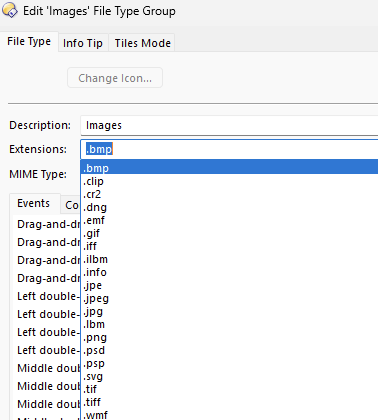
No change. Also the left-double-click event isn't assigned to anything for images. Hence my question - how do I let DO also handle SVGs like other images (yeah I know it's XML 😉 ). Also no context menu entry, that I could click on ("View in Directory Opus" for other images) - somehow the default action is just "Open".
---
### Author:  [@Leo](https://resource.dopus.com/u/Leo)
#### Post date: [October 27, 2023, 6:29pm UTC](https://resource.dopus.com/t/svg-viewer-from-microsoft/35052/5 "2023-10-27T18:29:17Z")
In that case, try editing the SVG type itself, and set the Left Double-Click action to run `Show`.
Or right-click an SVG, use Open With \> Choose Default and point it to d8viewer.exe.
---
### Author:  [@moontear](https://resource.dopus.com/u/moontear)
#### Post date: [October 28, 2023, 8:44am UTC](https://resource.dopus.com/t/svg-viewer-from-microsoft/35052/6 "2023-10-28T08:44:18Z")
That works - didn't know about the Show command, perfect! Don't like overriding the default Open action, but it really helps you told me about d8viewer.exe.
Maybe you could check on your end for supporting SVGs as image types more "natively"?