# Tab-related buttons

**URL:** https://resource.dopus.com/t/tab-related-buttons/2029
**Category:** Buttons/Scripts
**Tags:** commands, button
**Created:** [May 30, 2006, 8:45am UTC](https://resource.dopus.com/t/tab-related-buttons/2029 "2006-05-30T08:45:44Z")
**Posts on this page:** 2
**Page:** 1

<div class="post-metadata">

### Author: ![Leo](https://resource.dopus.com/user_avatar/resource.dopus.com/leo/32/69732_2.png) [@Leo](https://resource.dopus.com/u/Leo)
#### Post date: [May 30, 2006, 8:45am UTC](https://resource.dopus.com/t/tab-related-buttons/2029/1 "2006-05-30T08:45:44Z")

</div>

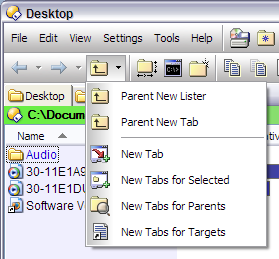
Here are some buttons which open different things in new tabs.
![opus-tab-buttons](https://resource.dopus.com/uploads/default/original/3X/3/0/30d5216e17fe2d927fc8f0543b2ad303b42537a2.png)

See [How to use buttons and scripts from this forum](https://resource.dopus.com/t/how-to-use-buttons-and-scripts-from-this-forum/3546/1) if you need help using the XML codes below.

Some of these buttons use icons from the [AEIcons Tab Icons Pack](https://resource.dopus.com/t/aeicons-24-tab-images/1180/1). If you copy the icons to `Images\AE-Icons`, below the main Directory Opus folder (which `/home` takes you to), then you won't have to modify the buttons at all.

### Parent New Lister

Not really tab-related; this opens the current folder's parent in a new window.

```xml
<?xml version="1.0"?>
<button display="both" effect="saturate">
	<label>Parent New Lister</label>
	<tip>Parent to %1 (new lister)</tip>
	<icon1>51</icon1>
	<function type="normal">
		<instruction>Go UP NEW</instruction>
	</function>
</button>

```

### Parent New Tab

Opens the current folder's parent in a new tab.

```xml
<?xml version="1.0"?>
<button display="both" effect="saturate" separate="yes">
	<label>Parent New Tab</label>
	<icon1>51</icon1>
	<function type="normal">
		<instruction>Go UP NEWTAB</instruction>
	</function>
</button>

```

### New Tab

Opens a new tab which initially shows the current directory.

```xml
<?xml version="1.0"?>
<button display="both" effect="saturate">
	<label>New Tab</label>
	<icon1>AE-Icons\AEi-DuplicateTab-20.png,0</icon1>
	<function type="normal">
		<instruction>Go CURRENT NEWTAB</instruction>
	</function>
</button>

```

### New Tabs for Selected

Opens the selected folders in new tabs.

```xml
<?xml version="1.0"?>
<button display="both" effect="saturate">
	<label>New Tabs for Selected</label>
	<icon1>AE-Icons\AEi-NewTabFromSelect-20.png,0</icon1>
	<function type="normal">
		<instruction>Go NEWTAB=nofocus,findexisting FROMSEL </instruction>
	</function>
</button>

```

### New Tabs for Parents

Opens the parents of the selected items in new tabs. This is useful when viewing the results of a Find operation where you wish to see the folders that some of the results were found in.

```xml
<?xml version="1.0"?>
<button display="both" effect="saturate">
	<label>New Tabs for Parents</label>
	<icon1>114</icon1>
	<function type="normal">
		<instruction>Go OPENCONTAINER NEWTAB=findexisting,nofocus</instruction>
	</function>
</button>

```

### New Tabs for Targets

With shortcut files selected, opens the folders which contain the items that the shortcuts point to.

```xml
<?xml version="1.0"?>
<button display="both" effect="saturate">
	<label>New Tabs for Targets</label>
	<icon1>18</icon1>
	<function type="normal">
		<instruction>Go NEWTAB=nofocus,findexisting OPENCONTAINER=target </instruction>
	</function>
</button>

```

---

<div class="post-metadata">

### Author: ![kenalcock](https://resource.dopus.com/letter_avatar_proxy/v4/letter/k/5e9695/32.png) [@kenalcock](https://resource.dopus.com/u/kenalcock)
#### Post date: [September 19, 2007, 6:49am UTC](https://resource.dopus.com/t/tab-related-buttons/2029/2 "2007-09-19T06:49:20Z")

</div>

### New Tab for Default

Opens a new Folder Tab to the default folder as specified in Preferences.

```xml
<?xml version="1.0"?>
<button backcol="none" display="both" textcol="none">
	<label>New Tab for Default </label>
	<tip>Opens a new Folder Tab to the default folder as specified in Preferences</tip>
	<icon1>#newtab</icon1>
	<function type="normal">
		<instruction>Go /default NEWTAB=findexisting</instruction>
	</function>
</button>

```
