# Tabs Customization
**URL:** https://resource.dopus.com/t/tabs-customization/1860
**Category:** Help & Support
**Created:** [April 18, 2006, 6:30am UTC](https://resource.dopus.com/t/tabs-customization/1860 "2006-04-18T06:30:47Z")
**Posts on this page:** 5
**Page:** 1
### Author:  [@Equinox](https://resource.dopus.com/u/Equinox)
#### Post date: [April 18, 2006, 6:30am UTC](https://resource.dopus.com/t/tabs-customization/1860/1 "2006-04-18T06:30:47Z")
I'm wading through the manual and have come across the following on page 20:
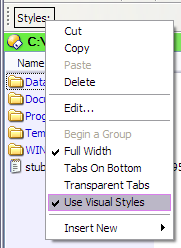
"If you right click on the tab control in Customize mode several options are available including an option to enable or disable Windows themes (under XP only), an option to display the tabs on the right or bottom (which reverses the display of the tabs when you have the toolbar on the right or bottom of the Lister) and an option to make the tab control ransparent".
I may be a bit slow, but so far I haven't been able to do this. What exactly am I supposed to right-click on and is it really in Customize mode?
Regards EQN.
---
### Author:  [@Leo](https://resource.dopus.com/u/Leo)
#### Post date: [April 18, 2006, 6:39am UTC](https://resource.dopus.com/t/tabs-customization/1860/2 "2006-04-18T06:39:01Z")
It's talking about the Styles tab control, not the Folder Tabs.
---
### Author:  [@Equinox](https://resource.dopus.com/u/Equinox)
#### Post date: [April 18, 2006, 7:43am UTC](https://resource.dopus.com/t/tabs-customization/1860/3 "2006-04-18T07:43:02Z")
Thanks, but I've right clicked on the style tabs, in and out of customize mode and there's no sign of the options mentioned.
---
### Author:  [@Leo](https://resource.dopus.com/u/Leo)
#### Post date: [April 18, 2006, 7:46am UTC](https://resource.dopus.com/t/tabs-customization/1860/4 "2006-04-18T07:46:53Z")
It's there for me in customize mode. See attached screenshot.
---
### Author:  [@Equinox](https://resource.dopus.com/u/Equinox)
#### Post date: [April 18, 2006, 8:25am UTC](https://resource.dopus.com/t/tabs-customization/1860/5 "2006-04-18T08:25:58Z")
Yes, I've got it. Sorry - I was clicking on everything but the correct place! Many thanks.
EQN