# Using Tags (and where's the manual?)
**URL:** https://resource.dopus.com/t/using-tags-and-wheres-the-manual/16550
**Category:** Help & Support
**Created:** [November 13, 2013, 6:46pm UTC](https://resource.dopus.com/t/using-tags-and-wheres-the-manual/16550 "2013-11-13T18:46:01Z")
**Posts on this page:** 14
**Page:** 1
### Author:  [@Melissa](https://resource.dopus.com/u/Melissa)
#### Post date: [November 13, 2013, 6:46pm UTC](https://resource.dopus.com/t/using-tags-and-wheres-the-manual/16550/1 "2013-11-13T18:46:01Z")
Regarding the second question, I'm having trouble finding the Opus manual. It's not linked under help anymore. For some reason the link in a prior post doesn't work (I updated Java but it says that Javascript is not working)--so I need the actual location listed. Thank you.
Main question
What I want to do is set up multiple tags from one (and more than one) Word document--and then be able to see those files in the lister sorted by those tags.
For example -if I tag in my Word documents a file with, to give a pseudo example, "Maine, California, Oregon"--how do I set that up so that they then can be sorted in groups in the lister? Also will it support two word tags such as "Oregon Trail"
I might have multiple Word documents with variations of these tags. Perhaps six which are tagged California and perhaps have other tags.
Anyway--the state example is not so good, but it's for tracking storylines and themes in writing.
Melissa
---
### Author:  [@aussieboykie](https://resource.dopus.com/u/aussieboykie)
#### Post date: [November 13, 2013, 8:00pm UTC](https://resource.dopus.com/t/using-tags-and-wheres-the-manual/16550/2 "2013-11-13T20:00:13Z")
See [http://www.gpsoft.com.au/docs.html](http://www.gpsoft.com.au/docs.html) for access to the manual and online help,
Regards, AB
---
### Author:  [@Jon](https://resource.dopus.com/u/Jon)
#### Post date: [November 13, 2013, 8:13pm UTC](https://resource.dopus.com/t/using-tags-and-wheres-the-manual/16550/3 "2013-11-13T20:13:10Z")
Or just press F1 in the program itself.
---
### Author:  [@Leo](https://resource.dopus.com/u/Leo)
#### Post date: [November 13, 2013, 8:13pm UTC](https://resource.dopus.com/t/using-tags-and-wheres-the-manual/16550/4 "2013-11-13T20:13:55Z")
You should be able to open the manual by pushing F1 or via the 1st item in the help menu, unless the menu or toolbar it's on has been edited to remove it.
If the help viewer is opening but not displaying the manual correctly, it's likely your Windows Help components need repairing. See our [Help file does not display correctly](https://resource.dopus.com/t/help-file-does-not-display-correctly/11534/1) guide for what to do if you're seeing that problem.
(Java is not required for any part of Opus, by the way. Javascript, despite its similar name, is totally separate from Java and built into Windows so you shouldn't have to worry about it, either.)
You can also access an [online version of the manual](http://gpsoft.com.au/help/opus10/default.htm) via the web. (The F1 version is usually preferable, though, since it's quicker.)
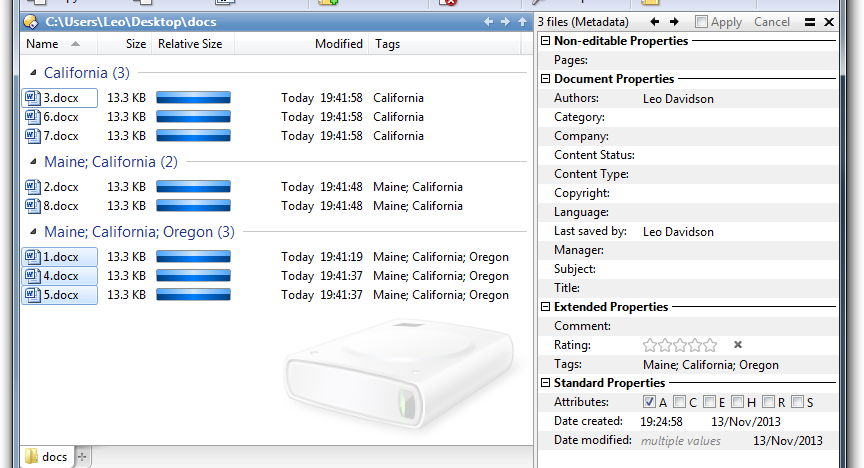
If you tag the files and then use grouping, you'll get something like this:
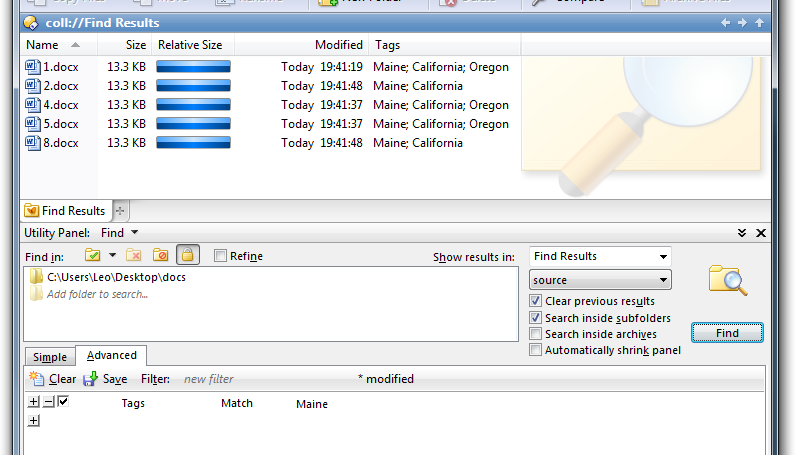
If you want to see all the files with a particular tag, using Tools \> Find Panel \> Advanced lets you do that:
---
### Author:  [@michaelkenward](https://resource.dopus.com/u/michaelkenward)
#### Post date: [November 13, 2013, 10:17pm UTC](https://resource.dopus.com/t/using-tags-and-wheres-the-manual/16550/5 "2013-11-13T22:17:12Z")
> [@jon](#):
>
> Or just press F1 in the program itself.
Isn't it there in the Help menu?
Or did I edit that to add the PDF file?
Probably. Worth adding though.
---
### Author:  [@Melissa](https://resource.dopus.com/u/Melissa)
#### Post date: [November 13, 2013, 10:20pm UTC](https://resource.dopus.com/t/using-tags-and-wheres-the-manual/16550/6 "2013-11-13T22:20:53Z")
Thank you very much, Leo. This (the way we can use tags) looks super helpful. 😃 Your illustration is great and I appreciate the time you spent to set that up.
Also thank you for the keyboard shortcut (F1) to bring up the manual.
Melissa
---
### Author:  [@Melissa](https://resource.dopus.com/u/Melissa)
#### Post date: [November 13, 2013, 10:24pm UTC](https://resource.dopus.com/t/using-tags-and-wheres-the-manual/16550/7 "2013-11-13T22:24:30Z")
Regarding the keyboard shortcut--thank you, Jon.
MK--my Opus set up doesn't show the help menu for some reason. Things are a bit disordered as it's a new install, and I'm getting it set up, but I didn't see it. F1 one though seems great as the help menu at the top just takes up valuable real estate.
Melissa
---
### Author:  [@rcoleman1943](https://resource.dopus.com/u/rcoleman1943)
#### Post date: [November 13, 2013, 11:38pm UTC](https://resource.dopus.com/t/using-tags-and-wheres-the-manual/16550/8 "2013-11-13T23:38:11Z")
(On a new install you should see the help menu as a question mark which takes up very little space).
---
### Author:  [@Leo](https://resource.dopus.com/u/Leo)
#### Post date: [November 13, 2013, 11:39pm UTC](https://resource.dopus.com/t/using-tags-and-wheres-the-manual/16550/9 "2013-11-13T23:39:32Z")
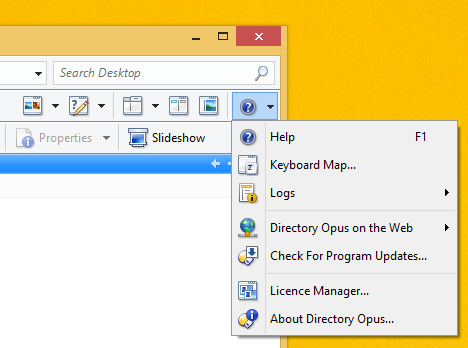
I just realised that if you've moved from the Opus 9 default toolbars to the Opus 10 ones, the Help menu will have changed from the word "Help" to an icon, which may be why it seems to be missing.
This is what the Help menu looks like with the Opus 10 default toolbars:
---
### Author:  [@michaelkenward](https://resource.dopus.com/u/michaelkenward)
#### Post date: [November 14, 2013, 4:17pm UTC](https://resource.dopus.com/t/using-tags-and-wheres-the-manual/16550/10 "2013-11-14T16:17:34Z")
> [@Melissa](#):
>
> the help menu at the top just takes up valuable real estate.
I wish you hadn't said that. As a keyboard junkie I like to have keyboard shortcuts to turn things on and off.
After I read your message I decided to set up some Keys to toggle that menu (and others).
In the process I found that the toggle works.
Toolbar NAME="ListerMenu - Custom" TOGGLE
But when I restore it, the toolbar reappears in a place where I don't want it. Not where it was when I closed it.
So I now have another project on my hands. Work out how to tell the Toolbar to show up where I want it. Grrr.
PS I know this is taking the discussion of topic, but I wanted to suggest a way to control your problem with real estate.
---
### Author:  [@Jon](https://resource.dopus.com/u/Jon)
#### Post date: [November 14, 2013, 7:00pm UTC](https://resource.dopus.com/t/using-tags-and-wheres-the-manual/16550/11 "2013-11-14T19:00:58Z")
You can use the LINE and STATE arguments to control where the toolbar appears.
---
### Author:  [@Melissa](https://resource.dopus.com/u/Melissa)
#### Post date: [November 15, 2013, 1:57am UTC](https://resource.dopus.com/t/using-tags-and-wheres-the-manual/16550/12 "2013-11-15T01:57:58Z")
Well, thank you, Michael, and best of luck with your second unintended project.
Melissa
---
### Author:  [@ouwen](https://resource.dopus.com/u/ouwen)
#### Post date: [January 29, 2016, 6:29pm UTC](https://resource.dopus.com/t/using-tags-and-wheres-the-manual/16550/13 "2016-01-29T18:29:01Z")
How should I write the command for a button that would toggle a tag?
The manual entry almost gets me there, but I still don't quite understand. [https://www.gpsoft.com.au/help/opus11/index.html#!Documents/Keywords\_for\_SetAttr\_META.htm](https://www.gpsoft.com.au/help/opus11/index.html#!Documents/Keywords_for_SetAttr_META.htm)
Ideally this would work the way TOGGLE works for many other commands.
```auto
SetAttr META tags:one TOGGLE
```
So how do I make something like:
`IF not tags:one THEN
SetAttr META tags:one TOGGLE
ELSE
SetAttr META tags:-one TOGGLE`
---
### Author:  [@Leo](https://resource.dopus.com/u/Leo)
#### Post date: [January 29, 2016, 6:43pm UTC](https://resource.dopus.com/t/using-tags-and-wheres-the-manual/16550/14 "2016-01-29T18:43:17Z")
Scripting could be used to toggle tags, since the [Metadata](https://www.gpsoft.com.au/help/opus11/index.html#!Documents/Scripting/Metadata1.htm) object can be used to find out which tags a file has.
If you need help with the scripting, please start a fresh thread as this one from 2013 is already covering too many topics to be that useful for people searching for answers.