# Video in viewer pane
**URL:** https://resource.dopus.com/t/video-in-viewer-pane/6964
**Category:** Help & Support
**Created:** [October 29, 2008, 11:02pm UTC](https://resource.dopus.com/t/video-in-viewer-pane/6964 "2008-10-29T23:02:49Z")
**Posts on this page:** 20
**Page:** 1
### Author:  [@deepkent](https://resource.dopus.com/u/deepkent)
#### Post date: [October 29, 2008, 11:02pm UTC](https://resource.dopus.com/t/video-in-viewer-pane/6964/1 "2008-10-29T23:02:49Z")
Since updating to Version 9, I can no longer play video in the viewer pane - I just see text code. I had no trouble in version 8. I have searched the FAQ - honest! - but can find nothing on point. I'm sure the answer is simple, but I'd be gratefuol if anyone can supply it. Thanks.
---
### Author:  [@Leo](https://resource.dopus.com/u/Leo)
#### Post date: [October 29, 2008, 11:23pm UTC](https://resource.dopus.com/t/video-in-viewer-pane/6964/2 "2008-10-29T23:23:28Z")
Is the movie plugin enabled?
Have you tried different video formats in case some work and others don't?
Do the same videos play in Windows Media Player?
When you say you searched the FAQ do you mean [the FAQ on video playback](https://resource.dopus.com/t/how-to-enable-fix-playback-of-various-media-formats-in-opus/1974/1) or do you mean you searched the list of FAQs but couldn't find a relevant one?
---
### Author:  [@deepkent](https://resource.dopus.com/u/deepkent)
#### Post date: [October 30, 2008, 4:50pm UTC](https://resource.dopus.com/t/video-in-viewer-pane/6964/3 "2008-10-30T16:50:29Z")
Thanks for your reply. I have no idea whether the movie plugin is enabled, which suggests it isn't. I certainly did nothing to enable it in version 8 - it just played videos. So I assumed it would just play in version 9. I have done a search for "video plugin", and could see nothing directly relevant on the first two pages - which begin with conversation we are having.
---
### Author:  [@Leo](https://resource.dopus.com/u/Leo)
#### Post date: [October 30, 2008, 5:57pm UTC](https://resource.dopus.com/t/video-in-viewer-pane/6964/4 "2008-10-30T17:57:57Z")
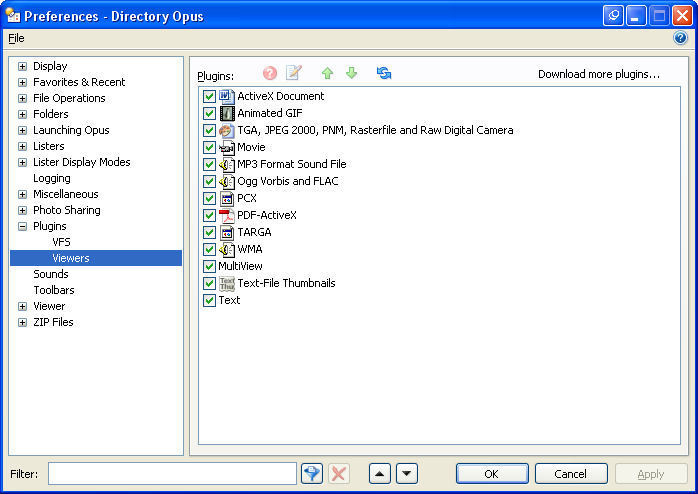
The movie plugin is enabled by default. You can check it under Settings -\> Preferences / Plugins / Viewers.
What about my other questions? Do other formats work in Opus and/or WMP?
---
### Author:  [@deepkent](https://resource.dopus.com/u/deepkent)
#### Post date: [October 30, 2008, 6:13pm UTC](https://resource.dopus.com/t/video-in-viewer-pane/6964/5 "2008-10-30T18:13:25Z")
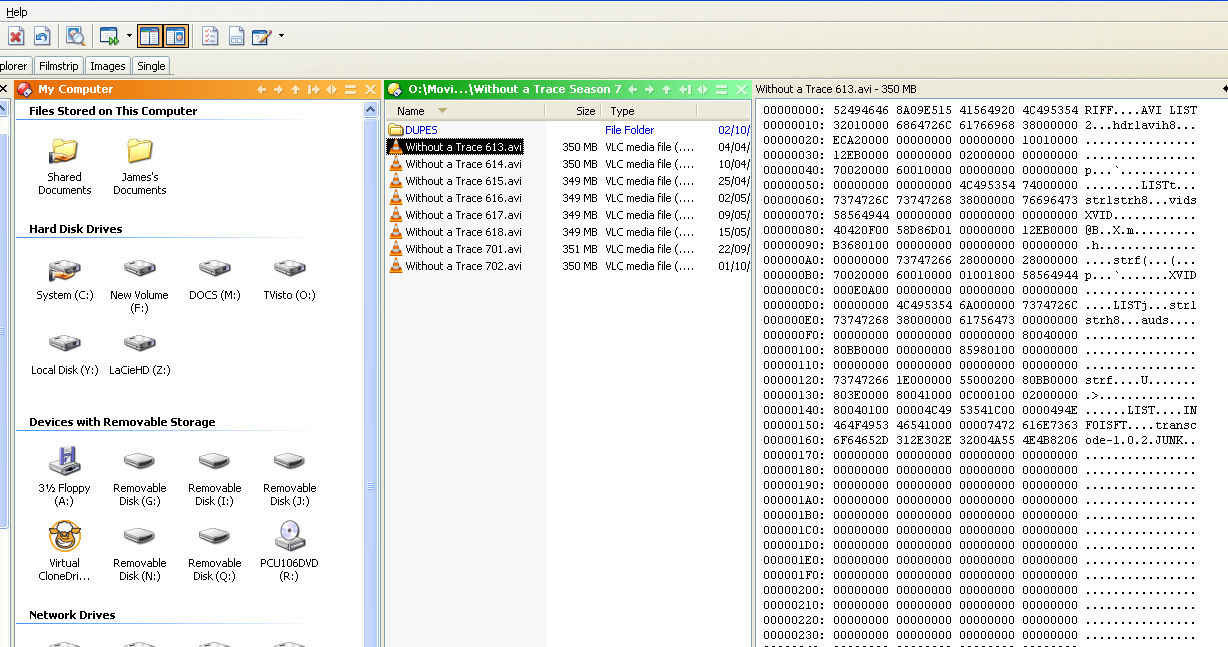
Thank you again! And I am relieved, because I haven't been a complete idiot. The fact that it is enabled by default explains why it worked in version 8 without any intervention on my part. It is enabled in version 9 as well - see Viewer pane 01.jpg attached. But it doesn't work - see Viewer pane 02.jpg. I have tried it with all sorts of video files, always with the result you see here. Is there anything else I should do? Thank you.
---
### Author:  [@deepkent](https://resource.dopus.com/u/deepkent)
#### Post date: [October 30, 2008, 6:14pm UTC](https://resource.dopus.com/t/video-in-viewer-pane/6964/6 "2008-10-30T18:14:50Z")
Sorry - posted too hastily without answering your other questions. No, other video formats do not work, either.
---
### Author:  [@deepkent](https://resource.dopus.com/u/deepkent)
#### Post date: [October 30, 2008, 6:16pm UTC](https://resource.dopus.com/t/video-in-viewer-pane/6964/7 "2008-10-30T18:16:14Z")
I should also have said that content type is enabled as "Movies".
---
### Author:  [@Leo](https://resource.dopus.com/u/Leo)
#### Post date: [October 30, 2008, 6:25pm UTC](https://resource.dopus.com/t/video-in-viewer-pane/6964/8 "2008-10-30T18:25:26Z")
What about in Windows Media Player?
Looks like you are using VLC for playback which means you may not have the required codecs installed on your system for Opus and Windows Media Player to play those videos.
VLC has its own codecs "baked in" so it doesn't rely on codecs being installed for the whole system like most other video players.
---
### Author:  [@deepkent](https://resource.dopus.com/u/deepkent)
#### Post date: [October 30, 2008, 10:53pm UTC](https://resource.dopus.com/t/video-in-viewer-pane/6964/9 "2008-10-30T22:53:27Z")
Can I get the codecs from within D Opus?
---
### Author:  [@Jon](https://resource.dopus.com/u/Jon)
#### Post date: [October 30, 2008, 11:03pm UTC](https://resource.dopus.com/t/video-in-viewer-pane/6964/10 "2008-10-30T23:03:17Z")
You need to download and install the appropriate codecs for the video formats you are trying to play. Most likely though, all you need is ffdshow as this includes support for most common video formats.
You can get it from [sourceforge.net/project/showfile ... \_id=173941](http://sourceforge.net/project/showfiles.php?group_id=173941) (I'd suggest just going for the "generic build (stable)" at least to start with)
---
### Author:  [@deepkent](https://resource.dopus.com/u/deepkent)
#### Post date: [October 31, 2008, 9:42am UTC](https://resource.dopus.com/t/video-in-viewer-pane/6964/11 "2008-10-31T09:42:29Z")
That made no difference, I'm afraid. but I can't be absollutely sure, because the program prompted me to install a minor upgrade, and now wants a new certificate. Does this mean I have to pay again? If so, then the prompt should have said something like "Caution! You willl be charged for this update - press No to refuse it." Please clarify - and let me know how I can roll back to my previous paid-for installation.
---
### Author:  [@Leo](https://resource.dopus.com/u/Leo)
#### Post date: [October 31, 2008, 9:48am UTC](https://resource.dopus.com/t/video-in-viewer-pane/6964/12 "2008-10-31T09:48:01Z")
FFDShow shouldn't ask you for a certificate at all.
Or did you mean Opus is asking for a certificate? If so then see the FAQ: [Registration Certificate suddenly expires or does not stick](https://resource.dopus.com/t/registration-certificate-installation-problems/1509/1).
You do not have to pay for minor Opus updates so if you've updated from version 9.X to version 9.Y you should not have to get a new certificate. Only major upgrades require new certificates, e.g. version 8 to version 9.
(One possibility not mentioned in the FAQ is that you're using a pirate certificate. New versions tend to block those...)
Also: You still haven't answered my question about Windows Media Player. Do the videos play in it or not?
---
### Author:  [@deepkent](https://resource.dopus.com/u/deepkent)
#### Post date: [October 31, 2008, 9:52am UTC](https://resource.dopus.com/t/video-in-viewer-pane/6964/13 "2008-10-31T09:52:13Z")
Yes, the videos play in everything except directory Opus
---
### Author:  [@deepkent](https://resource.dopus.com/u/deepkent)
#### Post date: [October 31, 2008, 9:52am UTC](https://resource.dopus.com/t/video-in-viewer-pane/6964/14 "2008-10-31T09:52:41Z")
And the certificate I am asked for is for D Opus.
---
### Author:  [@Leo](https://resource.dopus.com/u/Leo)
#### Post date: [October 31, 2008, 10:03am UTC](https://resource.dopus.com/t/video-in-viewer-pane/6964/15 "2008-10-31T10:03:44Z")
I would fix the certificate issue before worrying about anything else.
Have a read of the FAQ I linked above.
Try simply reinstalling your existing certificate since if it's a valid Opus 9 certificate it should work.
Failing that, you'll need to [contact GPSoftware](http://www.gpsoft.com.au/Support.html) with your certificate details to ask them why it isn't working.
---
### Author:  [@deepkent](https://resource.dopus.com/u/deepkent)
#### Post date: [October 31, 2008, 10:04am UTC](https://resource.dopus.com/t/video-in-viewer-pane/6964/16 "2008-10-31T10:04:29Z")
I am now nearly there, but it has been a long haul. I have retrieved my licence from the licence manager on your website - though it is a bit of an inconvenience to have to do so. I can now sort of play videos in D Opus. But I was first given an incomprehensible warning in a window titled "AVI Chunk Manager", which I simply closed. The video then played distorted - long and thin - though recognisable. I could not close the program, because the hourglass kept spinning, so I closed it via Task Manager. I can now still hear the audio of the video file, even though D Opus is shut!
---
### Author:  [@deepkent](https://resource.dopus.com/u/deepkent)
#### Post date: [October 31, 2008, 10:06am UTC](https://resource.dopus.com/t/video-in-viewer-pane/6964/17 "2008-10-31T10:06:42Z")
(I should have called the window AVI Chunk VIEWER.) I have just reopened directory Opus, and can play the file, again distorted in the same way. But I can now hear both the audio from the currently playing file AND from the one I closed a few minutes ago. You will probably realise that this is beginning to drive me nuts.
---
### Author:  [@deepkent](https://resource.dopus.com/u/deepkent)
#### Post date: [October 31, 2008, 10:08am UTC](https://resource.dopus.com/t/video-in-viewer-pane/6964/18 "2008-10-31T10:08:32Z")
I have just closed D Opus in the usual way, which shut off the audio as well as the video from file 2. But the audio from file 1, the first one I opened, is still going.
---
### Author:  [@Leo](https://resource.dopus.com/u/Leo)
#### Post date: [October 31, 2008, 10:10am UTC](https://resource.dopus.com/t/video-in-viewer-pane/6964/19 "2008-10-31T10:10:15Z")
The "AVI Chunk Viewer" message doesn't come from Opus itself. It must be coming from whichever video codec is being used to play the files. I'd expect the same message to appear in Windows Media Player for the same file.
If your video codecs are messed up it can be a real pain to find and fix the problem. This isn't an Opus issue but a general Windows issue. Often you can fix things by just installing FFDShow but if other video codecs are also installed then they can clash with each other and cause real headaches.
---
### Author:  [@deepkent](https://resource.dopus.com/u/deepkent)
#### Post date: [October 31, 2008, 10:10am UTC](https://resource.dopus.com/t/video-in-viewer-pane/6964/20 "2008-10-31T10:10:47Z")
I tried stopping dopus.exe in Task Manager/Processes. It did not stop the phantom audio, which now keeps distorting - sounds rather like water going down a plughole.
[Next page](https://resource.dopus.com/t/video-in-viewer-pane/6964.md?page=2)