# View thumbnail and save folder format
**URL:** https://resource.dopus.com/t/view-thumbnail-and-save-folder-format/34059
**Category:** Help & Support
**Tags:** commands
**Created:** [December 8, 2019, 6:34am UTC](https://resource.dopus.com/t/view-thumbnail-and-save-folder-format/34059 "2019-12-08T06:34:51Z")
**Posts on this page:** 8
**Page:** 1
### Author:  [@skinz](https://resource.dopus.com/u/skinz)
#### Post date: [December 8, 2019, 6:34am UTC](https://resource.dopus.com/t/view-thumbnail-and-save-folder-format/34059/1 "2019-12-08T06:34:51Z")
Hi, I'm a newbie here. I try make dopus behave like explorer. I set all my drive (C: D: E: etc) to view in details format and I want to create view thumbnail + save folder format (not save for all sub-folders) in a single button. And I want to create another button for clear folder format ( for this folder only). How could I do that? I hope somebody can help me, thanks.
---
### Author:  [@Leo](https://resource.dopus.com/u/Leo)
#### Post date: [December 8, 2019, 1:19pm UTC](https://resource.dopus.com/t/view-thumbnail-and-save-folder-format/34059/2 "2019-12-08T13:19:25Z")
To save the current settings for the current folder (but not sub-folders), without showing any additional dialogs:
```nohighlight
Set SAVEFORMAT=folder
```
Or, if you also want to update/replace the formats stored within Layouts, Tab Groups, etc. for the same path:
```nohighlight
Set SAVEFORMAT=folder,replace
```
I don't think there is currently a way to delete a folder's format entirely via a command (only via the UI), but you could achieve something similar by resetting it to the default and then saving that as the new format for that folder:
```nohighlight
Set FORMAT=!default
Set SAVEFORMAT=folder
```
However, you'd end up accumulating a lot of unnecessary formats that way. We can add a way to delete formats via commands if you need that.
The commands above can all be combined with commands to turn thumbnails on and off, of course:
```nohighlight
Set VIEW=thumbnails
Set SAVEFORMAT=folder
```
(Edit: Actually, the last command doesn't work, but we'll provide a way to do this in the next version. See below.)
---
### Author:  [@skinz](https://resource.dopus.com/u/skinz)
#### Post date: [December 8, 2019, 1:45pm UTC](https://resource.dopus.com/t/view-thumbnail-and-save-folder-format/34059/3 "2019-12-08T13:45:22Z")
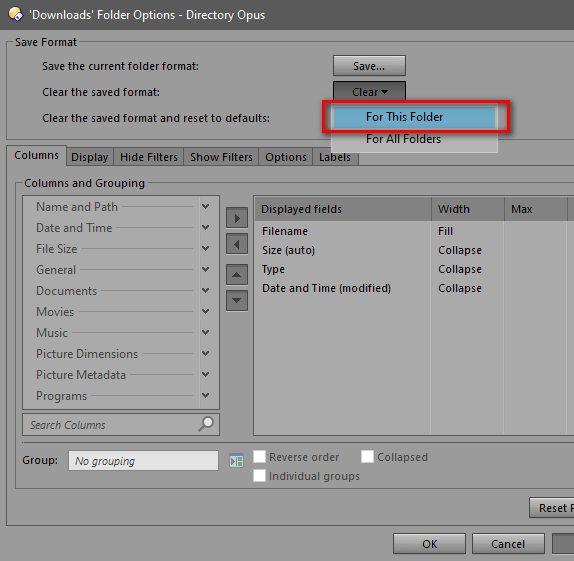
Thanks for your reply, Leo. Personally I don't want set format to default and save folder format, as I said in the first post, I already set my drive C: D: E: F: etc to view in details, what I need is command to clear folder format (For This Folder). I wish there is other way to clear folder format, rather than open folder format dialog anytime I want to delete/ clear folder format.
---
### Author:  [@Leo](https://resource.dopus.com/u/Leo)
#### Post date: [December 8, 2019, 10:21pm UTC](https://resource.dopus.com/t/view-thumbnail-and-save-folder-format/34059/4 "2019-12-08T22:21:11Z")
In the next version, we'll make it so you can do this via the following commands.
- Switch to thumbnails mode, and save it for the current folder:
- Delete the current folder's format, and re-evaluate the current folder based on the remaining formats:
(It's important to do the first one as a single, combined line, and the second one as two separate lines. Otherwise things happen in the wrong order.)
---
### Author:  [@skinz](https://resource.dopus.com/u/skinz)
#### Post date: [December 9, 2019, 3:25am UTC](https://resource.dopus.com/t/view-thumbnail-and-save-folder-format/34059/5 "2019-12-09T03:25:01Z")
Thanks Leo for your support, I will wait to the next release.
---
### Author:  [@Jon](https://resource.dopus.com/u/Jon)
#### Post date: [December 12, 2019, 7:12am UTC](https://resource.dopus.com/t/view-thumbnail-and-save-folder-format/34059/6 "2019-12-12T07:12:48Z")
Beta [12.18.3](https://resource.dopus.com/t/directory-opus-12-18-3-beta/34087/2) is out now and has this addition.
---
### Author:  [@skinz](https://resource.dopus.com/u/skinz)
#### Post date: [December 12, 2019, 7:41am UTC](https://resource.dopus.com/t/view-thumbnail-and-save-folder-format/34059/7 "2019-12-12T07:41:17Z")
Thank you John for the confirmation, I'll try it now.
---
### Author:  [@skinz](https://resource.dopus.com/u/skinz)
#### Post date: [December 12, 2019, 8:00am UTC](https://resource.dopus.com/t/view-thumbnail-and-save-folder-format/34059/8 "2019-12-12T08:00:22Z")
All of these commands work perfectly in Dopus 12.18.3 Beta. Now I can set view details and thumbnail in Dopus behave like in explorer. Many thanks for this update.