# Viewing Windows Documents and Settings sub-folders
**URL:** https://resource.dopus.com/t/viewing-windows-documents-and-settings-sub-folders/6791
**Category:** Help & Support
**Created:** [September 23, 2008, 6:31pm UTC](https://resource.dopus.com/t/viewing-windows-documents-and-settings-sub-folders/6791 "2008-09-23T18:31:44Z")
**Posts on this page:** 3
**Page:** 1
### Author:  [@gmoline](https://resource.dopus.com/u/gmoline)
#### Post date: [September 23, 2008, 6:31pm UTC](https://resource.dopus.com/t/viewing-windows-documents-and-settings-sub-folders/6791/1 "2008-09-23T18:31:44Z")
How do I configure Directory Opus to display all of the sub-folders in the Windows "Documents and Settings" folder? Currently some folders are missing, such as Application Data and Local Settings. These folders are viewable in Windows Explorer.
---
### Author:  [@Leo](https://resource.dopus.com/u/Leo)
#### Post date: [September 23, 2008, 6:47pm UTC](https://resource.dopus.com/t/viewing-windows-documents-and-settings-sub-folders/6791/2 "2008-09-23T18:47:36Z")
You must have Opus set not to show Hidden files/folders.
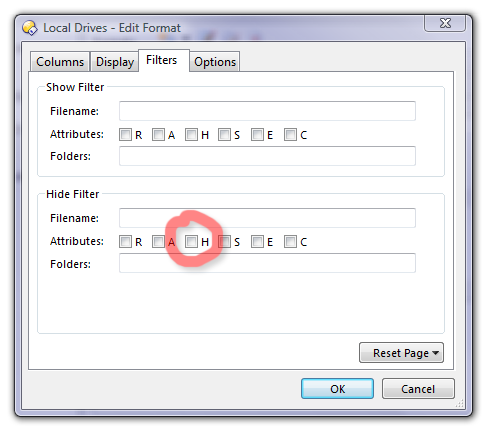
If you want them shown all the time then go through all of your [Folder Formats](https://resource.dopus.com/t/folder-formats-quick-guide/1313/1) and make sure they do not have the H checkbox set under Filters / Hide Filter (see below).
If you only want to see the hidden items temporarily, hiding them normally, then you can make a toolbar button or hotkey which runs this command:
```auto
Set HIDEFILTERATTR=h
```
(That command will act as a toggle automatically.)
---
### Author:  [@Jon](https://resource.dopus.com/u/Jon)
#### Post date: [September 23, 2008, 8:04pm UTC](https://resource.dopus.com/t/viewing-windows-documents-and-settings-sub-folders/6791/3 "2008-09-23T20:04:33Z")
Also check that Preferences -\> Folders -\> Options -\> Hide protected operating system files is not turned on.