# What is your productivity stack (most helpful programs)
**URL:** https://resource.dopus.com/t/what-is-your-productivity-stack-most-helpful-programs/57891
**Category:** Off-Topic
**Created:** [November 28, 2025, 4:58am UTC](https://resource.dopus.com/t/what-is-your-productivity-stack-most-helpful-programs/57891 "2025-11-28T04:58:23Z")
**Posts on this page:** 20
**Page:** 1
### Author:  [@jfour18](https://resource.dopus.com/u/jfour18)
#### Post date: [November 28, 2025, 4:58am UTC](https://resource.dopus.com/t/what-is-your-productivity-stack-most-helpful-programs/57891/1 "2025-11-28T04:58:23Z")
Heya,
I was just reflecting on all the programs that I have discovered this year that have really improved my workflow/life and was wanting to share them, and to ask you all what programs are most useful to you?
For me it is:
1. Dopus - at the centre of most of my work (keeping records; reviewing documents etc.)
2. Workspacer - amazing open source windows management program. Allows me to have multiple clean workspaces (one per application) to avoid mental clutter. It also plays well with Switcheroo (a free window switching program). Alt Tab Terminator is another great window switcher but it doesn't play well with workspacer.
3. Obsidian - electron note taking app.I'm still learning it but it seems to have the most utility of any markdown app on windows. Sublime text is also a great notetaking app with less features (more for coding).
4. Iris (paid) screen brightness modifier (love that you can adjust brightness and level of blue light with hotkeys.
5. AHK - allow you to create hotkeys for pretty much anything. Helpful in programs like Zotero or Foxit which have terrible presets.
6. Tampermonkey - broswer add-on that allows you to modify webpages locally. Useful for websites that you have to use but that you would like to be slightly different (e.g. useful for modifying AI websites, github etc.)
What am I still missing?
---
### Author:  [@dpuser441](https://resource.dopus.com/u/dpuser441)
#### Post date: [November 28, 2025, 1:11pm UTC](https://resource.dopus.com/t/what-is-your-productivity-stack-most-helpful-programs/57891/2 "2025-11-28T13:11:09Z")
- ShareX: Screenshot tool, also good for simple graphic edits
- Everything: Searching files
- [Strokesplus.net](http://Strokesplus.net): mouse gestures
- A QMK-based keyboard (not “software” really)
- ManicTime for tracking work time (what have I done for whom)
- On my Android phone: MixPlorer file explorer
- Directory Opus would be on the of this list, obviously ❤
---
### Author:  [@Chuck](https://resource.dopus.com/u/Chuck)
#### Post date: [November 28, 2025, 3:46pm UTC](https://resource.dopus.com/t/what-is-your-productivity-stack-most-helpful-programs/57891/3 "2025-11-28T15:46:51Z")
Used with DOpus:
- [Everything Search](https://www.voidtools.com/): quick search, DOpus integration
- [StrokesPlus.net](http://StrokesPlus.net): use mouse gestures in workflows
- [ShareX](https://getsharex.com/): screen grabs and recordings
- [QuickLook](https://github.com/QL-Win/QuickLook): file preview using spacebar
- [AutoHotkey](https://www.autohotkey.com/) (AHK): hotkeys and scripting
- [Listary](https://www.listary.com/) (Paid): Quick folder navigation and app launcher. Some find this better than QAP
- [Beyond Compare](https://www.scootersoftware.com/): compare files and folders
- [WinMerge](https://winmerge.org/?lang=en): folder and file merging tool
- [Copernic Desktop Search](https://copernic.com/en/desktop/) (Paid): search within files
- [Duplicate File Detective](https://www.duplicatedetective.com/) (Paid): self-explanatory
- [FolderSizes](https://www.foldersizes.com/): disk space analyzer
Other Useful Programs
- Display
- [DisplayFusion](https://www.displayfusion.com/) (Paid): multi-monitor configuration
- [Sizer](https://www.brianapps.net/sizer/): Assign windows to specific areas and dimensions, with other options and a handy right-click context menu on each window edge
- [Divvy](https://mizage.com/divvy/): Assign windows to specific areas and dimensions via hotkeys
- [f.lux](https://justgetflux.com/): Adjust screen brightness & color based on time of day
- Utility
- [ClipboardFusion](https://www.clipboardfusion.com/) (Paid): clipboard manager, macros and hotkeys
- [Quick Access Popup](https://www.quickaccesspopup.com/) (QAP): Quick folder navigation and app launcher. Some find this better than Listary
- [Alt-Tab Terminator](https://www.ntwind.com/software/alttabter.html): Alt-Tab replacement; sizable and configurable
- [Rainmeter](https://www.rainmeter.net/): Configurable skins to monitor or display just about anything
- [UCheck](https://www.adlice.com/ucheck/): Check for application updates
- [Notepad++](https://notepad-plus-plus.org/): Notepad replacement
- [Stickies](https://www.zhornsoftware.co.uk/stickies/): Notes on the desktop for quick reference; specific notes can be “attached” to windows (will open and close as attached window opens and closes)
- Security
- [Unchecky](https://ramensoftware.com/introducing-unchecky): uncheck automatic offers and warnings
- [Macrium Reflect](https://www.macrium.com/) (Paid): drive backup
- Search
- [WinCatalog](https://www.wincatalog.com/): offline disk file search
- Alternative File Management
- [OneCommander](https://onecommander.com/index.php): Miller column file manager; useful for those occasions when this view is required
- [Nemo Documents](https://www.nemo-docs.com/): Calendar interface file manager; useful for finding files based on day accessed
- Imaging, Graphics and Design
- [Paint.net](http://Paint.net): graphics and image editing
- [Affinity](https://www.affinity.studio/): graphics, imaging and design suite
- [IcoFX](https://icofx.ro/) (Paid): icon and cursor editor
- [Axialis IconWorkshop](https://www.axialis.com/iconworkshop/) (Paid): icon authoring tool
---
### Author:  [@PolarGoose](https://resource.dopus.com/u/PolarGoose)
#### Post date: [November 28, 2025, 6:25pm UTC](https://resource.dopus.com/t/what-is-your-productivity-stack-most-helpful-programs/57891/4 "2025-11-28T18:25:20Z")
In addition to the previously mentioned:
- [Keypirinha](https://keypirinha.com/) - quick launcher.
- [ShowWhatProcessLocksFile](https://github.com/PolarGoose/ShowWhatProcessLocksFile) - simple alternative to [LockHunter](https://lockhunter.com/) and [File Locksmith](https://learn.microsoft.com/en-us/windows/powertoys/file-locksmith) - discover what locks files
- [BluetoothDevicePairing](https://github.com/PolarGoose/BluetoothDevicePairing) - console utility to pair Bluetooth devices. I have several laptops and need to connect my mouse and headset between them throughout the day. The utility allows me to automate it with a `bat` script instead of using the Windows UI.
---
### Author:  [@joer](https://resource.dopus.com/u/joer)
#### Post date: [November 28, 2025, 7:49pm UTC](https://resource.dopus.com/t/what-is-your-productivity-stack-most-helpful-programs/57891/5 "2025-11-28T19:49:04Z")
I recently added [Raycast](https://www.raycast.com/)for Windows to my workflow. The beta launched a few days ago, bringing the previously Mac-exclusive app to PC. It allowed me to immediately replace Command Palette, as Raycast natively handles features like currency conversion much better. The design is excellent and keeps improving.
---
### Author:  [@jfour18](https://resource.dopus.com/u/jfour18)
#### Post date: [December 4, 2025, 11:59am UTC](https://resource.dopus.com/t/what-is-your-productivity-stack-most-helpful-programs/57891/6 "2025-12-04T11:59:12Z")
I have come across a more modern and scriptable tiling manager that workspacer called Whim.
> **[GitHub - dalyIsaac/Whim: Pluggable dynamic window manager for Windows🏗️🪟](https://github.com/dalyIsaac/Whim)**
>
> Pluggable dynamic window manager for Windows🏗️🪟
---
### Author:  [@David](https://resource.dopus.com/u/David)
#### Post date: [December 4, 2025, 3:39pm UTC](https://resource.dopus.com/t/what-is-your-productivity-stack-most-helpful-programs/57891/7 "2025-12-04T15:39:43Z")
I use a few calculator emulators.
They sure beat Microsoft's calculator
[EMU48](https://hp.giesselink.com/emu48.htm) emulates HP38G, HP39G, HP40G, HP48SX, HP48GX and HP49G calculators. There is also a version for Android.
Typically the 48GX is my go to calculator just because I have used them for so long.
HP's [HP 35s](https://www.educalc.net/page/2336231/) emulator is great for fractions especially if you live in the US and have to work with non metric measurements.
There is also an emulator for the [HP Prime](https://www.hpcalc.org/details/8939) .
This isn't the version you will find on the Microsoft store.
The HP Prime can be used in Algebraic mode rather than the traditional HP RPN mode.
RPN is like this. 2 ENTER 3 + and the stack displays 5 rather than 2 + 3 = .
There is also a version for Android.
---
### Author:  [@Hardkorn](https://resource.dopus.com/u/Hardkorn)
#### Post date: [December 4, 2025, 4:33pm UTC](https://resource.dopus.com/t/what-is-your-productivity-stack-most-helpful-programs/57891/8 "2025-12-04T16:33:07Z")
Always used (except on public holidays and vacation):
Brain.exe
Most used:
dBpoweramp Control Center
Directory Opus
Everything 1.5a
FastStone Capture
Firefox
foobar2000
LibreOffice 25.8
Mp3tag
MPC-BE x64
Notepad++
PDF-XChange Editor
PerfectTUNES
Thunderbird
Vivaldi
Less used:
Affinity
FreeFileSync
KeePassXC
LocalSend
MKVToolnix 95.0
Mullvad VPN
MultiPar
PDF24 Launcher
PS Remote Play
RustDesk
Spotify
WinCatalog 2024
WinRAR
WireGuard
XnView MP
Used in the background:
DesktopOK
File Juggler 3
Icaros
LAV Filters
UniGetUI
---
### Author:  [@jinsight](https://resource.dopus.com/u/jinsight)
#### Post date: [December 5, 2025, 2:08am UTC](https://resource.dopus.com/t/what-is-your-productivity-stack-most-helpful-programs/57891/9 "2025-12-05T02:08:44Z")
Programs Used Often
In decreasing order of frequency of use
All are free
Directory Opus: Superior file manager
- [https://www.gpsoft.com.au](https://www.gpsoft.com.au)
Everything: Searching files
- [Everything 1.5 Alpha - voidtools](https://www.voidtools.com/everything-1.5a/)
True Launch Bar: Global access to all programs from the task bar using standard .lnk files in hierarchical folders
- [https://www.truelaunchbar.com/](https://www.truelaunchbar.com/)
Notepad++: Notepad replacement
- [Downloads | Notepad++](https://notepad-plus-plus.org/downloads/)
Dittto: Clipboard manager
- [Ditto - Clipboard Manager | Ditto](https://sabrogden.github.io/Ditto/)
ShareX: Screenshot tool
- [https://getsharex.com/](https://getsharex.com/)
Brave: Browswer
- [https://brave.com](https://brave.com)
Vivaldi: Web browser
- [https://vivaldi.com](https://vivaldi.com)
Free File Sync: Backup manager
- [https://freefilesync.org/](https://freefilesync.org/)
ExplorerDialogPathSelector: Path history for Opus dialog windows
- [Releases · ThioJoe/ThioJoe-AHK-Scripts · GitHub](https://github.com/ThioJoe/AHK-Scripts/releases)
QuickSwitch
- [Release QuickSwitch v1.9 · JoyHak/QuickSwitch · GitHub](https://github.com/JoyHak/QuickSwitch/releases/tag/1.9)
John's Background Switcher: Wallpaper manger for multiple monitors
- [John’s Background Switcher – John's Adventures](https://johnsad.ventures/software/backgroundswitcher/)
volumouse: Control volumn from the task bar with the scroll wheel
- [Volumouse - control the sound volume with a wheel mouse](https://www.nirsoft.net/utils/volumouse.html)
Autoruns: Control what programs and services are set to boot at startup
- [https://autoruns.org/](https://autoruns.org/)
PDF-XChange Viewer: Light weight PDF viewer
- [PDF-XChange Viewer for Windows - Free download and software reviews - CNET Download](https://download.cnet.com/pdf-xchange-viewer/3000-10743_4-10598377.html)
XNView: Organizer, viewer and editor of raster images
- [Image Viewer | Photo Viewer | Image Resize | XnView](https://www.xnview.com/en/)
HiBit Uninstaller: Superior uninstaller
- [HiBit Uninstaller](https://www.hibitsoft.ir/Uninstaller.html)
Hibit Startup Manager: Superior startup manager
- [HiBit Startup Manager](https://www.hibitsoft.ir/StartupManager.html)
Whim: Superior windows manager
- [GitHub - dalyIsaac/Whim: Pluggable dynamic window manager for Windows🏗️🪟](https://github.com/dalyIsaac/Whim)
Executor: Gateway to opening many things, instantly from keyboard
- [https://executor.dk/](https://executor.dk/)
---
### Author:  [@xavierarmand](https://resource.dopus.com/u/xavierarmand)
#### Post date: [February 1, 2026, 7:07pm UTC](https://resource.dopus.com/t/what-is-your-productivity-stack-most-helpful-programs/57891/10 "2026-02-01T19:07:33Z")
> [@Chuck](#):
>
> [Nemo Documents](https://www.nemo-docs.com/): Calendar interface file manager; useful for finding files based on day accessed
@Chuck this is a little gem! very retro but great for project tracking when you start filter by dir and file type! do you happen to have a copy of the offline installer?? it only link for on their website is broken. DM if you could share it.
---
### Author:  [@jinsight](https://resource.dopus.com/u/jinsight)
#### Post date: [February 1, 2026, 7:52pm UTC](https://resource.dopus.com/t/what-is-your-productivity-stack-most-helpful-programs/57891/11 "2026-02-01T19:52:31Z")
Try again. It just downloaded for me.
---
### Author:  [@xavierarmand](https://resource.dopus.com/u/xavierarmand)
#### Post date: [February 1, 2026, 9:34pm UTC](https://resource.dopus.com/t/what-is-your-productivity-stack-most-helpful-programs/57891/12 "2026-02-01T21:34:40Z")
a few of my favs that i haven't seen in anyone else's list yet...
[dnGREP webpage](https://dngrep.github.io) - Powerful search for Windows. -- I love this one, its easy to script, use it daily in my AHK apps as it has robust CLI eg, `Run, %dngrep% /f "%ahk%" /st %mode% /pi "%dnGREPIgnoreASD%" /pm %dnGREPMatch% /s* %find%` one click\hotkey and I'm searching inside the active files of my current project. there's Everything integration as well, use EV to search files system wide, while dngrep searches inside of the found files. [dnGREP Github](https://github.com/dnGrep/dnGrep) the developers are great and involved! I've posted with issues\bugs and feature request which they implemented in short time.
[Typora](https://typora.io) Paid - Markdown Editor. -- My default WYSIWYG `.md` app. i used Obsidian for a long while but the **Mandatory Vault System** drove me away. for everyday use, i have 9 harddrives with readme.md on everyone of them and you can just double click to quick read (or edit) it using obsidian, it must exist in the almighty vault! Typora is bit more **simple** , built for mac users, its like notepad for .md just open, edit, save, and done! anywhere.
[Flow Launcher](https://github.com/Flow-Launcher/Flow.Launcher) - a robust `alt`+`space` launcher tool with many plugins _(don't go too crazy, less is more!)_ which allow for even more customizations and cli options. I'm still using an older version, v19.5 its faster, portably on drive X: jumping between win 10\11 is seamless! it has native dopus integration I've match all my dopus alias's in keywords or simply put a name link you start folder. search browser bookmarks, open windows, services, control panel and settings, process, environment, etc etc etc all from one box. powertoys new "cmd palette" is attempting to emulate this app.
Notepad++ with [Notepad Replacer: Replace Notepad the Easy Way by Binary Fortress Software](https://www.binaryfortress.com/NotepadReplacer/) - it makes a simple registry hijack key to send anything that would default to opening notepad too Notepad++ \*\* _(or the text editor of your choice, the installer lets you pick which to use)_ instead. _ **NOTE!** _ while this does nothing to notepad in sys32 you should know **you will not be able to use windows notepad.exe with this installed.** It 100% makes Notepad++_(or your choice)_ the default! and now that notepad has ai, I'm okay with never seeing it again, not that i have in 7+ years any. its as simple as `Run, "%pathto%\NotepadReplacerSetup-1.6c.exe" /NOTEPAD="C:\Program Files\Notepad++\notepad++.exe" /SILENT`
[System Informer](https://systeminformer.sourceforge.io) - an overpowered mashup of Task Manager and Process Explorer. \<-- when they can't find or let you kill it, system informer will. Any of the performance graphs can placed task tray for easy monitoring and access.
[Registry Finder](https://registry-finder.com) - for power users - Search the entire windows registry in seconds, see all results in a list view! save favorites, keeps of history of changes! and more. supports cli as well, i use ahk to send searches to %regf% via selected text, keys or flow launcher.
---
### Author:  [@xavierarmand](https://resource.dopus.com/u/xavierarmand)
#### Post date: [February 1, 2026, 9:47pm UTC](https://resource.dopus.com/t/what-is-your-productivity-stack-most-helpful-programs/57891/13 "2026-02-01T21:47:29Z")
[https://www.nemo-docs.com/media/static/nemo-documents-1.2.2-offline-setup.exe](https://www.nemo-docs.com/media/static/nemo-documents-1.2.2-offline-setup.exe)
404 Not Found on 3 different browsers and with and without vpn on.
---
### Author:  [@jinsight](https://resource.dopus.com/u/jinsight)
#### Post date: [February 1, 2026, 9:50pm UTC](https://resource.dopus.com/t/what-is-your-productivity-stack-most-helpful-programs/57891/14 "2026-02-01T21:50:55Z")
I downloaded it off of the big green download button on this page: [https://www.nemo-docs.com/](https://www.nemo-docs.com/).
---
### Author:  [@xavierarmand](https://resource.dopus.com/u/xavierarmand)
#### Post date: [February 1, 2026, 9:52pm UTC](https://resource.dopus.com/t/what-is-your-productivity-stack-most-helpful-programs/57891/15 "2026-02-01T21:52:26Z")
i got that, I'm wanting the **offline installer** so i don't have to run it from C:\
---
### Author:  [@jinsight](https://resource.dopus.com/u/jinsight)
#### Post date: [February 1, 2026, 9:54pm UTC](https://resource.dopus.com/t/what-is-your-productivity-stack-most-helpful-programs/57891/16 "2026-02-01T21:54:48Z")
I installed it, zipped the results excluding two uninstall files and then uninstalled it. With the zip, I can put it anywhere.
---
### Author:  [@jinsight](https://resource.dopus.com/u/jinsight)
#### Post date: [February 1, 2026, 9:55pm UTC](https://resource.dopus.com/t/what-is-your-productivity-stack-most-helpful-programs/57891/17 "2026-02-01T21:55:57Z")
Big ditto on dnGREP, Notepad++ and Registry Finder. Don't leave home without them.
---
### Author:  [@Chuck](https://resource.dopus.com/u/Chuck)
#### Post date: [February 1, 2026, 10:18pm UTC](https://resource.dopus.com/t/what-is-your-productivity-stack-most-helpful-programs/57891/18 "2026-02-01T22:18:37Z")
Messaged you with last posted offline installer
---
### Author:  [@tbone](https://resource.dopus.com/u/tbone)
#### Post date: [February 7, 2026, 6:54am UTC](https://resource.dopus.com/t/what-is-your-productivity-stack-most-helpful-programs/57891/19 "2026-02-07T06:54:01Z")
Thank you for posting that dnGrep thing, I used "grepWin" before, but "dnGrep" with that preview area and highlighting of the search-hit, this is the type of workflow and application I was actually looking for! o) I would like this kind of functionality in DO as well to be honest.. o)
What bugged me right upfront with dnGrep though, was the theming and that fact that the title bar is not to be differentiated / recognizable. It all blends into some kind of "dark mode" mess.Can anybody see the 4 windows in this screenshot? I mean I can, but you need to look hard, not useful! o) UI design these days, I don't get it..
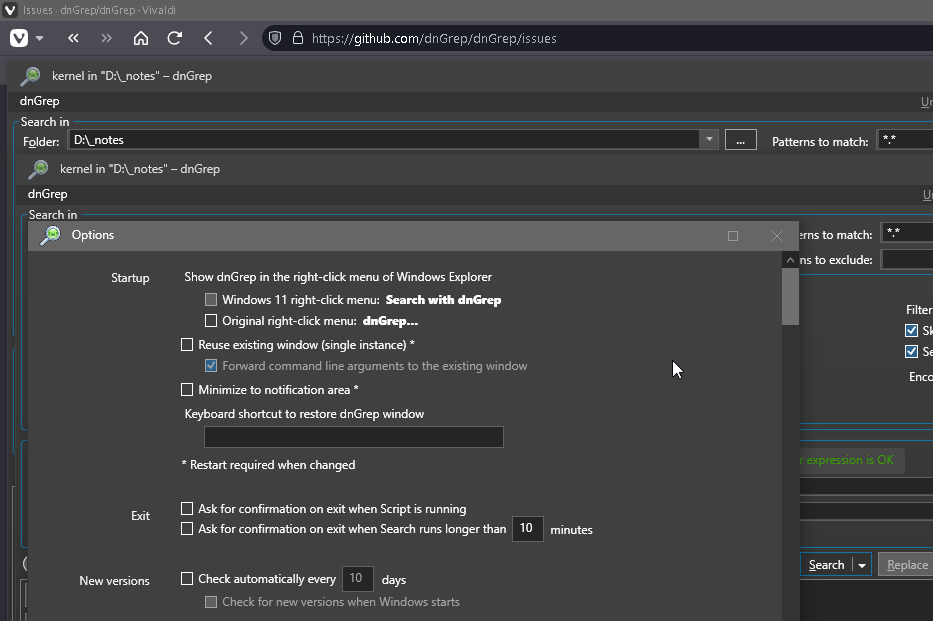
But.. I contacted the developer and you will find a new theme in an upcoming release to get "decent" title bars, it will be called "DarkColorful" or something and it will show some colour so you can find that dnGrep window more easily and even find a spot to "grab" it and move it around as we were used to.

The developer even has a ThemeEditor you can use to tweak the appearance!
> **[GitHub - doug24/ThemeEditor: A basic theme editor for dnGrep](https://github.com/doug24/ThemeEditor)**
>
> A basic theme editor for dnGrep
---
### Author:  [@jfour18](https://resource.dopus.com/u/jfour18)
#### Post date: [February 7, 2026, 10:58am UTC](https://resource.dopus.com/t/what-is-your-productivity-stack-most-helpful-programs/57891/20 "2026-02-07T10:58:50Z")
WinUtil on Github is another great way to find good utilities and for easily installing them on a new pc. It also has options for debloating your pc, and for bypassing win 11 requirements on older PC's
[Next page](https://resource.dopus.com/t/what-is-your-productivity-stack-most-helpful-programs/57891.md?page=2)