# Why does the N key delete files?
**URL:** https://resource.dopus.com/t/why-does-the-n-key-delete-files/45026
**Category:** Help & Support
**Created:** [July 13, 2023, 10:00pm UTC](https://resource.dopus.com/t/why-does-the-n-key-delete-files/45026 "2023-07-13T22:00:12Z")
**Posts on this page:** 9
**Page:** 1
### Author:  [@SirCyg](https://resource.dopus.com/u/SirCyg)
#### Post date: [July 13, 2023, 10:00pm UTC](https://resource.dopus.com/t/why-does-the-n-key-delete-files/45026/1 "2023-07-13T22:00:12Z")
Hello. If I have a file selected, then start typing to search for a file starting with the letter N Dopus asks me if I want to delete the selected file. I discovered this by accident as I'm usually not looking at the screen as I type. I've lost a lot of files in a folder when it was selected during such a search, before I realized what was happening and stopped the folder deletion. To make it much worse is that the deleted files (when typing the letter N) are not sent to the recycle bin, i.e. they're permanently deleted.
This is new phenomenon occurring in recent weeks. I don't use Macros nor any non-microsoft combinations so I didn't inadvertantly program the N key to do anything. Why does typing a word starting with N delete my files?
please help
---
### Author:  [@Leo](https://resource.dopus.com/u/Leo)
#### Post date: [July 13, 2023, 10:04pm UTC](https://resource.dopus.com/t/why-does-the-n-key-delete-files/45026/2 "2023-07-13T22:04:55Z")
It doesn't do that by default.
Check Settings \> Customize \> Keys to see if a hotkey has been set to the N key.
(If it's not there, it's probably an external tool doing something.)
---
### Author:  [@SirCyg](https://resource.dopus.com/u/SirCyg)
#### Post date: [July 13, 2023, 10:55pm UTC](https://resource.dopus.com/t/why-does-the-n-key-delete-files/45026/3 "2023-07-13T22:55:59Z")
I know it's not by default; I've been using Dopus for years. I don't have any new software that hasn't been on my computer for many months at least. The only thing "new" are various updates for Windows and one or two other apps that ought to have nothing to do with files. I also should note that the "n" key does not delete files in Windows Explorer, nor some other apps that list files. It is just in Dopus. I didn't see any key combination under "customise" either. It is truly baffling to me.
This just started happening I think last week. Prior to that the "n" key didn't register at all for list searches, i'e. if I was looking for a file that started with letter "n" it wouldn't register unless I used shift-n. that oddity was normal all the way back to Dopus 9, and is still the case when a file is not selected.
---
### Author:  [@abr](https://resource.dopus.com/u/abr)
#### Post date: [July 14, 2023, 12:38am UTC](https://resource.dopus.com/t/why-does-the-n-key-delete-files/45026/4 "2023-07-14T00:38:58Z")
If you push that "z" symbol on the right side of your search box in the \> Keys setting, you could search for a whole word like "delete", to see, if that command appears in some unexpected place.
---
### Author:  [@SirCyg](https://resource.dopus.com/u/SirCyg)
#### Post date: [July 14, 2023, 1:59am UTC](https://resource.dopus.com/t/why-does-the-n-key-delete-files/45026/5 "2023-07-14T01:59:46Z")
abr, I am stunned. that absolutely worked. I did find it that way and unchecked that box and not only did it fix the delete problem, but also fixed the "n" not registering when I list search, which Dopus was doing as far back as version 9. I'm very grateful, but still wonder how this problem can occur.
---
### Author:  [@Jon](https://resource.dopus.com/u/Jon)
#### Post date: [July 14, 2023, 2:29am UTC](https://resource.dopus.com/t/why-does-the-n-key-delete-files/45026/6 "2023-07-14T02:29:03Z")
> [@SirCyg](#):
>
> still wonder how this problem can occur
Presumably you added a hotkey for the 'n' key which made it delete files 🙂 It doesn't just happen spontaneously.
---
### Author:  [@Itisi](https://resource.dopus.com/u/Itisi)
#### Post date: [July 14, 2023, 7:42am UTC](https://resource.dopus.com/t/why-does-the-n-key-delete-files/45026/7 "2023-07-14T07:42:58Z")
Not to be a bean counter, but it took me a good ten minutes to look for a 'Z' symbol near the search box in SETTINGS PREFERENCES (!) - where I wasn't supposed to be looking - and a Google search to find the setting in the Opus online documentation.
Having made it my policy to take notes on almost everything - there are so many nice note-taking apps now - and having **learnt something new** (thanks @abr ), I will share this note with you.
Just in case someone as stupid as me comes along ...
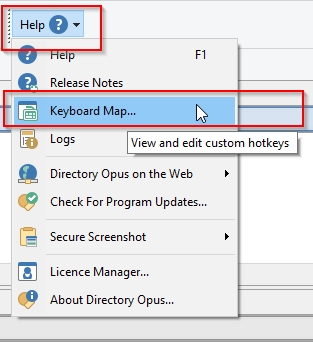
**Online Doku:** [Keymap](https://www.gpsoft.com.au/help/opus12/index.html#!Documents/Hotkeys.htm)
> You can quickly get to this page of the Customize dialog via Help \> Keyboard Map
**Screenshot** :
---
### Author:  [@SirCyg](https://resource.dopus.com/u/SirCyg)
#### Post date: [July 14, 2023, 12:21pm UTC](https://resource.dopus.com/t/why-does-the-n-key-delete-files/45026/8 "2023-07-14T12:21:02Z")
that't the problem. I don't mess with the settings ever, so it had to be done by some accident during normal operations. I just don't know how it was possible.
---
### Author:  [@lxp](https://resource.dopus.com/u/lxp)
#### Post date: [July 15, 2023, 6:25am UTC](https://resource.dopus.com/t/why-does-the-n-key-delete-files/45026/9 "2023-07-15T06:25:56Z")
> [@SirCyg](#):
>
> I just don't know how it was possible.
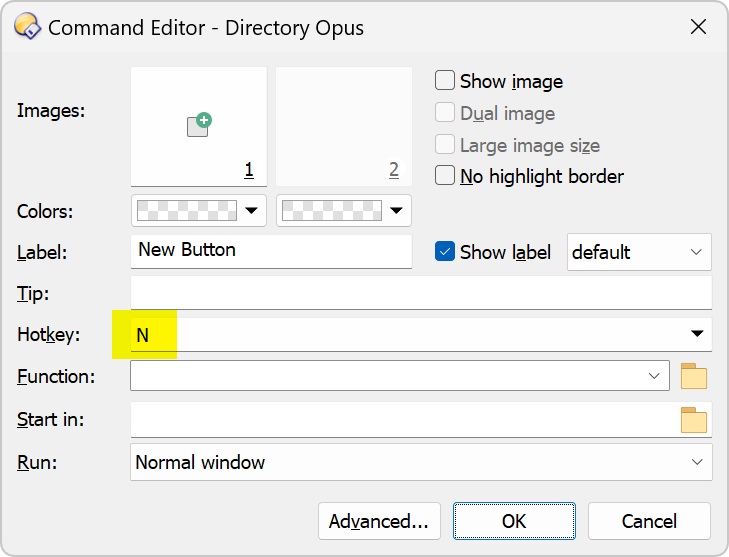
There are not that many steps needed: Open a button, click the hotkey field, type N, click OK or press Enter. It can happen in the heat of the moment 🙂