# WSL2 file system changes are not updated automatically. Have to press F5 manually
**URL:** https://resource.dopus.com/t/wsl2-file-system-changes-are-not-updated-automatically-have-to-press-f5-manually/53329
**Category:** Help & Support
**Tags:** windows-issue
**Created:** [November 2, 2024, 8:32pm UTC](https://resource.dopus.com/t/wsl2-file-system-changes-are-not-updated-automatically-have-to-press-f5-manually/53329 "2024-11-02T20:32:14Z")
**Posts on this page:** 5
**Page:** 1
### Author:  [@PolarGoose](https://resource.dopus.com/u/PolarGoose)
#### Post date: [November 2, 2024, 8:32pm UTC](https://resource.dopus.com/t/wsl2-file-system-changes-are-not-updated-automatically-have-to-press-f5-manually/53329/1 "2024-11-02T20:32:14Z")
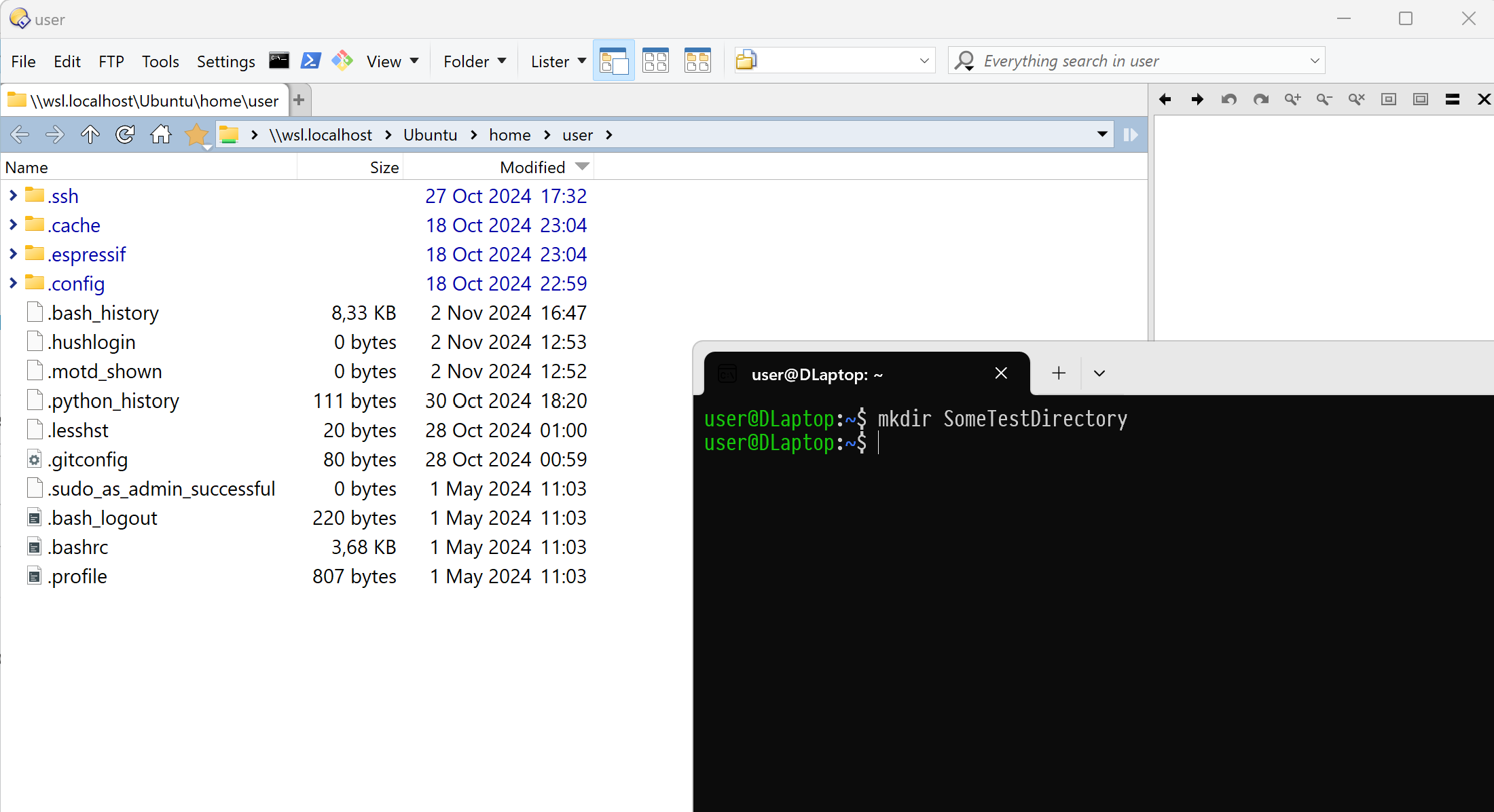
WSL2 allows browsing Linux file systems via paths like `\\wsl.localhost\Ubuntu\home\user`
The screenshot below shows the problem:
The folder `SomeTestDirectory` is not visible in the Dopus unless I manually click F5
---
### Author:  [@Leo](https://resource.dopus.com/u/Leo)
#### Post date: [November 2, 2024, 8:34pm UTC](https://resource.dopus.com/t/wsl2-file-system-changes-are-not-updated-automatically-have-to-press-f5-manually/53329/2 "2024-11-02T20:34:53Z")
What happens in File Explorer?
More things to check under [Changes to folders are not being detected](https://resource.dopus.com/t/changes-to-folders-are-not-being-detected/1786)
---
### Author:  [@PolarGoose](https://resource.dopus.com/u/PolarGoose)
#### Post date: [November 2, 2024, 8:38pm UTC](https://resource.dopus.com/t/wsl2-file-system-changes-are-not-updated-automatically-have-to-press-f5-manually/53329/3 "2024-11-02T20:38:00Z")
Windows File Explorer has the same issue. Have to press F5 manually to see the changes.
Thank you for the link, I think the problem is that it is a Samba share that doesn't support change notifications.
Is it possible to make DirectoryOpus poll the directory every 5 seconds f.e.?
Update: it seems that it is a known issue [Need to manually refresh file explorer in WSL to see changes, both windows10 and windows11](https://github.com/microsoft/WSL/issues/7941)
---
### Author:  [@Leo](https://resource.dopus.com/u/Leo)
#### Post date: [November 4, 2024, 5:41pm UTC](https://resource.dopus.com/t/wsl2-file-system-changes-are-not-updated-automatically-have-to-press-f5-manually/53329/4 "2024-11-04T17:41:59Z")
Samba usually works these days, but there are still things which will break it, such as something inside a Docker container making changes to a filesystem that lives outside of Docker. In situations like that, change events aren't generated outside the Docker container (even though the filesystem _is_ outside of it!), due to deficiencies in how Linux and Docker are designed, and nothing will know the change occurred (whether Opus, File Explorer, or something else). WSL may have similar issues sometimes.
You can tell Opus that change notification is broken on certain paths, and to use polling instead, via here:
Preferences / Miscellaneous / Advanced: [Troubleshooting] notify\_poll\_paths
But beware that his will not work well with large/deep directories, and of course this won't fix the problem in anything except Opus.
---
### Author:  [@PolarGoose](https://resource.dopus.com/u/PolarGoose)
#### Post date: [November 4, 2024, 7:10pm UTC](https://resource.dopus.com/t/wsl2-file-system-changes-are-not-updated-automatically-have-to-press-f5-manually/53329/5 "2024-11-04T19:10:28Z")
Thank you for the explanation.
`notify_poll_paths` sounds like a nice workaround.
I have tried it, it works. I added `\\wsl.localhost\Ubuntu` to it.