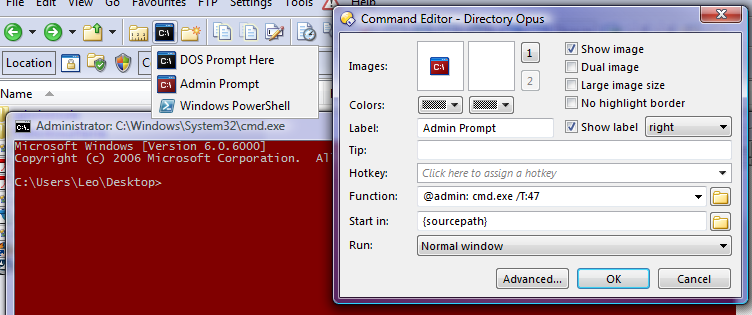
This button launches an Administrator Command Prompt on Windows Vista, using the new @admin feature in Directory Opus 9.
The prompt opens in the current directory and with a red background.
Of course, this is only useful for people running Vista with UAC enabled.
<?xml version="1.0"?>
<button backcol="none" display="both" icon_size="large" label_pos="right" textcol="none">
	<label>Admin</label>
	<icon1>#cliadmin</icon1>
	<function type="normal">
		<instruction>cd {sourcepath}</instruction>
		<instruction>@admin: cmd.exe /T:47</instruction>
	</function>
</button>
To add the button to your toolbar:[ul][li]Copy the text above to your clipboard.[/li]
[li]Select Settings -> Customize.[/li]
[li]Right-click an empty space on your toolbar and select Paste.[/li][/ul]
To open a non-admin prompt you can use the usual CLI DOSPROMPT command.
Opus 9 has built-in, matching icons for normal and admin prompts which you can see in the screenshot above. The button uses the built-in icon. I've also included, below, an alternative icon which matches the Vista's DOS prompt icon.
