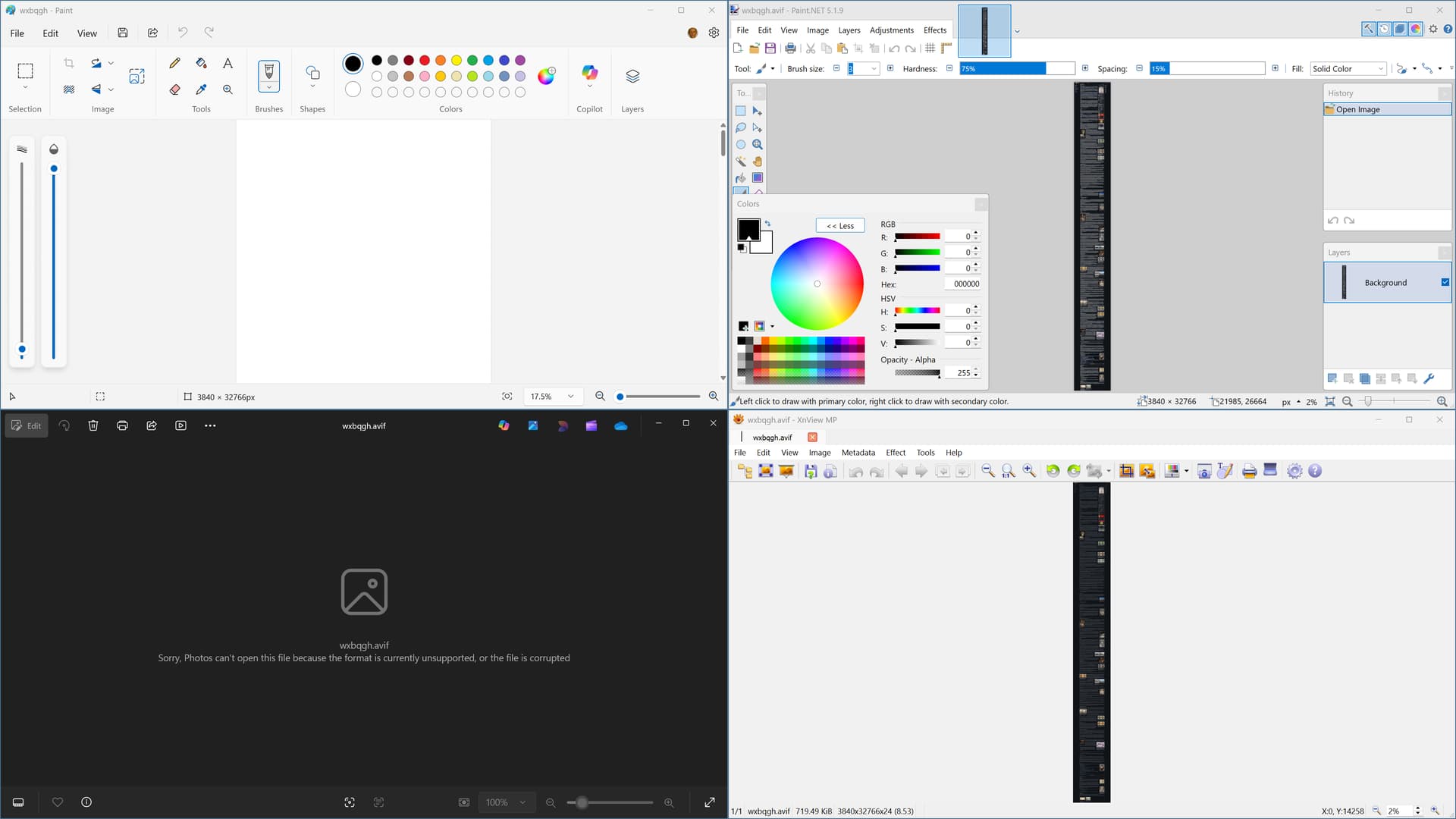
I take screenshots of websites regularly, and then convert them to .avif to save 95-98% storage while retaining a high quality. These screenshots can be up to 3840x65000 pixels, but they don't take up more than 1-2 megabytes each. When you place a dozen or so of these images into a folder and then open that folder with DO, RAM usage spikes up to 28-30GB (I have 32GB in total), with CPU usage of my 12600K spiking to 90%, while also turning my PC into a powerpoint slideshow for the next 10-15 seconds, or in the worst case, crashing DO completely. I'm assuming this is the thumbnail generation service of DO.
This is made worse by the fact that .avif thumbnails on Windows aren't displayed if the image file is above a certain resolution, so DO will repeat this pointless thumbnail generation process each time the folder is opened.
I know I can turn down CPU threads for thumbnail generation, but that is just a bandaid fix for DO wasting copious amounts of CPU and RAM on generating thumbnails for images that fundamentally don't support thumbnails. And since DO fails to create thumbnails for them, it will repeat this whole process every time you open the folder.
Using version 13.18
You can reproduce this issue by downloading this image and creating a bunch of copies of it in a single folder, then opening that folder.
AVIF thumbnails are generated by a shell extension or WIC codec (the same one File Explorer will use), not by Opus itself.
If there’s a memory leak in that component, updating, replacing or getting the authors to fix it are the only ways to get it fixed. All we can do on our side is block the component.
Thanks for clarifying. To narrow down if WIC is the issue I ran a comparison test, please see the results of opening the same folder, with the same amount of items visible. "start loading thumbnails before they become visible" was turned off.
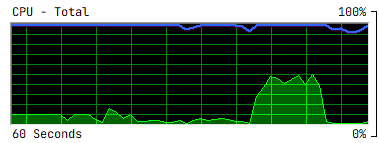
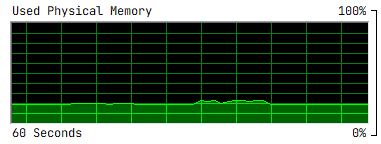
File Explorer took 8 seconds with 1.5GB RAM and ~50% CPU usage.
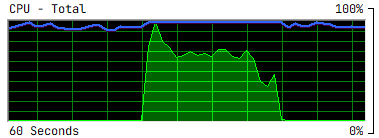
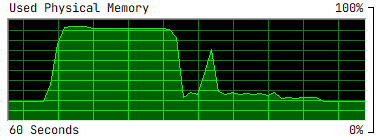
Directory Opus was 20 seconds, took up all available RAM on the system and peaking at 26GB, while using 70% CPU. During this DO went "Not Responding" multiple times.
As I increase the CPU thread count, the memory usage scales proportionally. 1 CPU thread = 1.5GB. And this just happens to be the exact same amount of memory FFMPEG uses during the encoding of 1 of these pictures.
I could leave CPU threads at 1, but even then DO causes 40% CPU usage for 40-50 seconds, compared to FE's of 8 seconds.
I have the latest WIC installed. I'd gladly let the WIC authors know about this issue via any channel I can, but not sure how strong of an argument I have considering this is not an issue in File Explorer. I've been working with .avif images of this size for years in File Explorer, and never had an issue like this.
FWIW the AVIF you attached above won't display at all for me in Windows Photos or Opus, despite having the codec installed and working in both for other AVIF files.
I'd say something about the image causes problems with the codec one way or another. May depend on codec versions.
(I'm using Microsoft's AV1 codec from the Microsoft Store.)
There's nothing wrong with the image, I just tested multiple similar ones plus downloaded my own uploaded one, what you're both seeing is standard behavior for 16K+ AVIF images. I personally use Nomacs image viewer, it displays fine.
AV1 is originally a video codec, and hardware decoders are limited by the AV1 spec's level sheet, which maxes out at 16384. So you often see this artificial limitation for AVIF as well in software where the devs took those levels as gospel and ignored and/or were unaware that the codec's limit is 65536 x 65536 pixels.
You should be able to open the image directly via above given link in your "major" web browser.
It works here in Microsoft Edge, because it has an own codec in the browser engine.
It fails in Windows Photo Viewer with Microsoft's AV1 extension.
The reason is apparently the dimension issue as noted.
JPEG has the same 64K (16-bit) dimension limit, which is appropriate for still images.
Any lower limit would be inappropriate for universal still image application.
So the flaw seems to be in Microsoft's AV1 extension.
AVIF has currently 0.9% usage share of image file formats for websites (link).
Perhaps Microsoft will improve the codec when usage rises...