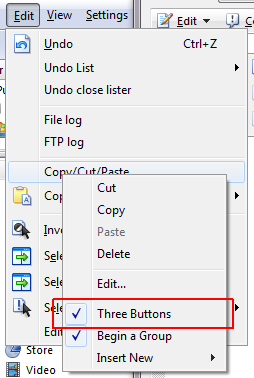
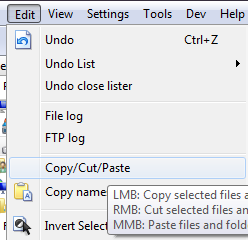
Currently it's impossible to use three-buttons menu items without using mouse (I tried to hit Enter when the item is highlighted).
If I create customized menus I quickly get used to them and would like to use them the same way as usual even if I'm temporarily using only keyboard.
I suggest to make Enter work like LMB, Shift+Enter - RMB and Ctrl+Enter - MMB (or something similar).
Sounds interesting, but how do you approach those items in the first place (i suppose they are in a toolbar)? Also, i could imagine to use modifier keys for
the Enter command, like we have for click events already.
Like, Enter is the plain command, defined for items in the music file type group, opening the item in KMPLayer, using Shift Enter opens it in Foobar, Alt Enter for the sound editor, etc.
I know, we can use the context menu for different file type groups, to achieve the same, without having the context menues crammed, but the modifier or keydown concept
would be another elegant way to control, how to open files.
I mentioned menu items only - there's no problem with accessing lister context menu or main menu (the one under windows title bar). But I already thought about accessing toolbar items (without specifying shortcut keys).
You just reminded me that there is @keydown modifier which may additionally change behavior of menu item while Ctrl or Shift is held. I can see that Alt+Enter currently does nothing. Maybe it could pop up sub menu with all three options (of a three-button item) after Alt+Enter is pressed on a menu item and this way let user choose which button to use.
Abr, if I understood you, you went a little too far. I just want a simple way to use three-buttons menu items with keyboard.
I think abr was referring here to what you actually typed in your original post re: "three-buttons" in the first part of his response... and which I'm also still wondering about. Meaning - how would you place input focus on a specific toolbar button that is configured as a three-button button in the first place, in order for Opus to know which button to run your proposed "Enter work like LMB, Shift+Enter - RMB and Ctrl+Enter - MMB" logic against?
You can get to the Menu toolbar by pressing Alt... and then cursor left and right to move to different menu entries. Maybe you've added a three-button button to the Menu toolbar, or have three-button buried in another toolbar under some menu-button that once you expanded you could cursor up and down to a three-button button on there?
For regular toolbars though - I don't think theres anyway to even "get" to the three-button (or really even any regular button) in the first place.
This might be a little non-standard, but yes, I have three-button items in my menu (the name - three-button may be misleading and make you think it's toolbar button but I'm talking about menu items). DOpus GUI allows to do that so why wouldn't I use that? The only weakness of this is I have to use mouse with this menu.
The same applies to lister context menu (see customize dialog -> context menus).

 I just want a simple way to use three-buttons menu items with keyboard.