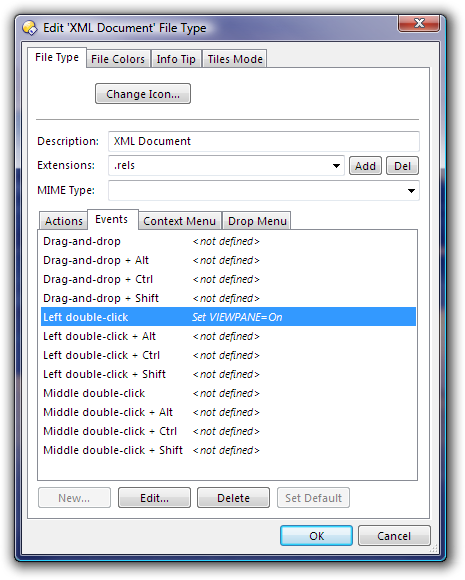
is there something like a feature for activating the Viewer Pane only for special file type? For example if i click on a xml file, it opens the viewer pane, showing the content of the xml, if i click afterwards on a zip file, the viewer pane will automaticly get closed.
You could set one of the double-click events on the XML file-type to run this:
Set VIEWPANE=On
That gives you an easy way to turn the viewer on for XML files, I guess...
Making it close for other files could be done by the same command, but with Off instead of On, set for one of the events on the All Files file-type.
If you wanted to make left-button double-clicking other files turn the viewer off and launch the files normally then you might be able to use this, but I'd advise against it as it's a bit of a strange thing to do, and it assumes that "open" is the default verb for files when it might not be:
Set VIEWPANE=Off
FileType ACTION=open
(That said, it does seem to work for most file types... Just remember to try removing it if you do try it and then later find weird things happen when you left-double-click files. )
Of course, if you use one of the other double-click actions then you can leave the left double-click alone and all should be well.
I was hoping, there is a way to do this just via single-left-click on the file, or selection via Keyboard. Reassigning the double-click isn't the best choice i guess.
 )
)