I use the Favorites list extensively, mainly starting with folders that define important categories of links. I've always wanted to be able to click on a folder in the list and go to that folder. The present behavior is that clicking on a Favorites folder either does nothing, or does the same thing as hovering over it. Since hovering will quickly display the folder contents, I think that clicking should go to that folder instead of just toggling the folder content display.
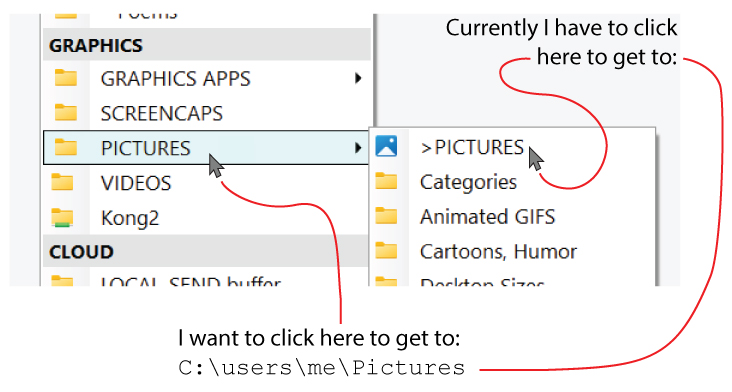
Example: A folder called Pictures contains links to several subfolders (or related folders). Clicking on Pictures doesn't really do anything, so I have to create a redundant Favorite item called, say, >Pictures so I have something to click on if I want to go to the Pictures destination itself. These redundant links within a folder are required just to get to the destination the Favorites Folder "seems" to be pointing to.
I hope this is clear. The required jargon is a bit entangled. A pic is worth 1,000 tokens:
The first Pictures in your screenshot is a sub-menu you've made in the folder tree, not a favorite or directory. Clicking on it will open the sub-menu.
You could put the favorite/directory in the same place if you want something there you can click to go to it.
I guess we could have button-menus within the favorites list but I think it would add a lot of complexity (for both users and us maintaining all the ways Favorites can be displayed).
Yes, thanks, I realize it's a folder. What I was hoping for is a folder with the same behavior as a favorite. I.e., when clicked, rather than hovered, it goes to a defined destination. But if such a button-menuFolder adds excessive complexity, then I can surely get along with the functionality that's already there.
I have this same reaction to navbars on websites. If the navbar entry acts like a folder and reveals several destinations within some common location, I always feel that the main entry should itself go to the parent level of those destinations. (Although of course it could, if it's a button-menu, go anywhere.)
My solution now is functional, just slightly redundant from a UI perspective. The folders contain favorites which have the same name as the folder and a > prefix.
You can make your first entry written in a special color using <#rrggbb> in the label (e.g. <#ff0000> would make it red), and also start a new group after first entry so it stands out from your other buttons in that menu.
Thanks. The ">" pointer works well enough. I was just hoping to avoid the redundant entry. It's a "philosophy of UI design" thing, not an actual problem!
Since this is your own toolbar with your own "Favorites" (instead of regular Opus favorites), why don't you turn your menu entries into menu buttons, with the code to open the folder on the menu button, and the selected subfolders you like in the submenu, like this:
I appreciate your suggestions, but since this is the regular Opus favorites menu, I didn't feel the need to write my own alternative menu just for this minor adjustment. I like the way Opus integrates their Favorites menu into the Settings system, etc., and if -- through no effort of my own -- I could have it work slightly differently, that would be great. But I don't have time (or need) to build a whole new Favorites menu of my own -- it would look exactly the same as the Opus version, but with just this small difference in the behavior of a folder node. I really like the visual presentation of the standard system, especially now that it supports those bold section headings. But again, thanks for your interest and suggestions. Someday, perhaps, I might design a more elaborate Favorites system of my own, with different features, and I would probably do that within DOpus (which can probably do anything I would ever come up with).
I'm wondering if perhaps I'm misusing the term Favorites. The menu I showed is what drops down when I click the Favorites star button in DOpus -- it's not something I've created. I've used the built-in Ctrl-D command and the built-in Edit Favorites settings page to manage the dropdown list contents. I think of these items as favorites, or folders containing favorites.
I do not use favorites so I just interpreted (wrongly as it seems) Leo's comment in his first response.
If you're indeed using the built-in favorites system, I agree with your approach, as what I suggested needs more work to put in place (not that big a deal imho) but mostly needs to be maintained every time you wan to add another folder to your favorites (much more time consuming and breaking your workflows).

 so I just interpreted (wrongly as it seems) Leo's comment in his first response.