Add {file|noext_m} to get the name_stem_m from a multipart-extensions filename

For example, filename is "abcd.part1.rar".
I want only "abcd". {file|noext} will return "abcd.part1".

so as {filepath|noext_m}... :slightly_smiling_face:

We can define multipart-extensions via 〈Preferences / Miscellaneous / Advanced: [Information Display] multipart_extensions〉

It seems to already work like that for me.

I see.

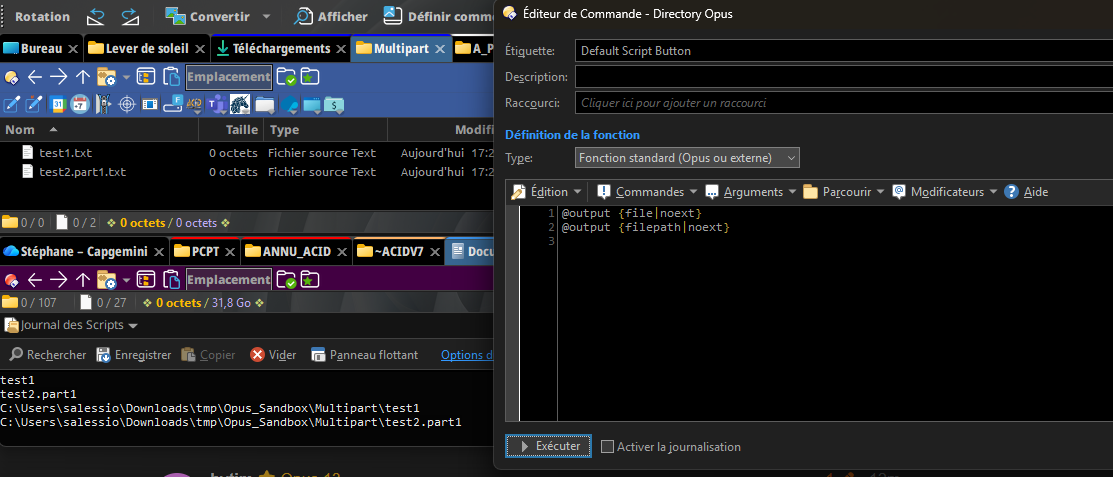
file: C:\aaaa.part1.rar
@output {file|noext} → aaaa
@output {filepath|noext} → C:\aaaa.part1 --- this is the problem.

They should be consistent.

noext_m does not exist as a code to modify filename.

And for me, {file|noext} and {filepath|noext} share the same return logic (i.e. they are consistent):

The multi-extension stuff only applies to certain patterns. So .part1.txt and .part1.rar are treated differently, for example, since it's how multi-part RAR archives are named and you want the "extract to <archive name>" command to trim off the .part1 when creating the new folder.

There is indeed a difference between how {file|noext} and {filepath|noext} handle multi-part extensions. That probably wasn't intentional, but if we change it now it might break people's buttons, so I am not sure if we will. But explicit noext_m and noext_nom or something might make sense.

You can use {filepath|..}{file|noext} as a workaround, to get the full path minus the multi-part extension.

{file}                    = Test.part1.rar
{file|noext}              = Test

{filepath}                = C:\Users\Cliff\Desktop\Test.part1.rar
{filepath|noext}          = C:\Users\Cliff\Desktop\Test.part1
{filepath|..}{file|noext} = C:\Users\Cliff\Desktop\Test