Well, we have editable in the Metadata panel Date Digitized and Date Taken, equivalent to Date Time Original. The metadata panel doesn't work with my old Minolta .mrw raw photos, but the processed .tif and .jpg do.
So my idea, and this is only an idea, open to discussion, acceptance, or rejection is to consider added support for the EXIF Date/Time Modified field. Exiftool refers to this field as EXIF-ModifyDate.
The photo development process can then be dated internally from raw -> tif or jpg raw conversion -> additional photo adjustment .
As I said, this is only an idea.
I have never implemented any metadata date tweaks before in my photos.
All three fields in my photos all have the same shutter clicked date.
You can already change it by changing one of the other two fields, which both read and write multiple fields at once (as in File Explorer and several other metadata editors).
The new field just reads from fewer sources than the old one, for people who need to see if specific tags are present (at least as I understand it; I find the new field more confusing than useful, personally).
David,
If you convert to TIF or JPEG, and then use Opus to add or change the Windows property 'Date Taken', that date will be written to enough metadata fields that the date you enter will be recognized by applications as the 'shutter clicked date' - and i think that's your goal.
I like that you wrote 'shutter clicked' date'. I use the term 'Snap Date' when referring to when the shutter was clicked whether that date and time is know or unknown.
If you really want to see EXIF-ModifyDate, install the ExifTool Custom Columns plugin:
Leo mentioned a 'new field'. I think he is referring to the recently-added 'Date/Time Created' field. The release notes did not specify if it's an EXIF field, an XMP field, or an IPTC field. I think it's IPTC-DateCreated, but I'm not sure.
If you have other questions about photo metadata, feel free to message me.
Thankyou for your thoughtful reply.
Yes, I use @lxp's Exiftool Custom Columns script. It is one of, if not my most, cherished scripts.
I modified a line in it yesterday so that Exiftool's CreateDate was better understood by myself at least. exifColumns.push_back(GetColumnMap('EXIF', 'CreateDate', '', 'EXIF-DateTimeDigitzed', 'EXIF-DateTimeDigitzed', '', '', 'datetime'));
I was hoping I could use EXIF-ModifyDate to internally flag rework done on photos.
But as Leo pointed out, it isn't so simple.
I'd like to help, but I don't have enough information.
You write that you want to "flag rework done on photos". Rework done on the RAW photos, or rework done on the JPEG and/or TIFFs?
David,
If there is a way to track changes/edits to RAW files using metadata, I don't know of it.
Because edits or metadata changes to a RAW files is saved in XMP sidecar files, the PHOTO itself (pixels) is never modified.
Only when you export (as JPEG) from an application (like Lightroom Classic) and choose to write the XMP metadata to the files is a new JPEG photo created. Edits and/or metadata changes made to the RAW files are reflected in the new JPEG file.
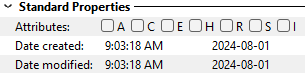
When RAW files are converted to JPEG, the newly-created JPEG files will have a System/File Properties Date Created and Date Modified matching when the files were converted:
That is not photo metadata (EXIF, IPTC, or XMP).
The idea wasn't to change any metadata in the RAW photo.
The idea was to create the jpg and have a separate date within it as to when it was created.
DateTimeOriginal = Shutter Click
DateDigitized = jpg version creation date/time ( I often have multiple versions )
DateTimeModified or ModifyDate as ExifTool calls it = Last rework on jpg date/time
One thing that may be causing confusion here is that I rarely use XMP files.
They are useful as they save the adjustments used to generate the jpg.
They also cause clutter in my archive photo archive folders and when I use a program that does generate them, I tend to delete them. The original software for my old circa 2005 Minolta A2 didn't generate XMP files, but it was also very limited in what it could do. These days I tend to use Corel Aftershot 3. It can be purchased on the cheap and works well.
I found a way to do what I wanted this morning using ExifTool.
I'm not sure I'm going to follow through with this as it was only an idea to start with.
I have this working on a few test photos.
David,
I hope I understand correctly now - but I'm not sure I do!
Once the info in XMP files has been written to the JPEGS, most people do delete the XMP files UNLESS they might want to make more changes to the RAW files.
After Exporting as JPEGs, the JPEGS will have a System/File Properties Date Created and Date Modified matching when the JPEGS were created:
AND the EXIF-Modify field (from the ExifTool Custom Columns script) will also have that date:
Is that what you want? Or do you want that date added to other fields as well?
If yes, in the Metadta Pane, copy the File Created Date to the Date Taken field: .
That will change enough date metadata fields that what you see in the Date Taken column will be recognized as the shutter click date in any photo-related application:
I didn't know that until now !
Yes, that is what I wanted, but it wasn't always like that.
I have been going back in time here looking at photos I processed from mrw years ago and the System/File Properties dates do not match the EXIF-Modify field in those jpg photos.
The older the photo, the more likely it was transformed to jpg with all EXIF date fields the same as DateTimeOriginal.
Tiff photos are a different story. A conversion from mrw to tiff results in all EXIF date fields the same as DateTimeOriginal.
Yes, I am still able to do a .mrw RAW conversion using the original Minolta program on Win 10.
I just did one from September of 2011 to jpg.
All EXIF date fields including Date/Time Modified aka Exiftool Exif-ModifyDate are the same as DateTimeOriginal in the resultant jpg.
This happens in Corel Aftershot 3 as well as the ancient Minolta program.
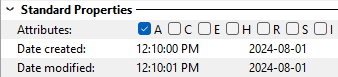
Using Directory Opus to convert or modify the image, jpg or tiff, also results an unchanged Date/Time Modified Field.

 .
.