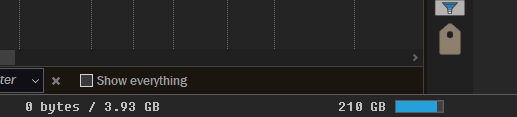
The status bar seems to have some alignment problems.
Without any alignment code the disk space graph is aligned to the center of my screen (not the right edge of the left lister):
With no alignment code, adding spaces after the graph code fixes it but I think the code itself doesn’t work.
And there isn’t a code for “align to right edge of right lister”. {rright}
If I disable “seperate definitions” I can fix the left side but the right one is way off:
(I want to align the graph to the right edge, it looks nice and neat)
The “pad remaining width” code doesn’t seem to work with the graph on the right side.
The pad 100% of remaining width doesn’t add a number to the code so I have to add it myself.
So if I add {rpad} or {rpad100} before the graph code it just shifts it a little bit instead of aligns it to the right side. (And it moves the lock icon too for some reason)
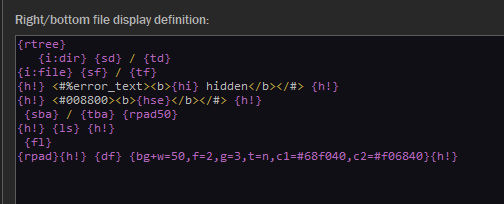
So that line is this:
{rpad}{h!} {df} {bg+w=50,f=2,g=3,t=n,c1=#68f040,c2=#f06840}{h!}
It'd help to show the code you're using at each step, else we don't know where you're adding {rleft} or what else is there that might be conflicting with it.
It would also be better to show the full window, as we can't really tell if your cropped screenshots are from a single or dual display window, and if they're the left or the right display.