Hi. I have been using Directory Opus for quite some time now but I have to confess that I only use a few basic functions.
I now have the need to copy files to a folder and have the files prefixed with a sequential number. I need this to continue as I add new files to the same folder over time. So, if I initially add 20 files to the folder, the files are prefixed with the numbers 01 through to 20. If I later add another 20 files, they are are automatically prefixed with the numbers 21 through to 40. And so on as I add more files in the future.
Does anyone know how I can achieve this using Directory Opus or do I need to look for alternative software?
This iterative idea inherently requires a rename of files in the destination folder when the prefixed number exceeds the zero pad. So if in time file 100 is added, the entire numerical sequence then needs to be renamed.
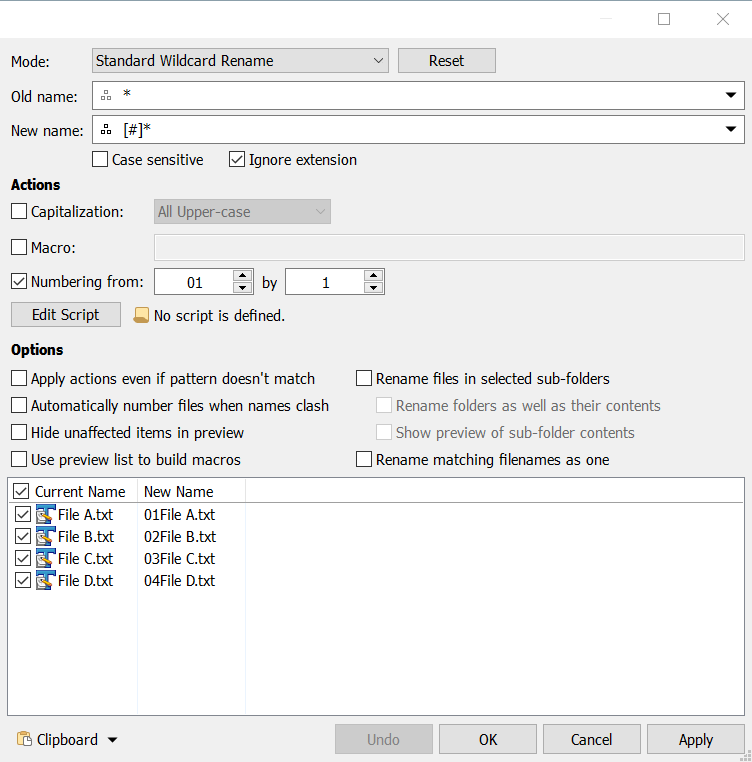
I thought about the grand idea some, but starting with the advanced rename may be all you really need.
It is easy to define the starting prefixed number using the advanced rename as well as the increment and zero padding.
Hi David. I have just applied your solution to my files and it seems to do just the job I need. (I am having issues with my in-car audio player and this method should resolve the issue.) Thank you very much for your help.