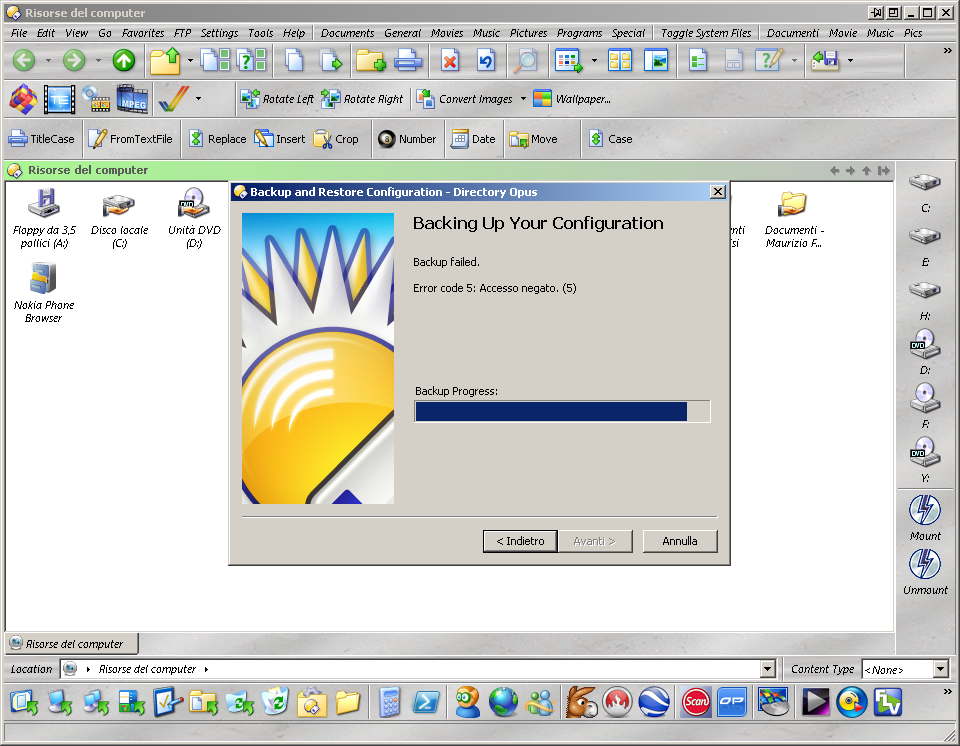
Hi, i have a BIG problem with config backup....
Cannot anymore do this as you can see in the atteched screenshot.
This happens only since few updates (actually i have the last illuminati update) and it happens also if i change the direcory where to save the backup file.
In "documents" i still have previous backups saved without any problem.
Are you using 64 bit Windows? If so, this can happen if for some reason the COM proxy that provides Zip support have become deregistered. As a test, see if you can browse into a Zip file in Opus. If it fails then this is almost certainly what has happened. The easiest solution in this case is to simply reinstall Opus over the top of your existing setup.
No. i don't use 64bit windows and i can easily browse into a ZIP file...
Following your advice i must first uninstall DOpus and then reinstall it ? Or i can install OVER the Dopus i actually have installed ?
Only thing I can think of trying is running Process Monitor in the background to see which operation dopus.exe or dopusx64.exe do which fails just before the error message appears.
Oh, it might also be worth a try to disable any real-time anti-virus scanning in case it's locking the zip file Opus is trying to create in a way which prevents it finishing the backup.
[quote="leo"]Only thing I can think of trying is running Process Monitor in the background to see which operation dopus.exe or dopusx64.exe do which fails just before the error message appears.
Oh, it might also be worth a try to disable any real-time anti-virus scanning in case it's locking the zip file Opus is trying to create in a way which prevents it finishing the backup.[/quote]
I tried to use ProcMon but it creates a 74.8Mb logfile
I think i must learn how ProcMon works to save a little logfile to post here...
I tried also to disable AVGAntivirus but dopus fails again...
It creates a 78.8kb files and then exit with that error !!!!!!!