Hi!
I'm trying to find out how the "Modifiers" tab for command buttons of the "Script Function" type works.
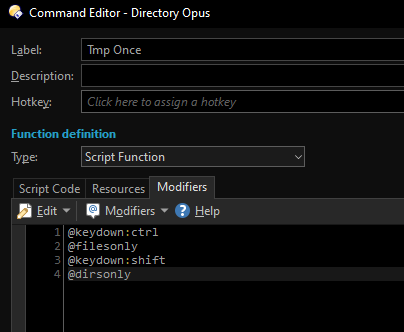
Looking through the docs (Advanced Command Editor, Script Functions, Command modifiers), I can't find anything talking specifically about how they work for JS script type buttons.
- I assume evals are not happening per click unless
@evalalwaysis on? - I hope anything dynamic happens before the script's
OnClickis called? - Can modifiers be applied conditionally here?
To the last point:
Consider the following working Standard Function (Opus or external) example which copies either everything (default), or only files or folders on ctrl/shift, respectively
@keydown:ctrl
@filesonly
@keydown:shift
@dirsonly

@keydown:common

Copy TO ".\# target"
If I try to replicate the functionality of setting a different modifier based on @keydown states for a Script Function, it fails by always behaving like @filesonly was specified, no matter the keydown states:
function OnClick(clickData){
	DOpus.Output("Count: " + clickData.func.command.files.count);
	DOpus.Output(colToArray(clickData.func.command.files).join("\n")); // `Item`'s default return value of its path (string) is used
}

// Just a helper function; should not be relevant to this question
function colToArray(coll){
	if(!coll || typeof coll != "object")
		return [];
	try{
		var enumFields = new Enumerator(coll); // jshint ignore:line
		enumFields.moveFirst();
		var array = [];
		while (enumFields.atEnd() === false) {
			var i = enumFields.item();
			array.push(i);
			enumFields.moveNext();
		}
		return array;
	}
	catch(e){
		// log("Error trying to convert coll to array");
		// log(e);
	}
	return [];
}
Modifiers tab:
@keydown:ctrl
@filesonly
@keydown:shift
@dirsonly
For an example of
C:\tmp\Some folder
C:\tmp\Some file
being selected, this only ever outputs
C:\tmp\Some file
with the above modifiers.
Why is this?
Is there documentation on the Modifiers tab and how things here differ from the body of a "Standard Function (Opus or external)" button script?
