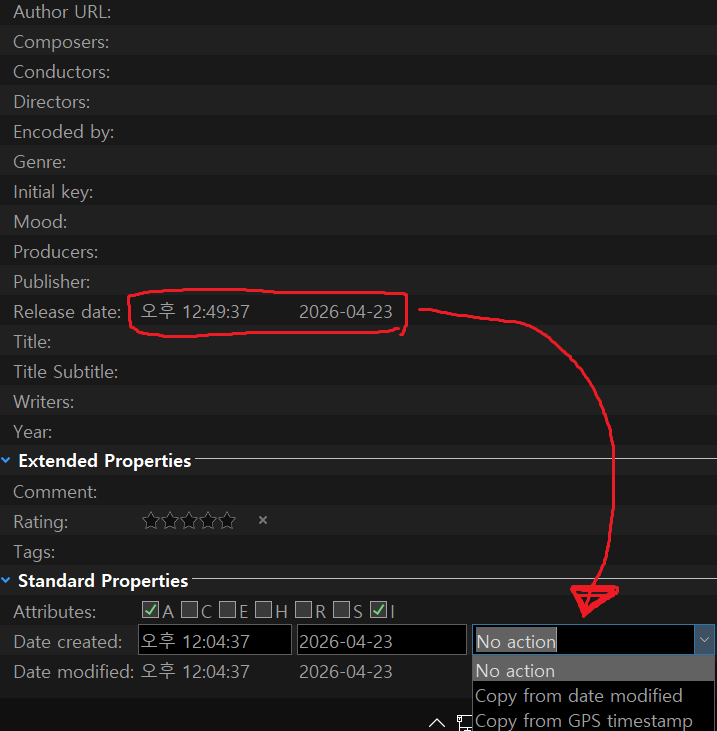
Can you provide various options so that I can copy and put other dates?
I encoded the video, but I want to copy the date I took, but the only option the encoding program supports was the release date
But on dopus, you can copy the date as it is on GPS, but it's a shame that there's no option to copy and paste other date options. So I hope there's an option to copy the option of a completely different date
If I had known coding, I would have made a related plug-in like that, but I'm sorry I couldn't, so I wanted to ask if you guys could easily add features
And if possible, I wish there was a function to copy and insert metadata as it is. Maybe that's possible or if there is such a plug-in, please let me know
Then, we don't need the functions that we requested
I also request that ‘Release Date’ have the same ‘operations’ available as ‘Date Taken’.
When date metadata has been stripped from videos (as frequently occurs) the file/system Date Created or Date Modified often seem correct based on other clues, like folder names or filenames. So, I’d like to be able to copy one of those dates to the Release Date field.
If I understand correctly, you want the release date to be copied to the creation date of the file.
If so, this button should do the trick (it can work on multiple files at once, copying each release date to the creation date).
 Be careful, as the date formats could be an issue. Test it first on copy/copies of your files to ensure there is no issue.
The button:
Copy release date to creation date.dcf (3.1 KB)
The inner code:
function OnClick(clickData)
{
	DOpus.ClearOutput();
	var cmd = clickData.func.command;
	cmd.deselect = false; // Prevent automatic deselection
	// --------------------------------------------------------
	cmd.RunCommand("Set VIEW=Details");
	// --------------------------------------------------------
	if (clickData.func.sourcetab.selected.count == 0)
	{
		DOpus.Output("No file selected. Exiting.");
		return;
	}

	var cmd = DOpus.Create.Command();
	for (var e = new Enumerator(clickData.func.sourcetab.selected); !e.atEnd(); e.moveNext())
	{
		var item = e.item();
		if (item.is_dir)
		{
			DOpus.Output(item.RealPath + " is a folder, skipping");
			continue;
		}

		var meta = DOpus.FSUtil.GetMetadata(item);
		if (meta != "video") {
			DOpus.Output("This is not a video file (" + item.name + "), skipping");
			continue;
		}

		var vMeta = meta.video;
		DOpus.Output(">" + item.name + " : Release Date = " + vMeta.releaseDate);

		var opusDate = DOpus.Create.Date(vMeta.releaseDate);
		//DOpus.Output("Date = " + opusDate.Format("D#yyyy-MM-dd T#HH:mm:ss"));

		var cmdLine = 'SetAttr "' + item.realpath + '" CREATED "' + opusDate.Format("D#yyyy-MM-dd T#HH:mm:ss") + '"';
		cmd.AddLine(cmdLine);
	}

	if (cmd.count == 0)
		DOpus.Output("No file to process.");
	else {
		DOpus.Output("Processing #" + cmd.count + " file(s)");
		cmd.Run();
	}
}
Of course, I'm sure there's a one-liner with evaluator ... just couldn't get it 
You should have a look at the SetAttr command (SetAttr [Directory Opus Manual]). That's exactly what it is made for (and what is used in this script in the end to overwrite the created date of the file)..
Thank you. However, in my opinion, it would be a great addition to the U.I and help a lot of non-techy people work manage video dates.
FYI, I tried to create a command, but never got it to work.
No real opinion about that, and anyways, not something I can do
What kind of command did you try to write? What was it supposed to do?
Try and explain, I'll see if I can help.
I agree
I think both should have the ability to copy (release date, shooting date, revision date)
The reason I asked for this feature was because it seemed like it would be easier for the developer to modify it like that
I paid for it, so I thought I could ask that much
I'm really sorry, but how do I use this code? Do I add it when I type it in as a script? Or where do I need to write it down separately? Sorry, I'm a beginner in this program
And thank you for making the code!
We'll look at adding this in the next beta (won't be out until after 13.23 stable, but shouldn't be too long).
Thank you, developer!
It can be a busy and difficult task, but thank you for considering adding it!
Sorry, I should have been more precise.
You can download the .dcf file, then enter Customize mode, and then drag and drop it to one of your toolbars. This will create a button with the code inside it.
After that, select one or more files, and click the button (once you have exited the customize mode).
More generally: How to use buttons and scripts from this forum - #3
Still, thank you for the details!
Thank you for caring despite your busy schedule!
I'll try it out!!
Related comment:
Why is there no GPS Timestamp column available? Could one be added? I think there’s a column for all other fields in the Metadata Pane.
Originally, there was a gps time, but since that video is an encoded video from the original shot, the gps time was changed to release time. So I tried to copy it, and there was no option to copy that time as it is. So I wanted to ask the developer. I thought maybe it was a small fix
Hey, would it be a pain to get that same script but in reverse. I'm looking to copy the file creation date and paste it into the "Release Date" EXIF info.
If you use Exif Tool, check out the tool that was just updated:
OpusExifTool
Otherwise, yours is another use case for multiple clipboard streams, and more auto date tracking options, that I kept ranting about in the past.
This Evaluator button will copy the date:
items = GetItems("s");

for (i = 0; i < Len(items); i++) {
	f = ArrayGet(items, i);
	d = FileDate(f, "c") As "D#yyyy-MM-dd";
	cmd = "SetAttr FILE=""" + f + """ META releasedate:" + d;
	Output(cmd);
	Run(cmd);
}
XML
<?xml version="1.0"?>
<button backcol="none" display="both" label_pos="right" textcol="none">
<label>FileDate to Realeasedate</label>
<icon1>#newcommand</icon1>
<function type="eval">
<instruction>items = GetItems("s");</instruction>
<instruction />
<instruction>for (i = 0; i < Len(items); i++) {</instruction>
<instruction> f = ArrayGet(items, i);</instruction>
<instruction> d = FileDate(f, "c") As "D#yyyy-MM-dd";</instruction>
<instruction> cmd = "SetAttr FILE=""" + f + """ META releasedate:" + d;</instruction>
<instruction> Output(cmd);</instruction>
<instruction> Run(cmd);</instruction>
<instruction>}</instruction>
</function>
</button>
If you want to copy date and time, use ExifTool:
/programfiles\ExifTool\exiftool.exe -"QuickTime:CreateDate<FileCreateDate" -api QuickTimeUTC -@ {allfilepath|filem}
The requested feature was added not long ago. Now the Metadata Panel includes the option, so there's no need to use a command/script/evaluator column:


lxp,
I'm not sure Release date always equals QuickTime CreateDate, though it may for some file extensions. Do you know?
It mostly does (from a quick check).
MKV files may use Matroska:DateTimeOriginal and MP3 files may use ID3:ReleaseTime. Unfortunately, ExifTool can't modify either of them.
Can you also review this?
I felt it while using this function, but it's uncomfortable to click when there's not enough space
- Data Creative, Data Modifi, Release Data Copy Option Space Modification Request
If you look at the screenshot right now, you can see the options if there's enough space to copy the time period to each other
If it's not that wide, I can't see that information and I can't choose. Even if it's not that wide, I want you to change it so that I can see the options when I click on it
※ Date Data Copy Space See all options if appropriate
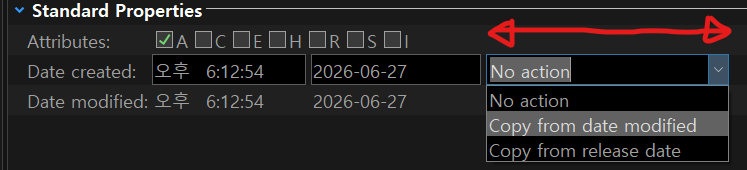
※ If the date data copy space is small, the option is not visible or clicked
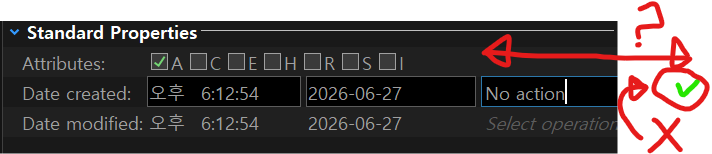
And if I revise the release date, the time will be modified, so can I change the date only and not record the time at all?