I have been using custom buttons for years to launch other applications from Dopus, and have recently created a new one, as an MS-DOS Batch file, calling Exiftool for some very useful function for me. I have also been experimenting on another button just trying things out, and one thing I tried was a dialogue box. It has now put the dialogue box in the other button and any new one that I create, even if I copy the instructions to Notepad and then into a new Button - no code running just the dialog. I should make it clear that there is no Dialog function/command in my tiny Batch file (now files), and any new Button just starts with the 'choose a folder' dialog no matter what code there is in it!
Can someone tell me what has happened? How is it that any new button now has a dialog box in it as default, but I cannot seem to control it.
Err ... Just closing Dopus and restarting it got rid of the problem (I usually have it open all the time).
OK, that seems to have got rid of the problem, but can anyone tell me how this happened? Did I do something inadvertently without actually noticing? It has been driving me very slightly mad for over an hour, and yes, I should have tried shutting Dopus down and restarting, but ... but will this come back?
I've never heard of that happening before.
Well, I guess that is not entirely surprising as it is quite bizarre. However, I spoke too soon about closing Dopus and restarting clearing the problem as it has re-appeared this afternoon. It is not consistent in that sometimes the dialog box appears and sometimes the batch file works normally and it is proving difficult to pin down any pattern.
To be clear, I tried putting a dialog box into an MS-DOS Bat file even though I thought it may not work because nothing I read in the Help info said I couldn't and it would be useful if it did work. OK, when it was put into the middle of the Bat file with commands before and after and the Bat was run nothing else happened (i.e. none of the commands preceding it were run), the dialogue box came up, I closed it (with the 'X' in top right) and nothing else ran. I then opened another button, copied and pasted the contents of the original Bat file into it, saved it and ran it and ... the dialog box came up! (Please note that the dialog call had been removed from the original immediately after the first failure). I have tried today just going into Edit Mode on the button and saving it and sometimes that clears it and sometimes it doesn't, but even if it does then after 1 or more activations the damn dialog reappears.
It does appear that somehow DOpus is connecting all MS-DOS Bat file buttons (I only have the two: one useful one and one tester) with this dialog box now, even though it is inconsistent.
I will continue to experiment but I have no idea how a new Bat file Button can 'inherit' a dialog box without it being specified. It is however a real PITA.
Re-reading the original post, a "choose a folder" dialog will appear if your button needs a source/destination folder and one doesn't exist naturally. It's likely just that.
Details of what the button actually runs and a screenshot of the dialog may help if that doesn't explain things.
Err ... hang on, are you saying that DOpus scans any Bat file searching for anything that needs a source and destination folder (e.g. {sourcepath} or {destpath}) and if, say, DOpus is currently showing only one lister then it ignores the Bat file and puts up a 'choose folder' dialog box?
I had a check at the beginning to use Set to force it into Dual lister if only one was visible, so that is redundant and I can only use the 'Hide' button function?
What do the buttons actually run?
It's hard to answer the question accurately without that information.
OK, using my Tester Bat file which has been pared right down to a silly level I find that, something that I had missed but was not involved in the initial problems, if I use the Bat file REM to comment out lines DOpus still interprets them and I must use // to prevent that being done:
Echo Copy image files into a yyyy // mm - month // dd folder structure
// Echo !! Ensure source is correct and active !!
// Echo Sourcepath = {sourcepath}
Pause
REM exiftool -k -o . -d "{destpath$}%%Y%%m - %%B%%d" "-directory<CreateDate" .
exiftool -k -o . -d "E:\Work%%Y%%m - %%B%%d" "-directory<CreateDate" .
Echo Copy image files into a yyyy // mm - month // dd folder structure
// Echo !! Ensure source is correct and active !!
// Echo Sourcepath = {sourcepath}
Pause
// REM exiftool -k -o . -d "{destpath$}%%Y%%m - %%B%%d" "-directory<CreateDate" .
exiftool -k -o . -d "E:\Work%%Y%%m - %%B%%d" "-directory<CreateDate" .
It does however, illustrate the point perfectly.
With 1), if it is run when in single lister mode the dialog box comes up, and nothing else.
With 2), if that is run in single lister mode it will execute (the Echo on line one and the Pause).
So, yes, DOpus is scanning the Bat file for such as {sourcepath} and inserting the dialog box if it finds something but is in single mode and my unfortunate (and misguided, I should have found that in the documentation, but there is a lot of it) use of REM and not // was extremely confusing.
Now, checking for Dual Mode at the start seems to work, as in:
3)
if:!Set DUAL=OFF
Set DUAL=ON,Left,Source
Echo Copy image files into a yyyy // mm - month // dd folder structure
Echo !! Ensure source is correct and active !!
Echo Sourcepath = {sourcepath$}
Pause
// REM exiftool -k -o . -d "{destpath$}%%Y%%m - %%B%%d" "-directory<CreateDate" .
But, if I remove the '//' from the last line and run the button with a single lister I get the following behaviour:
a) If I have previously had dual listers up, then the Bat file will force Dual listers and run OK.
b) If I shut down DOpus with a single lister, restart it unchanged, and run the button the dialogue button comes up.
c) If I then switch into Dual Mode, switch back into single mode, run the button, the Bat works again and forces Dual Mode.
If I repeat b) and c) after enabling the call to ExifTool, by now removing the REM, exactly the same happens in b) and ExifTool operates correctly in c).
It has been very confusing and I am sorry that I thought DOpus was somehow 'passing' the dialog to a new button, but I think that was because of the inconsistent behaviour when starting with a single lister (i.e. whether a fresh start or not), but it would appear that the only way to get around this is to use the 'Hide' function in single lister mode which I feel is clunky. I much prefer to check the mode and force Dual on but that appears to be unworkable because sometimes checking the lister mode and setting it works and sometimes it doesn't.
I am including a somewhat redundant screenshot of the dialog box
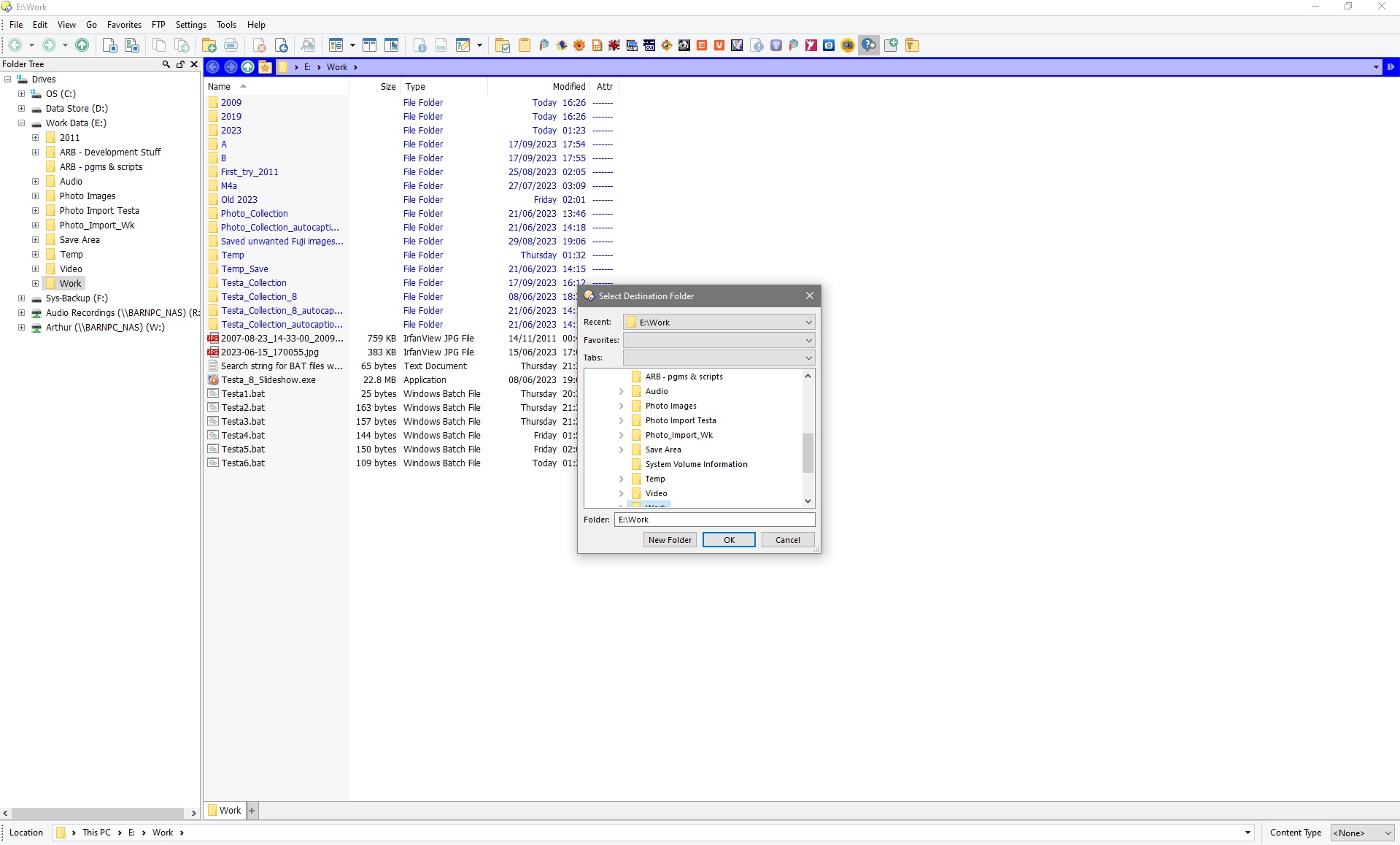
If you're using {sourcepath$} and {destpath$} in the commands, and there is no destination path (and/or no source path, which can happen with floating toolbars when no file display is open at all), then the button will prompt you for those paths.
{destpath$} means needs a destination path, so the button has to have one, by definition, and it'll ask if there isn't one.
You can use {destpath} (without the $) if the destination path is optional, but then nothing will be inserted there if there's no destination, which is rarely what you'd want.
What would you expect to happen otherwise? You've made a command that needs a destination path and then run it when there isn't one.
It should work. Please show the code that doesn't work if you're having problems with that.
I would expect the documentation to explain that DOpus will not run the Bat file and present me with an error but will scan it and prompt me for what it thinks MUST be present before executing any code that I may put in to avoid the error happening.
"It should work."
As I said in my last post as points a), b) and c) and the paragraph following sometimes it does and sometimes it doesn't depending on the circumstances; try it.
Basically, checking whether Dual is active by using the Set command at the start of the Bat file is pointless because the results are unpredictable.
You’ve put {destparh$} in the button and then clicked the button when there is no destination path. It’s going to either fail or ask what you want to use as the destination path. It does the latter, which seems the most useful. (You can always click Cancel if you’d rather it did nothing at that point.)
That’s using if when it should be @if.
And it’s saying “if dual is not off, turn it on”.
In other words, “if dual is on, turn it on”.
Should be clear why it doesn’t do anything now.
It also doesn’t end the @if statement, so it will skip everything else in the button if dual is off and the other things are fixed.