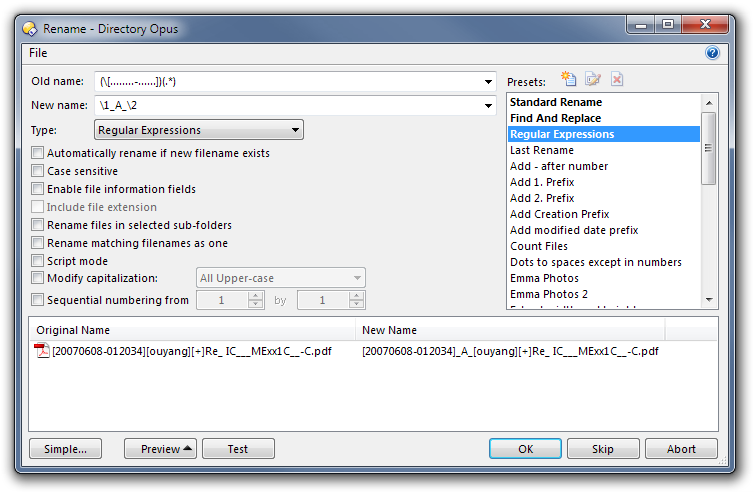
In the Advanced Rename dialogue box, using Standard Rename, I can use "*" as wildcard, but not "?".
I can not even type the "?" in the old name field. Is the "?" wildcard not allowed? How do I search for a single character?
In the Advanced Rename dialogue box, using Standard Rename, I can use "*" as wildcard, but not "?".
I can not even type the "?" in the old name field. Is the "?" wildcard not allowed? How do I search for a single character?
Forgot to add (I wish that i could edit my post!?):
Here is what I tried to rename:
OLD: [????????-??????]*
NEW: [????????-??????]A*
In other words, insert "A" after the end of the 1st bracket (the bracket contains date-time; 8-6 char)
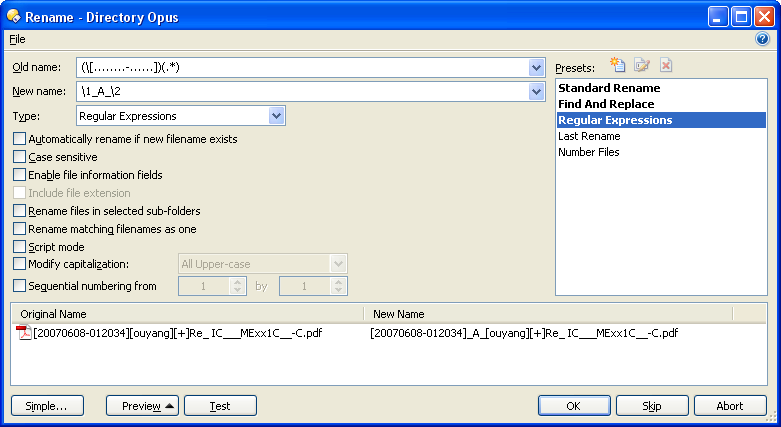
Use this with type = regular expression:
Old: ([........-......])(.*)
New: \1_A_\2
Thanks for your help. Unfortunately, it didn't work 
For example, Wanted:
OLD: [20070608-012034][ouyang][+]Re_ IC___MExx1C__-C.pdf
NEW: [20070608-012034]A[ouyang][+]Re_ IC___MExx1C__-C.pdf
but your expression gave
NEW: ._A_pdf
Also, why can I not use the regular "?" wildcard?
It appears to be a bug:
If I open the Advanced Rename Window, enter your expressions and thereafter select Type=Regular Expressions, it doesn't work.
However, if I open the Advanced Rename Window and select Type=Regular Expressions before I enter your expressions, it works fine!
There is an even more serious issue;
Although the RegEx expression is working now, the rename fails.
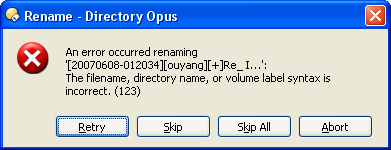
When I click OK, I get an error message "The filename directory name, or volume label syntax is incorrect. (123)".
If I rename manually it works fine.
In addition to manual rename, standard rename and Find and Replace works fine. It is just the Regular Expression that throws the error above .
Can you please post a screenshot.
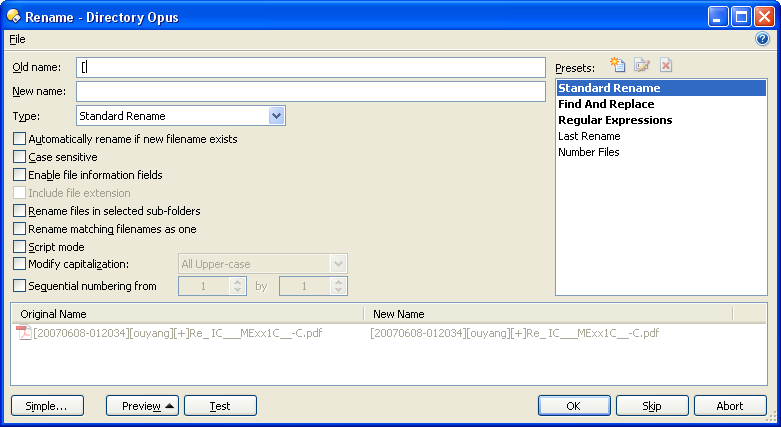
You can't type or paste a \ into the old name field unless you're in regular expressions mode already.
\ is an invalid character for the old name in the other two modes.
(Similarly, a string starting with \ pasted into the old name field has the \ stripped away unless you're in regular expressions mode already.)
I assume that you meant of the error message? (see below)
Can you reproduce the error using the file name:
[20070608-012034][ouyang][+]Re_ IC___MExx1C__-C.pdf
and the regEx
Old: ([........-......])(.*)
New: \1_A_\2
Furhtermore, is the "?" wildcard not allowed in standard rename?
[quote="leo"]You can't type or paste a \ into the old name field unless you're in regular expressions mode already.
\ is an invalid character for the old name in the other two modes.
(Similarly, a string starting with \ pasted into the old name field has the \ stripped away unless you're in regular expressions mode already.)[/quote]
OK. I am just surprised that the \ character is not later recognized after changing the Type to Regular Expression.
A screenshot showing the rename dialog along with the preview pane, similar to the one Leo posted earlier. So we can see exactly what you're doing.
I just tried this with the filename shown and it worked fine. You could try using ProcMon (technet.microsoft.com/en-us/sysi ... 96645.aspx) to see what's actually happening and maybe why it's failing (the error comes from the filesystem, not Opus, so for some reason it's rejecting the new name).
One thought is maybe you are running into a maximum path length limit - what's the full path of the file you are trying this with?
[quote="erik"][quote="leo"]You can't type or paste a \ into the old name field unless you're in regular expressions mode already.
\ is an invalid character for the old name in the other two modes.
(Similarly, a string starting with \ pasted into the old name field has the \ stripped away unless you're in regular expressions mode already.)[/quote]
OK. I am just surprised that the \ character is not later recognized after changing the Type to Regular Expression.[/quote]
The character is gone before you change the type.
[quote="jon"]I just tried this with the filename shown and it worked fine. You could try using ProcMon (technet.microsoft.com/en-us/sysi ... 96645.aspx) to see what's actually happening and maybe why it's failing (the error comes from the filesystem, not Opus, so for some reason it's rejecting the new name).
One thought is maybe you are running into a maximum path length limit - what's the full path of the file you are trying this with?[/quote]
1. I am still not clear if you were able to type in the wildcard "?" in the standard rename box?
2. I run Process Monitor as I was trying to use the RegEx rename, and copied some the events:
581 4:35:46.6628380 PM dopus.exe 2932 NotifyChangeDirectory C:\ SUCCESS Filter: FILE_NOTIFY_CHANGE_FILE_NAME, FILE_NOTIFY_CHANGE_DIR_NAME, FILE_NOTIFY_CHANGE_ATTRIBUTES, FILE_NOTIFY_CHANGE_SIZE, FILE_NOTIFY_CHANGE_LAST_WRITE, FILE_NOTIFY_CHANGE_CREATION
582 4:35:46.6632885 PM dopus.exe 2932 CreateFile C:\TEMP[20070608-012034][ouyang][+]Re_ IC___MExx1C__-C.pdf SUCCESS Desired Access: Read Attributes, Delete, Synchronize, Disposition: Open, Options: Synchronous IO Non-Alert, Open Reparse Point, Attributes: n/a, ShareMode: Read, Write, Delete, AllocationSize: n/a, OpenResult: Opened
583 4:35:46.6639501 PM dopus.exe 2932 QueryAttributeTagFile C:\TEMP[20070608-012034][ouyang][+]Re_ IC___MExx1C__-C.pdf SUCCESS Attributes: A, ReparseTag: 0x0
584 4:35:46.6639865 PM dopus.exe 2932 QueryBasicInformationFile C:\TEMP[20070608-012034][ouyang][+]Re_ IC___MExx1C__-C.pdf SUCCESS CreationTime: 10/1/2009 1:06:00 PM, LastAccessTime: 10/2/2009 4:22:45 PM, LastWriteTime: 10/1/2009 1:06:00 PM, ChangeTime: 10/2/2009 4:23:04 PM, FileAttributes: A
585 4:35:46.6645618 PM dopus.exe 2932 CreateFile C:\TEMP NAME INVALID Desired Access: Write Data/Add File, Synchronize, Disposition: Open, Options: , Attributes: n/a, ShareMode: Read, Write, AllocationSize: n/a
586 4:35:46.6649285 PM dopus.exe 2932 CloseFile C:\TEMP[20070608-012034][ouyang][+]Re_ IC___MExx1C__-C.pdf SUCCESS
587 4:35:46.6653682 PM dopus.exe 2932 RegQueryKey HKCU\Software\Classes SUCCESS Query: Name
588 4:35:46.6654642 PM dopus.exe 2932 RegOpenKey HKCU\Software\Classes\CLSID{450D8FBA-AD25-11D0-98A8-0800361B1103}\ShellFolder NAME NOT FOUND Desired Access: Maximum Allowed
589 4:35:46.6656972 PM dopus.exe 2932 RegOpenKey HKCR\CLSID{450D8FBA-AD25-11D0-98A8-0800361B1103}\ShellFolder SUCCESS Desired Access: Maximum Allowed
590 4:35:46.6660904 PM dopus.exe 2932 RegQueryKey HKCR\CLSID{450D8FBA-AD25-11D0-98A8-0800361B1103}\ShellFolder SUCCESS Query: Name
591 4:35:46.6661318 PM dopus.exe 2932 RegOpenKey HKCU\Software\Classes\CLSID{450D8FBA-AD25-11D0-98A8-0800361B1103}\ShellFolder NAME NOT FOUND Desired Access: Maximum Allowed
592 4:35:46.6662632 PM dopus.exe 2932 RegQueryValue HKCR\CLSID{450D8FBA-AD25-11D0-98A8-0800361B1103}\ShellFolder\WantsFORPARSING SUCCESS Type: REG_SZ, Length: 2, Data:
593 4:35:46.6664506 PM dopus.exe 2932 RegCloseKey HKCR\CLSID{450D8FBA-AD25-11D0-98A8-0800361B1103}\ShellFolder SUCCESS
594 4:35:46.6664796 PM dopus.exe 2932 RegOpenKey HKLM\SOFTWARE\Microsoft\Windows\CurrentVersion\ShellCompatibility\Objects{450D8FBA-AD25-11D0-98A8-0800361B1103} NAME NOT FOUND Desired Access: Query Value
It appears that the new name could not be created??
The path is very short:
C:\Temp[20070608-012034][ouyang][+]Re_ IC___MExx1C__-C.pdf
Note again that it is only Regular Expression Renaming that has this problem. When I do a Standard Rename on the same file it works fine!
I also tried a shorter file name, and had the same issues:
Old Name: ([.])(.*)
New Name: \1_A_\2
File Name: [1].txt => [1]A.txt
p.s. If I could get Standard Rename to work with the "?" wildcard, then I wouldn't need to use the problematic (for me at least) RegEx renaming.
I've tested the regular expression rename using the exact same filename and path on two computers (Win2k 32-bit and Win7 64-bit) using two versions of Opus and it works on both.
Double-check you've got everything set in the rename window exactly as shown in my screenshot.
BTW, standard vs regex should make no difference as to whether the rename succeeds if the two modes are generating the same filename. If you see the correct name in the Preview part of the rename window then that's the name Opus will try to use to rename the file. It doesn't matter which mode generated the name unless something very odd is happening.
Make sure the PDF file isn't open in anything like Adobe Reader which might be locking the file.
I trust the tests which worked were done in the same C:\temp folder? If not it could be folder permissions. By the look of the procmon log you posted, though, it looks like the wrong name is being generated and that should be reflected in the Preview part of the rename dialog if that's what's happening.