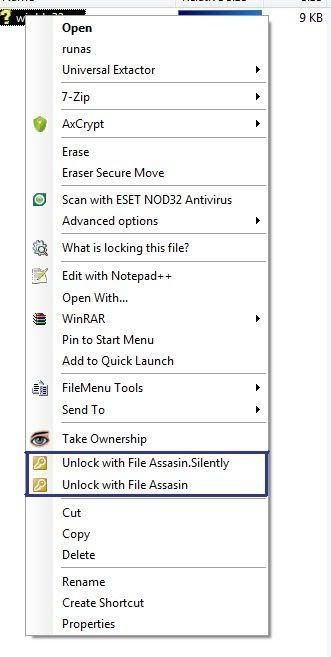
Before i start: Vista 64bit , Eraser 5.86 (updating as i am typing this), and File Assassin (Unlocker like app) 1.06. Directory Opus = 9.1.3.0
This has happened for a few programs and I have found a custom workaround using dos commands for the apps i want, but 2 that I know of are "Eraser 5.8x" ( ii am currently updating to see if it is fixed.
The other is File Assassin from the makers of Malware Bytes... if I go into the regular vista "explorer" the context menus are there for both (programs I mentioned), but esp for FA, I HAVE to make a custom right click which sort-of works (there is an extra error prompt but it works) when unlocking a file ... the two default (unlock and delete with FA) are not there "inside of " Directory opus.
I figured it may be a setting somewhere because i KNOW those context menu items appear on my other XP machine (even the same installers were used) and there is no issue.
I found a way around using Commands and FA command lines (although it works it DOES produce an extra error prompt which is no big deal) .. I just wondered if anyone else had this issue and how to fix it.
I am going to mess with "run as admin" for D.O. .. I already tried this with FA (even the FA installer) and still no luck... maybe the UAC is mucking up the settings?
FYI, 7-zip had issues at first but an update fixed that, and winrar is a-ok as well as "FileMenu tools" ( lopesoft.com/en/fmtools/info.html ) 's context menus appear no prob in our "out" or Directory opus...
again, FA's appear IN DO on XP, and in vista on it's own explorer, but not "in" DO.
-Xmetalfanx
 I cant comment on every context menu entry out there but here is one example for the File Assassin problem. I am on Vista Sp2 64bit with Directory Opus 64 (of course) and File Assassin 1.06 (apparently there will not be any more releases according to their site ...a simiilar prog that everyone seems to know about (Unlocker)'s developer(s) are working on a 64 bit extention.