Mount a partition (I use M:) using TrueCrypt encrypted file container.
Go to M:\ in DOpus. Browse through directories etc.
Go to some other folder D:\ so M:\ is no longer in use.
Try to dismount M:\
TrueCrypt says that the volume contains files or folders used by other applications and asks whether I want to force dismount (which I do not want, as I'm not sure if any other application uses this partition and I don't want any data loss).
This problem exists until I completely close DOpus window that was used to browse M:. This is the best possibility. Sometimes even closing the window does not help. I have to close all DOpus windows or even exit DOpus completely (Close PROGRAM=confirm). I'm not sure when exactly this problem occurs but the scenario described above is 99% true.
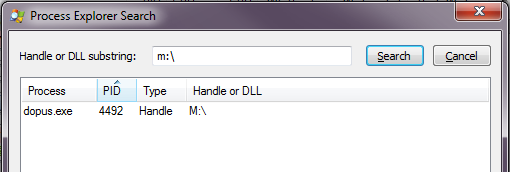
Process Explorer says that DOpus.exe is the only app that uses "M:".
Could you make DOpus close handlers when I navigate to any directory not related to M:?
If it still doesn't work, maybe TrueCrypt isn't sending the ejection message correctly, or something is blocking Opus from receiving it (e.g. the whole Opus process is running as admin instead of using the built-in UAC support).
If you need a workaround, this script can be used to close all tabs pointing to a drive before dismounting it. I use this myself, as I prefer not to mount things removable (I forget why):
cd /desktop
CloseAllTabs M:\*
"C:\Utils\MountUnmount.vbs"
(MountUnmount.vbs is a script which mounts or dismounts a TrueCrypt drive, depending on whether or not it's mounted already.)