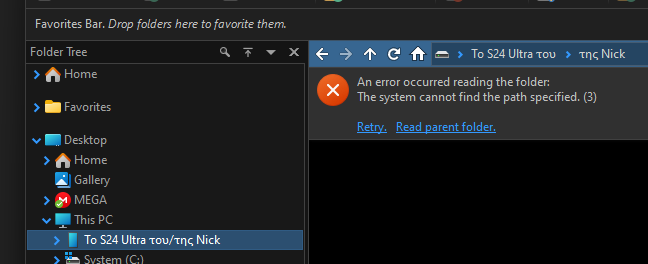
Connecting my smartphone (and any smartphone I tried - all Android) with the cable, shows properly in "This PC" under "Portable Devices", but I cannot open it.
It says it cannot find the path specified.
This used to work in older versions, although I am not sure when it broke because I use this functionality rarely.
This is NOT a connectivity problem between Windows and the smartphone, as opening this using the system file explorer works fine as it always did.
I suspect this is related to Windows showing the name of the smartphone localized:
"Το S24 Ultra του/της Nick" (meaning "Nick's S24 Ultra")
I see the system adds this "του/της" (meaning "his/hers"), that has the slash and POSSIBLY confuses DOpus, although Windows Explorer does not get confused and goes in properly.
This is further supported because when I click to open it in DOpus it does break exactly at the slash! It becomes:
"mtp://Το S24 Ultra του/της Nick" where the slash is a folder separator!
Since this is not configurable (I cannot stop the system from doing this in the Greek locale), DOpus should identify this "exception" and circumvent it.